For a small team of three to five answering one request for proposals
An RFP response tracker for a small team, on one shared board
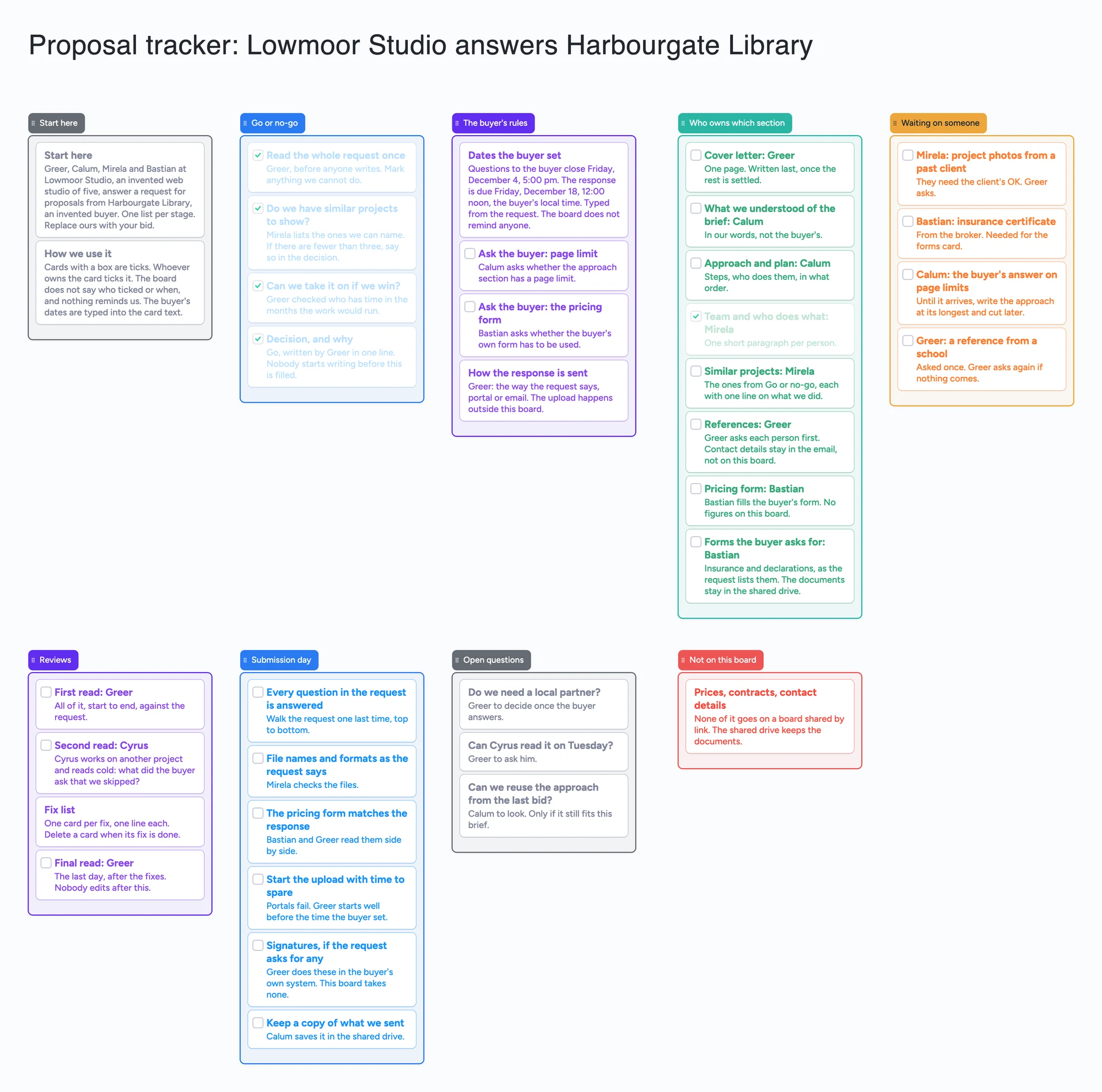
If your studio answers a few RFPs a year, a spreadsheet may be all you need, and the first section below says when. This page is for the next case: three or four people who each write a piece of the same bid and want one place to see who owns which section and what is still open. We make Instaboard, an online board for planning with other people. The board is already filled in for an invented web studio of five, Lowmoor Studio, answering an invented request from Harbourgate Library, with Greer leading, Calum on approach, Mirela on projects and team, Bastian on pricing and forms, and Cyrus as the cold reader. Nine lists: Start here, go or no-go, the buyer's rules, who owns which section, waiting on someone, reviews, submission day, open questions and what stays off the board. Open it, replace our bid with yours and send the link to the others. It is a shared place to see who has what. It is not RFP software: it holds no answer library, scores nothing, takes no signatures and sends no reminders or due-date alerts.
Opens in your browser. Anyone can view; a free sign-in lets you edit.
Updated
In short, for whoever leads the response
- Who it is for: three or four people writing one bid together. The example uses 46 of your 150 free items. If one person writes the whole response, a spreadsheet or one note is quicker; the next section says when.
- What it does: it puts one owner on each section of the response, next to what the buyer asked, what you are waiting on from other people, who reads it and the checks for submission day. Anyone you give edit access to can move a card or tick a box.
- What it isn't: it isn't RFP software. It keeps no answer library, scores no bids, collects no signatures and sends no reminders or due-date alerts. The buyer's two dates sit in one card as text you typed.
- Ticks: most lists have tick boxes. Anyone who can edit can tick or untick a card, and the board doesn't record who did or when. Agree who ticks what.
- Keep off it: prices, contract terms, contact details and anything the buyer marked confidential. A board is shared by link, so the example says where documents live and never holds them.
- Free plan: 5 boards, 150 items, 3 pictures per board. Copying the board takes 1 of your 5 boards. Writing on it needs a free sign-in. New boards start with Anyone who joins can view.
Start here: when a spreadsheet is enough
RocketDocs, a company that sells RFP software, says in its RFP tracker guide (October 1, 2026) that "Most teams start with a spreadsheet, and for a small number of bids that is a reasonable choice." Its own table lists a shared spreadsheet as free, familiar and easy to customize, and names the limits as manual updates, no built-in reminders and version drift. That is a vendor's view, and on this point we agree with it.
- One person writes it all, a few bids a year: one note or one sheet. Nobody else has to sign in to anything.
- Many bids at once, with dates you must not miss: a sheet with the dates coloured, a project app that sends reminders, or response software does that job better. This board sends nothing.
- Several people each write a piece of one bid: this board. The shared part is who owns which section and what is still waiting on someone.
What a small business asked, and what it needs
Reddit counts are as the page showed on November 26, 2026 against what we could read in an archived copy. Each reply is one person's account, not a rule.
In r/smallbusiness, How do small businesses track RFP / bid deadlines without missing them? (OP u/TimeJuggernaut5740, January 21, 2026 UTC; Reddit shows 7; we read 6 with text in an archived copy, one more removed), the OP wrote that they run a small business that occasionally answers RFPs and bids, mostly for service contracts, and use a mix of spreadsheets, email reminders and calendar alerts, but it still feels easy to lose track when several bids are open. u/edit_thanxforthegold answered that someone should be assigned to project manage it, creating a workback schedule, assigning every task and scheduling regular check-ins, and that an RFP content library is worth saving for reuse. u/commoncents1 suggested a project management app with multiple tasks and deadlines for many people, naming a category and no product. u/TomuStop (June 25, 2026 UTC) listed three tools, a grid app that shows every open bid and its stage, Airtable with custom fields and reminder automations, and Monday for larger teams, and added that something simple is easiest for less tech-savvy teams. That is one account's list: the same account posted similar lists in other subreddits the same day.
Our view: the OP's worry is deadlines, and the replies answer it with a project manager, a project app and one account's tool list, of which only the Airtable entry mentions reminder automations. This board sends no reminders. What the replies also describe is one person who owns the bid and a task for everyone, and that part is a shared list. The board puts the owners where all of you can see them, and leaves the alerts to your calendars.
Other ways to track one bid, side by side
Read on November 26, 2026; pages change, so check the page. A page date is printed only where the page shows one. Plan limits and prices were not read for any vendor below, except where a cell quotes one.
| Source | What the page says | Better for |
|---|---|---|
| RocketDocs, RFP tracker guide (October 1, 2026) | Compares a shared spreadsheet, a CRM opportunity list and response management software; says a sheet suits low bid volume but has manual updates and no built-in reminders | Many bids a year, deadlines you cannot miss, steady volume with many experts. A vendor's own page, written to sell its software |
| Noddis, How to Manage Multiple RFPs at Once (November 11, 2026) | Describes one tracker row per pursuit with due date, stage, next internal deadline, open inputs and oldest wait, and offers a blank CSV for Excel, Google Sheets or Numbers, no account needed. Its Free plan includes three active projects, as it states | Tracking several bids side by side. A vendor's own page, written by its founder |
| Smartsheet, RFP Management template set (no date printed) | Offers a template set to intake, track and manage multiple RFPs, with status, outcome and milestones, a catalog of standard assets and canned answers, and previews of a dashboard and a process map; marked Medium complexity | Teams that already use Smartsheet and want an answer catalog. A vendor's own page |
| Tools in one account's list in the r/smallbusiness thread (a grid app, Airtable, Monday) | Named by u/TomuStop, who posted similar lists in other subreddits the same day; their plans were not read | Reminder automations and fields for bid value and stage, if someone will set them up |
| One note or a shared sheet | Not read for this page | One person writing a few bids a year |
| Instaboard board | 5 boards, 150 items, 3 pictures per board on the free plan | A few people who need one plan they can all see and tick, with owners named on each section |
Swipe the table sideways to see every column.
Pages read November 26, 2026 in a browser: rocketdocs.com RFP tracker guide, kickoff guide and RFP project management guide; ociwins.com Managing Proposal Teams; noddis.com How to Manage Multiple RFPs at Once; smartsheet.com RFP Management template gallery. Our wording, not theirs.
Lowmoor's board, list by list
The example is invented. Read it from the top left, across, then the second row.
- Start here. Two grey cards: who the five people are and what the board is for, and how they use it.
- Go or no-go. Four tick cards, all ticked: read the whole request once, similar projects to show, whether the studio can take the work on if it wins, and the decision in one line.
- The buyer's rules. One text card with the buyer's two dates typed in, two cards for questions to ask the buyer (a page limit, whether the buyer's own pricing form must be used), and how the response is sent.
- Who owns which section. Eight cards, each with its owner in the title: cover letter, what we understood of the brief, approach and plan, team, similar projects, references, the pricing form and the forms the buyer asks for. One is ticked.
- Waiting on someone. Four cards for what other people owe, such as project photos that need a past client's OK and an insurance certificate from the broker.
- Reviews. First read, a second read by someone outside the bid, a fix list and a final read.
- Submission day. Six tick cards: every question answered, file names and formats, the pricing form matching the response, starting the upload early, signatures if the request asks for any, and keeping a copy of what was sent.
- Open questions. Three grey cards nobody has answered yet.
- Not on this board. One red card: prices, contracts and contact details stay in the shared drive.
The board sends no reminders or due-date alerts. The two dates are text on a card, and moving a card changes nobody's calendar.
One owner per section, written where everyone can see it
RocketDocs' kickoff guide (September 29, 2026) says every question needs exactly one owner even when several people contribute, and lists "owners named verbally but not recorded anywhere the team can see" among kickoff mistakes. OCI, a proposal consultancy, says in its proposal-team guide (updated September 22, 2026), which is about federal proposals, that every major deliverable should have one person ultimately accountable. Both are vendors describing larger teams, so we use the idea, not their sizes.
On the board that is the title of each card in the section list: the section, then a name. Three things follow from it in the example.
- The owner ticks it. The pricing form card is Bastian's, so Bastian ticks it, and the board does not record that he did.
- What is stuck moves to Waiting on someone. Mirela's photos wait on a past client, so the card sits in the waiting list with a name and what she needs, and the section card stays hers.
- What is undecided goes to Open questions. If two people each think the other will decide whether to bring in a local partner, the question gets a name there.
The dates the board cannot keep for you
RocketDocs' RFP project management guide (October 8, 2026) says a buyer's due date cannot move and that a late response is usually disqualified, and it advises reserving the last one or two business days for submission, because portals fail, files exceed size limits and signatures take time. The board's submission day list is built on that advice, but it holds the checks, not the clock.
- The buyer's dates are text. Greer types them from the request, with the time and time zone, and puts the same two dates in everyone's calendars.
- Internal dates are yours. Noddis, which sells a project app, suggests an internal deadline for every input at least two working days before the review it feeds. That is its advice, not a rule, and the board does not hold the dates.
- Nothing nags. The dates here are typed text, so nothing happens when one is near: there are no reminders or due-date alerts. If a date matters, put it in a calendar that sends alerts.
Setting it up for your next bid
- Open the board and sign in free when it asks you to write. Replace our studio, the library and the five names with yours.
- Read the request once, then fill Go or no-go. Nobody writes a section until the decision card has a line.
- Type the buyer's dates and rules into The buyer's rules: both dates, with time and time zone, and the questions you will ask the buyer.
- Put one name in each section title, and move anything you are waiting on to Waiting on someone.
- Send the link. Set Share to Anyone who joins can edit for the people who should write on it, or leave it on view for someone who should only read. Each person who writes signs in free.
- For the next bid, copy the board. A copy keeps its ticks, so untick them first, and replace the buyer, the dates and the names.
What stays off a link-shared board
- Prices and contract terms. The pricing form card says who fills it, not what is in it.
- Contact details for references. Ask the person first and keep the details in email.
- Anything the buyer marked confidential. Check the request before you paste any of it.
- Real client names and project photos you have not cleared. The example uses an invented studio and an invented buyer.
- Who ticked and when. Anyone who can edit can tick or untick a card, and the board does not record who or when.
- Privacy by default. New boards start with Anyone who joins can view. Anyone with the link can read it; sign-in is only needed to write. Set it to Anyone who joins can edit only for the people who should write on it.
How far 150 items goes across bids
Each card and each list is 1 of your 150 free items, across all your boards. The title text box counts too. Arrows, sections and pen strokes don't. Our arithmetic:
- As built: 9 lists + 36 cards + 1 title = 46.
- A second bid on a copy: 46 + 46 = 92, and the copy takes 1 of your 5 boards.
- A third: 138. A fourth would be 184, which is over 150.
- One card per buyer question instead of 8 section cards: with 60 questions, 46 - 8 + 60 = 98, and a second bid on a copy would bring you to 196. For a long request keep the question list in a sheet and put only the sections on the board.
Start from the ready board
It opens in your browser in a few seconds, with nothing to install. Sign in for free when you want to save it and share it.
Questions
What goes on an RFP response tracker board?
One list for each stage of one bid: the go or no-go decision, the buyer's rules and dates, who owns which section, what you are waiting on, reviews, submission day and open questions. The example holds a task per card and tick boxes on most lists. It holds no prices, contracts or contact details.
Does this replace RFP software?
No. It keeps no answer library, scores no bids, collects no signatures and tracks nobody across many bids. Response software and project apps do those jobs better. The board is for the few people who write one bid and need to see who owns what.
Will the board remind us of the due date?
No. It sends no reminders or due-date alerts. The buyer's dates are text you typed in a card, so one of you has to open the board. Put the real dates in your calendars.
Should the buyer or a partner see the board?
That is for you to decide. New boards start with Anyone who joins can view, so anyone with the link can read it. The example's Waiting on someone and Open questions lists are written for the team, so think before sharing the link outside it.
How much of the free plan does one bid use?
The example is 46 of your 150 free items. A copy for a second bid brings it to 92, a third to 138 and a fourth would be over the limit; each copy takes 1 of your 5 boards (our arithmetic).
Is Instaboard free?
There is a free plan: 5 boards, 150 cards and items across your account (pen strokes, arrows and sections don't count), and 3 pictures and 1 file per board. Anyone with the link can read a board; writing on it takes a free sign-in. Pro removes the item limit and adds invite-only boards: $5 a month billed yearly ($59.99 a year), or $7.99 monthly.
Sources
- r/smallbusiness: How do small businesses track RFP / bid deadlines without missing them? (OP u/TimeJuggernaut5740, January 21, 2026 UTC; replies are single accounts; Reddit shows 7; we read 6 with text in an archived copy, one more removed, November 26, 2026)
- RocketDocs (a vendor's own page): RFP Tracker: What to Track and How to Build One That Works (October 1, 2026; read November 26, 2026)
- RocketDocs (a vendor's own page): Proposal Kickoff Meeting: Agenda, Roles, and Checklist (September 29, 2026; read November 26, 2026)
- RocketDocs (a vendor's own page): RFP Project Management: A Practical Guide for Teams (October 8, 2026; read November 26, 2026)
- OCI (a proposal consultancy): Managing Proposal Teams: Key Roles & Best Practices (updated September 22, 2026; read November 26, 2026)
- Noddis (a vendor's own page): How to Manage Multiple RFPs at Once Without Missing a Deadline (November 11, 2026; read November 26, 2026)
- Smartsheet (a vendor's own page): RFP Management template (no date printed; read November 26, 2026)