For authors and co-authors outlining a how-to or idea book
Nonfiction book outline board: one list per chapter, thesis to takeaway
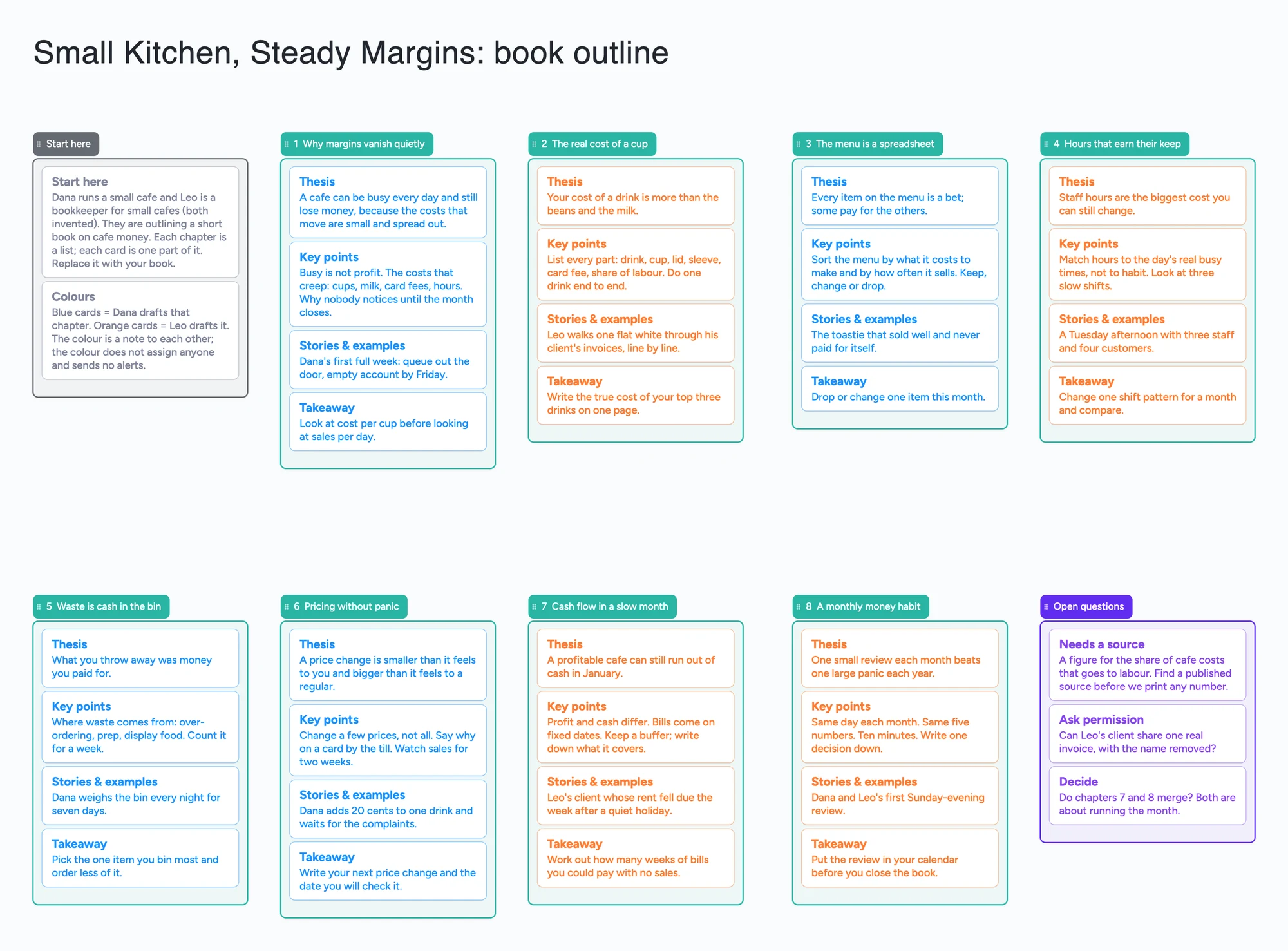
If you write alone and want the outline to sit beside the draft, Scrivener or Reedsy Studio are built for that. We make Instaboard, and this page gives you a nonfiction outline already laid out on it: one list per chapter, four cards in each (thesis, key points, stories, takeaway), and a list of open questions, for two authors who each draft some chapters. The book is invented. Open it, swap in yours, and send one link to your co-author.
Opens in your browser. Anyone can view; a free sign-in lets you edit.
Updated
The short answer
- A chapter is a list, and its parts are cards. The board here gives each chapter four cards: thesis, key points, stories and examples, and takeaway. Move a card to another list when a point belongs in a different chapter.
- The parts follow a published guide. Scribe Media's outline template (the page is dated February 18, 2019) gives each chapter a hook, a thesis, supporting content, stories and examples, a key takeaway, and an optional callback and segue. The board keeps four of the six; add the other two as cards if you want them.
- Two authors, two colours. Colour a card for the author who drafts that chapter. It is a note to each other: the colour does not assign a chapter to anyone and sends no alerts.
- Count the items before you copy it. The ready board is 10 lists, 37 cards and a title text box, 48 items. Each chapter of four cards is 5 items, so 28 chapters in this shape is 148 with the fixed lists (our arithmetic).
- Free plan: 5 boards, 150 items across your account, 3 pictures per board. Anyone who joins can view; editing needs a free sign-in.
- What it doesn't do: hold your draft, count words, number chapters for you or export to Word. It holds the outline, not the book.
What this board doesn't do, before you build
- No manuscript. There is nowhere to draft the chapters. Write in your word processor, Scrivener or Reedsy Studio.
- No link between a card and a draft. In Scrivener a card on the corkboard is attached to a section of the manuscript, so moving the card moves the section (Scrivener's overview page). Here a card is a note.
- No export to Word or a table of contents. You can copy a selection as a picture; cards don't turn into a file.
- No table view or sorting across lists. One Reddit poster outlined a whole book in Excel so they could sort it (below).
- No automatic numbering. The chapter numbers are typed in the list titles; if you move a chapter, rename the lists.
- No reminders or due-date alerts. Cards can carry a due date and typing @ assigns a person, but nothing alerts the other author; colour is the note on this board for whose chapter it is.
- Not private by default. A board shared by link can be opened by anyone who has the link; keep client names and unpublished figures off it.
When something else is the better choice
- You write alone and want the outline beside the draft. Scrivener's overview page describes an outliner with synopses that you arrange with folders and subfolders, and a corkboard of index cards attached to each section. It lists macOS, Windows and iOS versions, licences sold separately. Scrivener's store page lists a Standard Licence at US$59.99 for macOS (a download, macOS 11 or newer) and for Windows, an Educational Licence at US$50.99 for each, Scrivener for iOS and iPadOS at US$23.99, and a 30-day free trial (read November 25, 2026).
- You want to outline, draft and invite a co-author in one place. Reedsy's Studio page describes Boards for outlines, a chapter sidebar for the draft, and inviting a co-author, editor or proofreader to work on the book with track changes and comments. Its Studio page says the core writing and formatting features are free and that extra tools such as advanced outlining are on paid plans (Studio Essential $4.99 a month, Outlining $7.99 a month, read November 24, 2026). The page doesn't say which plan includes Boards, so check before you rely on it.
- Your outline is a document anyway. Scribe Media's template page says you can download it as a Google Doc or a Word file, and it gives two filled chapter examples. If a co-author is happy in a shared document, that is simpler than a board.
- You need to sort or total across the whole outline. Each list can be sorted or filtered by itself, but this board doesn't sort across lists or total anything; a spreadsheet does both.
- Your book is a memoir. Reedsy's nonfiction guide says "If your book idea follows a clearer narrative arc, check out our post on how to outline a memoir." This board is for the how-to or idea book.
Where the board helps: two people who each draft some chapters and want the whole plan on one screen, with every chapter's points and stories visible together.
What the guides say a chapter outline holds
These are the sources the board's layout comes from. Each is one publisher's or author's method, not a rule.
- Scribe Media (a book-publishing company that sells book coaching; template page). Three steps: brainstorm the chapters (it defines a chapter as a single cohesive idea, fully explored), write a table of contents with a one or two sentence thesis for each chapter, then fill in each chapter. Its chapter structure is hook, thesis, supporting content, stories and examples, key takeaway, and an optional callback and segue. It says 5 to 15 chapters is normal and warns against writing the book inside the outline.
- Reedsy (a writing-software and publishing marketplace; nonfiction outline guide). Start with the one big question the book answers and the readers it is for, then choose a structure: step-by-step for how-to books, an essay structure, or a chronological structure, then sketch each chapter with a mix of facts and anecdotes. It says to revise the structure while you write.
- Nonfiction Authors Association (storyboard method). Put each content idea on its own card (stories, key points, examples, case studies, statistics, exercises), set chapter headings as columns, drop the cards under them, and move cards until the chapters look balanced. Then transfer the cards to a document. That is the shape this board has, with a list as each column.
- Story Grid (a company that sells story coaching and courses; five-minute chapter outline). Five one-minute timers produce a quick chapter outline built on the five nonfiction storytelling commandments. The article says "they aren't shortcuts" and "we are just making a draft", a draft to tinker with. The page is here because it shows one way to get a first chapter down fast.
Dana and Leo's book, list by list
The example is invented. Dana runs a small cafe and Leo is a bookkeeper for small cafes; they are outlining a short book on cafe money, eight chapters. The chapters use the how-to shape: each takeaway is something the reader can do.
| List | What goes in it | In the example board |
|---|---|---|
| Start here (grey) | The two authors, and the colour rule | Dana and Leo; blue is Dana's chapter, orange is Leo's |
| Chapters 1 to 8 (green lists) | Thesis, Key points, Stories and examples, Takeaway | From "Why margins vanish quietly" to "A monthly money habit" |
| Open questions (purple) | What needs a source, a permission or a decision | A figure that needs a published source, a client's invoice to ask about, whether chapters 7 and 8 merge |
Swipe the table sideways to see every column.
The board's own wording. Names, the book and the chapters are made up. No figure on the board is a real statistic; the Open questions list is where an unsourced number goes.
The useful part is the last list. A claim with no source yet becomes a card there, so it doesn't slip into a chapter as fact.
How many chapters before you pass 150?
The free plan allows 150 items across all your boards. Each card, list and text box is one item; sections, arrows and pen strokes aren't. The ready board has 3 items outside the chapters (the Start here list and its 2 cards), 4 for the Open questions list and its 3 cards, and 1 for the title. Our arithmetic:
| Book | Layout | Chapter items | Fixed items | Items | Of the free 150 |
|---|---|---|---|---|---|
| 8 chapters, 4 cards each (as built) | A list per chapter | 40 | 8 | 48 | 102 left |
| 15 chapters, 4 cards each | A list per chapter | 75 | 8 | 83 | 67 left |
| 15 chapters, 6 cards each (Scribe's six parts) | A list per chapter | 105 | 8 | 113 | 37 left |
| 28 chapters, 4 cards each | A list per chapter | 140 | 8 | 148 | 2 left |
| 29 chapters, 4 cards each | A list per chapter | 145 | 8 | 153 | Over 150 |
Swipe the table sideways to see every column.
Our arithmetic from the free plan's 150 items: one list plus its cards for each chapter, plus the 8 fixed items on the ready board. Items are counted across all your boards, so a second board uses the same 150.
Scribe's page calls 5 to 15 chapters normal, which fits with room to spare. If you reach the limit, move the key points into one card per chapter or upgrade.
What nonfiction writers say about outlining
Four threads, read in an archived copy on November 24, 2026 (9, 6, 5 and 29 comments; live counts not checked). Each comment is one person's view.
- Outline lightly, outline per chapter, or not at all. In r/writing (January 2022; 9 comments read) u/HomoCoffiens wrote "I revise my outline as I research, so making an outline too in-depth is detrimental to my process." u/RobertPlamondon wrote "I don't do outlines anymore. When I did, it was mostly just a bullet list of topics arranged in an order that seems natural." u/susurrans, writing a biography, described a general outline first and then a rough outline for each chapter.
- Plan hard before you write a chapter. In r/writing (January 2026 (UTC); 6 comments read) u/atomicitalian wrote "nonfiction is no country for pantsers. Plan, plan, plan, and plan," and suggested asking early "Is this story an article, or is it a book?"
- A spreadsheet when you need to sort. In r/scrivener (October 2025 (UTC); 5 comments read) the poster u/ChrisF79 wrote that they had outlined an entire book in Microsoft Excel "so I can sort it" and wanted it inside Scrivener while they wrote each chapter; a reply from u/iap-scrivener pointed them to Scrivener's Outliner view.
- Co-authors who plan together first. In a 2017 r/writing thread about co-authoring creative writing (29 comments read), u/LorenzoLighthammer described brainstorming and outlining together, then choosing one person to write the draft and passing it on. The same comment said the method is only as good as that first outlining session.
None of the four threads asks for a shared board.
This board, Scrivener, Reedsy Studio and Scribe's template
| Instaboard | Scrivener | Reedsy Studio | Scribe's template, downloadable as Google Docs or Word | |
|---|---|---|---|---|
| What it is | A shared board of lists and cards | A writing app with an outliner and corkboard (its overview page) | A writing app with Boards, a draft editor and co-author invites (its Studio page) | A document you download as a Google Doc or Word file and fill in |
| Outline beside the draft | No draft on the board | Yes: cards attach to sections of the manuscript (overview page) | Yes: Boards and the chapter sidebar are in one app | Outline only |
| Working with a co-author | One link; viewing needs no account, editing a free sign-in | Not described on the overview page we read | Invite a co-author to the book; track changes and comments (Studio page) | A shared document, as your editor allows |
| Paid price | Pro $5 a month billed yearly ($59.99 a year), or $7.99 monthly; Pro removes the item limit | Standard Licence US$59.99 for macOS or Windows (download), Educational US$50.99 each, iOS and iPadOS US$23.99, 30-day free trial (store page, November 25, 2026) | Core writing and formatting free; advanced outlining on paid plans: Studio Essential $4.99 a month, Outlining $7.99 a month (Studio page, November 24, 2026). The page doesn't say which plan includes Boards | Not listed on the template page |
Swipe the table sideways to see every column.
Facts from Scrivener's overview and store pages, Reedsy's Studio page and nonfiction outline guide, and Scribe Media's template page, read November 24, 2026. "Not listed" means the page doesn't state it, not that the tool lacks it.
Turn it into your book
- Open the board and sign in free to edit it. Delete the cafe chapters as you go.
- Write the question your book answers on the Start here card, in one sentence.
- Brainstorm chapters as lists. Name each list with its number and a working title.
- Fill the Thesis card first, one or two sentences. Then the key points and the stories.
- Colour the cards by author. Set the board's Share setting to "Anyone who joins can edit" so your co-author can add cards, and give each of you your own cards rather than typing in the same one.
- Park every unsourced claim in Open questions until someone has a source for it.
Start from the ready board
It opens in your browser in a few seconds, with nothing to install. Sign in for free when you want to save it and share it.
Questions
Can two authors outline a book on one board?
Yes. Send the link; anyone can view it, and editing needs a free sign-in. A signed-in author can add and move cards while others watch the changes arrive. Give each author their own cards instead of typing in the same card at once.
How many chapters should a nonfiction book have?
One publisher's guide, Scribe Media's template page, says 5 to 15 chapters is normal and that fewer or more is unusual and needs a good reason. That is one publisher's view, not a rule.
Does this work for a memoir?
It isn't built for one. Reedsy's nonfiction outline guide says that if your book idea follows a clearer narrative arc, it has a separate post on how to outline a memoir. This board is laid out for a how-to or idea book.
Can I write the book on the board?
No. It holds the outline: theses, key points, stories and takeaways. Scrivener and Reedsy Studio are writing apps that hold the draft too.
How many chapters fit on the free plan?
With four cards per chapter, 28 chapters is 148 items including the Start here and Open questions lists and the title (our arithmetic). The limit is 150 items across all your boards.
Can I export the outline to Word?
No. You can copy a selection as a picture. Cards don't turn into a document, so if you need a file to send a publisher, copy the text by hand.
Sources
- Scribe Media (vendor, sells book coaching): The Simple Way To Outline A Nonfiction Book, with free template (three steps, chapter structure, 5 to 15 chapters; the page is dated February 18, 2019; read November 24, 2026)
- Reedsy (vendor, a writing platform): Outlining a Nonfiction Book, 3 Steps to Success (key question, step-by-step, essay and chronological structures, memoir note; the page prints "Last updated on Oct 15, 2025"; read November 24, 2026)
- Reedsy Studio (Boards, chapter sidebar, co-author invites, free core features and paid plans; no date printed; read November 24, 2026)
- Nonfiction Authors Association: How to Outline Your Nonfiction Book Manuscript Using the Storyboard Method (posted November 13, 2025 by Stephanie Chandler; read November 24, 2026)
- Story Grid (vendor, sells coaching and courses): The 5-Minute Nonfiction Chapter Outline (no date printed; read November 24, 2026)
- Scrivener overview (outliner, corkboard, macOS, Windows and iOS; read November 24, 2026; no date in the text we read)
- Scrivener store page (Standard and Educational licences for macOS and Windows, iOS price, 30-day free trial; no date; read November 25, 2026)
- Reddit r/writing: Nonfiction writing process (u/thenletsdoit, January 6, 2022; u/HomoCoffiens, u/RobertPlamondon)
- Reddit r/writing: Novice writer planning the outline of my first non-fiction book (u/Abbssis, January 19, 2026 (UTC); u/atomicitalian)
- Reddit r/scrivener: Creating a true outline of my non-fiction book (u/ChrisF79, October 3, 2025 (UTC); u/iap-scrivener)
- Reddit r/writing: How do authors co-author books (u/eradek, December 24, 2017; u/LorenzoLighthammer)
Related
Outline a story with a co-writer, on one board you both edit
Outline a story with a co-writer on one shared board: ideas lists for each of you, an agreed outline, a decide-by list. A filled example to copy. Not a drafting tool.
A book launch plan board: who owns each task and which reader still owes a review
Plan one book launch on a shared board with your editor, publicist or co-author: a card per task and per ARC reader, an owner on each, arrows from a task to the one waiting on it. Free ready board.