Updated after the October 16 retirement
Microsoft Whiteboard alternatives: what to use now that the apps are gone
The standalone Microsoft Whiteboard apps for Windows, iPhone, iPad and Android stopped working on October 16, 2026. If you used Whiteboard with a personal Microsoft account, your boards can no longer be opened in the app. Here is what changed, what you can still save, and which free Microsoft Whiteboard alternative or replacement fits people who draw with a pen.
Opens in your browser. Anyone can view; a free sign-in lets you edit.
Updated
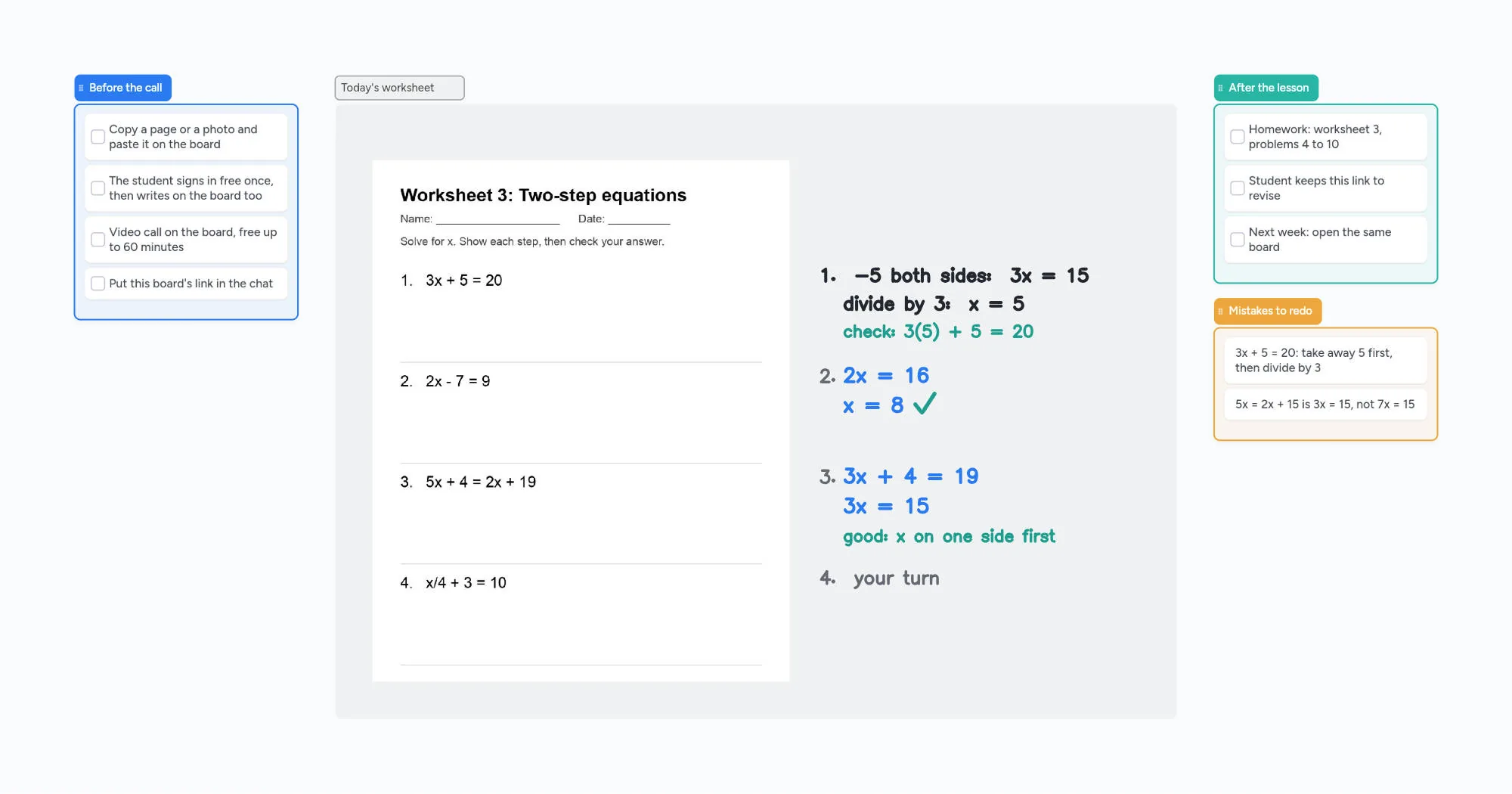
The short answer
- Work or school account: you may not need to switch. Microsoft says Whiteboard keeps running in Teams and on the web.
- Personal account: you need a new app. The apps retired on October 16, and Microsoft hasn't published a way to get personal boards back after that. Keep any images or ZIPs you exported.
- Free picks for drawing together: Instaboard (us), Excalidraw and Miro. Instaboard is the one built for pen, cards and lists on the same board, on every device.
Two more ready boards: study notes and a brainstorm
Whiteboard was where a lot of students kept their notes and a lot of groups sketched ideas. Both of these open in your browser and are yours to edit once you sign in for free.
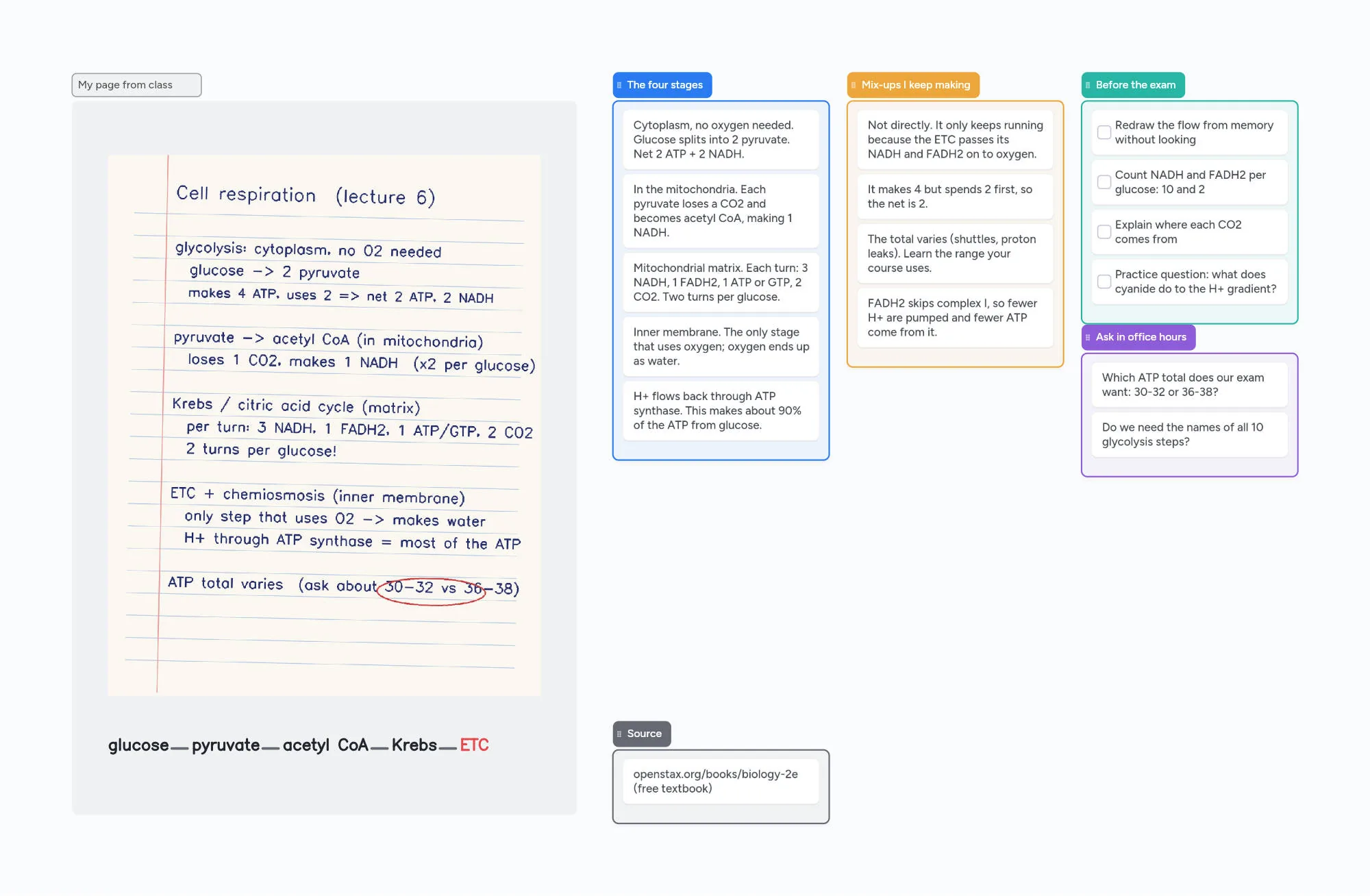
Study notes from your own material
A photo of a handwritten page next to the same notes as cards, the mix-ups to avoid and an exam checklist. Paste in your own pages and sort them the same way.
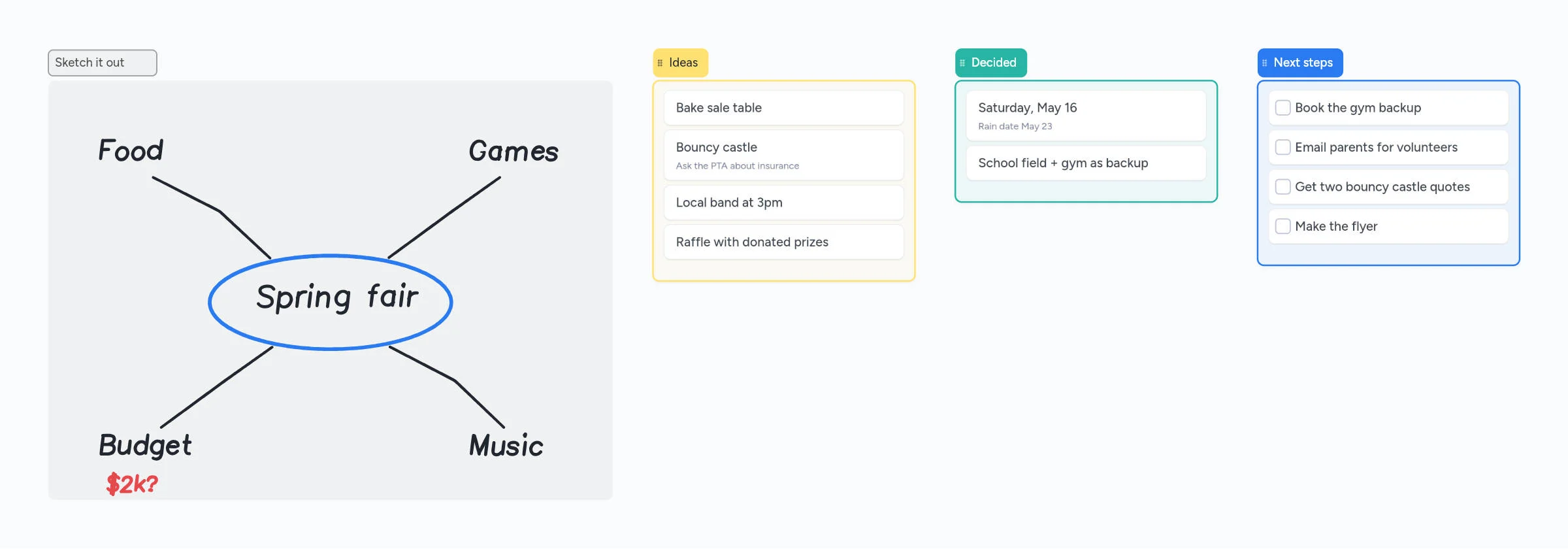
A brainstorm that turns into a plan
A pen-drawn mind map of a spring fair next to lists of ideas, decisions and next steps. Sketch first, then sort the sketch into lists.
What Microsoft changed, and when
Microsoft first gave earlier dates in August, then updated the timeline on August 25. Three different things have dates, so here they are by who they apply to, from Microsoft's own pages as read on November 2, 2026:
| Date | Applies to | What happened |
|---|---|---|
| September 25, 2026 | Personal Microsoft accounts | No more creating or editing whiteboards. Microsoft's notice said to export any boards you want to keep before October 16. |
| September 25, 2026 | Work or school boards still stored in the old Azure service | Migration to OneDrive ended. Those boards became read-only and could be viewed and exported until October 16. |
| October 16, 2026 | The Windows, iOS and Android apps, for personal and work or school accounts | The standalone apps retired. Installed apps show a retirement notice instead of your boards. |
| October 16, 2026 | Azure-stored boards that were not migrated | Permanently deleted, with no recovery. |
| November 30, 2026 | The old Azure Whiteboard service | Shuts down. |
Swipe the table sideways to see every column.
Work and school accounts keep Whiteboard on the web, in Teams meetings and chats, and as .whiteboard files in OneDrive. The apps are the only thing that retired for them.
Microsoft hasn't named a replacement for personal accounts. Microsoft Loop is a page-and-document tool, not a canvas. The new Microsoft Ink Canvas app (October 2026) is for drawing on your own; it doesn't document live collaboration.
What you can still save
- Work or school account: your boards are .whiteboard files in OneDrive. Open them in Whiteboard on the web or in Teams, then use Settings → Export to save an image or a ZIP (HTML + JSON). Microsoft's WhiteboardAdmin PowerShell module can export all of your boards at once.
- Personal account: the app now shows a retirement screen. Personal boards aren't stored in OneDrive, and Microsoft hasn't published a way to recover them after October 16.
- PDF: only the retired desktop app exported PDF. Printing from the web version gives a blank page.
Our step-by-step guide covers each of these, including the bulk export: How to export your Microsoft Whiteboard boards.
No other whiteboard app imports Whiteboard files
An image export is a flat picture, so your strokes won't come back as editable ink. A free Windows app called SQLBI Whiteboard can open the exported ZIP with its ink, notes and shapes, but it keeps boards on one PC and has no live collaboration.
On Instaboard you can drop exported images onto a board and draw on top of them. The free plan allows 3 images per board; Pro removes the limit.
Before you move off Microsoft Whiteboard: a short check
- Check your account and export first. Which account you have decides whether you need to move at all; the steps are in What you can still save.
- Say what you must keep. Pen feel, live drawing with others, a free plan that holds all your boards, or Teams. Use the tables above to drop the tools that fail your first one.
- Try one real board in your top pick with the people who will use it, each on their own device and account. Free plans cap boards, so don't copy everything over before you know it fits.
- Test with one colleague or student before you tell the group: can they open the link, write, and see your pen live?
What to look for in a replacement
We read the threads where Whiteboard users asked what to move to (r/Windows11, r/Surface, r/Office365, r/TutorsHelpingTutors and Microsoft Q&A). The same needs came up again and again:
- Pen that feels right. Pressure, palm rejection, the pen's side button, straight lines.
- Drawing together, live. Several people writing on the same board at once, not taking turns.
- Everything on one canvas. Screenshots, PDFs and notes next to the drawing, with room to keep going.
- Your devices. Surface and Windows, but also iPad, Android tablets and a laptop browser.
- A free plan you can live on. Many tools cap you at three editable boards.
- Something that will last. After Jamboard (2024) and now Whiteboard, people don't want to move a third time.
The alternatives side by side
| App | Free plan | Paid from | Draw together live | Works on |
|---|---|---|---|---|
| Instaboard | 5 boards, 150 cards and items (pen strokes don't count), unlimited collaborators | $5/mo billed yearly | Yes, with live cursors and video calls on the board | Any browser, iPhone, iPad, Android |
| Miro | Unlimited boards, but only 3 stay editable | $8/member/mo (yearly) | Yes | Browser, Windows, Mac, iPad, Android |
| FigJam | 3 FigJam files | $3/mo collab seat | Yes | Browser; iPad through the Figma app |
| Excalidraw | 1 scene, saved in your browser | $6/user/mo | Yes, by link | Browser |
| Zoom Whiteboard | 3 editable boards | Add-on from $2.07/user/mo | Yes, with other Zoom account holders; its plan list also says Basic boards can be shared "publicly with anyone, no sign-in required", without saying whether those people can edit | Zoom apps, browser |
| OneNote | Free with a Microsoft account | — | Shared notebooks, not a live canvas | Windows, Mac, iPad, Android, browser |
| Apple Freeform | Free | — | Yes, with Apple accounts | Mac, iPhone, iPad only |
| Concepts | Free sketching | $4.99/mo | No | iPad, Android, Windows |
Swipe the table sideways to see every column.
Prices and limits from each app's official pricing page, checked October 2026; Miro, Figma, Excalidraw, Zoom and Concepts re-read November 11, 2026.
Mural isn't in the side-by-side table; it has a row in the needs table below. It is a workshop tool for teams, and its help says the free plan keeps the three most recently created murals editable and shows visitors view-only (support.mural.co, read November 8, 2026). Our page on it is Mural alternatives.
Which Microsoft Whiteboard alternative for which need
This table starts from what you need. For Miro, Excalidraw and Instaboard the numbers are in the side-by-side table above. We make Instaboard, so it is one row of eight, and it has a catch like the others. Limits are from the vendors' own pages (pricing pages, Canva's whiteboard and Education pages, Microsoft's support pages), read November 26, 2026.
| Need | Look at | Free plan | Catch |
|---|---|---|---|
| Work or school account, meetings in Teams | Stay on Microsoft Whiteboard in Teams or on the web | Part of your Microsoft 365 setup | Only the standalone apps retired. Sharing with people outside your organization depends on your administrator (see the Teams section). |
| A free canvas for slides, posters and classes | Canva | Canva's whiteboard page says "Create as many whiteboards as you need" | Its whiteboard page says you can work with your team or class even if they don't have a Canva account, and its Education page says it stays free for K-12 (primary and secondary) educators, their students and qualified school districts and institutions. It is a design tool first, and we haven't tested its pen. |
| A big team workshop board | Miro | In the table above | Its pricing page says only the three most recent boards stay editable on Free. |
| Brainstorms with freehand drawing in a small team | Lucidspark | 3 editable boards, unlimited shapes per board | Team is $10 per user a month billed annually. Lucid says Individual licenses "work well for smaller projects that require minimal collaboration" and Team licenses suit "groups that need to collaborate quickly". |
| Team workshops | Mural | 3 editable murals | Team+ is $9.99 per member a month billed annually. Its pricing table lists guests on Business ($17.99) and Enterprise only. |
| Flowcharts and docs beside the board | Whimsical | Up to 50 board objects and 50 doc blocks a month | Free is capped per month, its page lists a watermark on Free exports, and Pro is $10 per editor a month billed annually. |
| A quick sketch you share by link | Excalidraw | In the table above | Plus adds unlimited scenes saved in the cloud and sharing with edit or view rights. |
| Pen, cards and lists on one board, with a call | Instaboard (we make it) | In the table above | Writing needs a free sign-in. No Windows app (browser only). Beside a Teams call as a link, not inside the meeting. Imports PDF only. |
Swipe the table sideways to see every column.
Cells are the vendors' own pages as read November 26, 2026; the Instaboard row is ours.
More on Lucidspark: Lucidspark alternatives.
Offline, Android, Mac, Linux and free: quick answers
Offline
Microsoft Ink Canvas, the new pen app for Windows, says you can write and sketch in it offline. It needs Windows 10 version 18362.0 or higher with integrated touch support, plus a Microsoft account and sign-in, and its support page doesn't describe a shared, live board. Excalidraw keeps its one free scene in your browser's storage on your own device. Instaboard keeps your changes and syncs them when you're back online, but it isn't an offline-first app with local files. Miro's help center says its offline mode is currently not on its radar.
Android
Microsoft's retirement list names apps for Windows, iOS and Android, so the Android app is one of the three that retired on October 16. Instaboard has an Android app, as well as apps for iPhone and iPad, and the same boards open in any browser. Miro and Concepts also run on Android.
Mac
Microsoft's retirement list doesn't include a Mac app. On a Mac, Instaboard runs in the browser, and Apple Freeform is built in if everyone you work with uses Apple devices. For drawing with a pen, an iPad with Apple Pencil works well with Instaboard's iPad app.
Linux
None of the Microsoft apps on the list ran on Linux. Instaboard has no Linux app, but it runs in a modern browser, as does Excalidraw. Check pen-tablet support with your own setup before you rely on it.
Free
Free options that draw together live are Instaboard (5 boards, all editable), Excalidraw (1 scene, kept in your browser) and Miro (only 3 stay editable). OneNote and Microsoft Ink Canvas are free for drawing on your own. The side-by-side table has the limits.
Whiteboard in Microsoft Teams: who can still use it
Work or school account: Microsoft says Whiteboard stays available on the web, in Teams meetings, in a Whiteboard tab in a Teams chat, in the Whiteboard app inside Teams, and as .whiteboard files in OneDrive. Only the Windows, iOS and Android apps retired.
Sharing is inside your organization by default. Microsoft's pages say you can share a whiteboard in a Teams meeting with attendees from your own organization, and that OneDrive whiteboards can be shared only with people in your organization. People outside it can join only if your administrator has turned on the right settings, and then only during the meeting: Microsoft says outside attendees can't open the whiteboard after the meeting ends. Its External Sharing page describes guest access as business to business, with a guest account in your company's tenant and "Share with specific people" links.
Personal Microsoft account: the pages we read describe no Teams whiteboard path for personal accounts, only that the apps retired.
For a tutor: if your student isn't in your organization, a board link they open in a browser is simpler than guest setup. On Instaboard they can view without an account, and they sign in for free to write.
Our picks, and who each one is for
Instaboard: pen, cards and lists on one board (that's us)
Instaboard is a free infinite whiteboard that also plans. Write with a pressure-sensitive pen or Apple Pencil, then put cards, checklists and lists right next to your sketch. Hold the pen still to straighten a line, use the stylus side button to erase, and turn on stylus mode so your finger scrolls while the pen draws. Others see your pen live, follow your view and talk to you in a video call on the board.
Where it falls short: the eraser removes whole strokes, not parts of them. People you share with need a free account to write (anyone with the link can view). There's no Windows app; on Windows it runs in the browser.
Excalidraw: the simplest free sketchpad
Excalidraw is great for quick diagrams with a mouse and joins by link without accounts. The free version keeps one scene in your browser's storage, which can be cleared, so it's not where you keep a library of boards.
Miro: the big team whiteboard
Miro has the deepest feature set for business workshops and runs everywhere. On the free plan only your three most recent boards stay editable, and Miro's help center says offline mode is currently not on its radar.
OneNote: if you only need ink on your own
OneNote is free with a Microsoft account and great for handwritten notes. It's a notebook, not a shared canvas, so it doesn't replace drawing live with someone.
Apple Freeform: if everyone is on Apple devices
Freeform is free and lovely with Apple Pencil, but everyone needs an Apple device and an Apple account.
Start from the ready board
It opens in your browser in a few seconds, with nothing to install. Sign in for free when you want to save it and share it.
Questions
Is Microsoft Whiteboard being discontinued?
The standalone Windows, iOS and Android apps retired on October 16, 2026, for personal and work or school accounts. For work and school accounts, Whiteboard continues on the web, in Teams and as files in OneDrive. Personal Microsoft accounts could no longer create or edit whiteboards from September 25, 2026.
What replaced Microsoft Whiteboard?
Microsoft's retirement page names no replacement app (as read November 26, 2026). It says the standalone Windows, iOS and Android apps retired on October 16, 2026 for personal and work or school accounts, and that work or school accounts keep Whiteboard in Teams and on the web. Microsoft Ink Canvas is a separate pen-first app for Windows: its support page lists Windows 10 version 18362.0 or higher, integrated touch support and a Microsoft account sign-in, says you can write and sketch in it offline, and doesn't describe shared, live boards. To draw together with other people, use one of the tools in the side-by-side table above.
Can I import my Microsoft Whiteboard boards into another app?
Not as editable boards in a live whiteboard. Whiteboard on the web exports an image or a ZIP (HTML + JSON), and no collaborative whiteboard app reads either as editable content. SQLBI Whiteboard, a free Windows app, opens the ZIP for use on one PC. Anywhere else, place the exported images on a new board and keep drawing on top.
What is the best free Microsoft Whiteboard alternative for a Surface Pen or Apple Pencil?
If you want to draw with others live, Instaboard has a pressure-sensitive pen, stylus mode and live collaboration on the free plan. If you only draw for yourself, OneNote or Microsoft Ink Canvas on Windows and Freeform on iPad are good free options.
Does Instaboard work on Windows?
Yes, in any modern browser on Windows, including Surface devices with a pen. There are also apps for iPhone, iPad and Android.
Is Instaboard free?
Yes. The free plan includes 5 boards, 150 cards and items across your account (pen strokes, arrows and sections don't count), 3 images and 1 file per board, unlimited collaborators and video calls up to an hour. Pro is $5 a month billed yearly ($59.99 a year), or $7.99 monthly, and the people you invite join free.
Sources
- Microsoft Support: Retirement of the standalone Microsoft Whiteboard apps
- Microsoft Support: Migration of Whiteboards from Azure to OneDrive
- Microsoft 365 Message Center MC1469557 (Sept 9, 2026): standalone app retirement
- Microsoft 365 Message Center MC1441775 (updated Aug 25, 2026): personal accounts and legacy boards
- Windows Central: More time before Microsoft takes away your whiteboard
- Microsoft Support: Use Whiteboard in a Teams meeting (read November 2, 2026)
- Microsoft Support: Collaborate with external participants in a Teams meeting (read November 2, 2026)
- Microsoft Support: External Sharing (read November 2, 2026)
- Microsoft Support: Find and share whiteboards in OneDrive (read November 2, 2026)
- Microsoft Support: Introducing Microsoft Ink Canvas (offline use and requirements, read November 2, November 19 and November 26, 2026)
- Miro pricing (read November 26, 2026)
- Miro Help Center: System requirements (offline mode, read November 11, 2026)
- Figma pricing
- Excalidraw+ pricing (read November 26, 2026)
- Zoom Whiteboard
- Concepts pricing
- Canva: Free online whiteboard (read November 26, 2026)
- Canva Education (read November 26, 2026)
- Lucidspark pricing (read November 26, 2026)
- Mural pricing (read November 26, 2026)
- Whimsical pricing (read November 26, 2026)
Related
How to export your Microsoft Whiteboard boards, even hundreds at once
The Whiteboard apps retired on October 16, 2026. How to export your boards as images, ZIP or HTML, export every board at once with PowerShell, why PDF and print fail on the web, and what personal accounts can still do.
An online whiteboard for tutoring that works the way you teach
A free whiteboard for online tutoring: paste the worksheet, write with a pen, and your student answers on the same board. Call on it or beside Zoom.
Jamboard alternatives for teachers, and how to get your old Jams back
Free Jamboard alternatives for teachers: share one board with your class by link, plus how to find your old Jams as PDFs in Google Drive (type:Jam).
A free infinite canvas app for your notes, on Windows, Android, Chromebook and iPad
OmniCanvas alternative? Compare the free plans of OmniCanvas, Goodnotes, Concepts and Obsidian Canvas, and open a free shared infinite canvas board.
A Zoom Whiteboard alternative where your student writes too
Zoom's free whiteboard gives you 3 editable boards, sharing is built around Zoom accounts, and free calls stop at 40 minutes. What tutors use instead, where Zoom is still better, and a ready lesson board.
How to teach math online: your first lesson, step by step
How to tutor math online as a beginner: what you need, how to run a first lesson on a board your student writes on too, with Zoom, Google Meet or no video app at all, and what to do without a whiteboard.