For a screenwriter planning a rewrite, alone or with one trusted reader
Screenplay rewrite board: notes in, three passes, keep, cut or merge
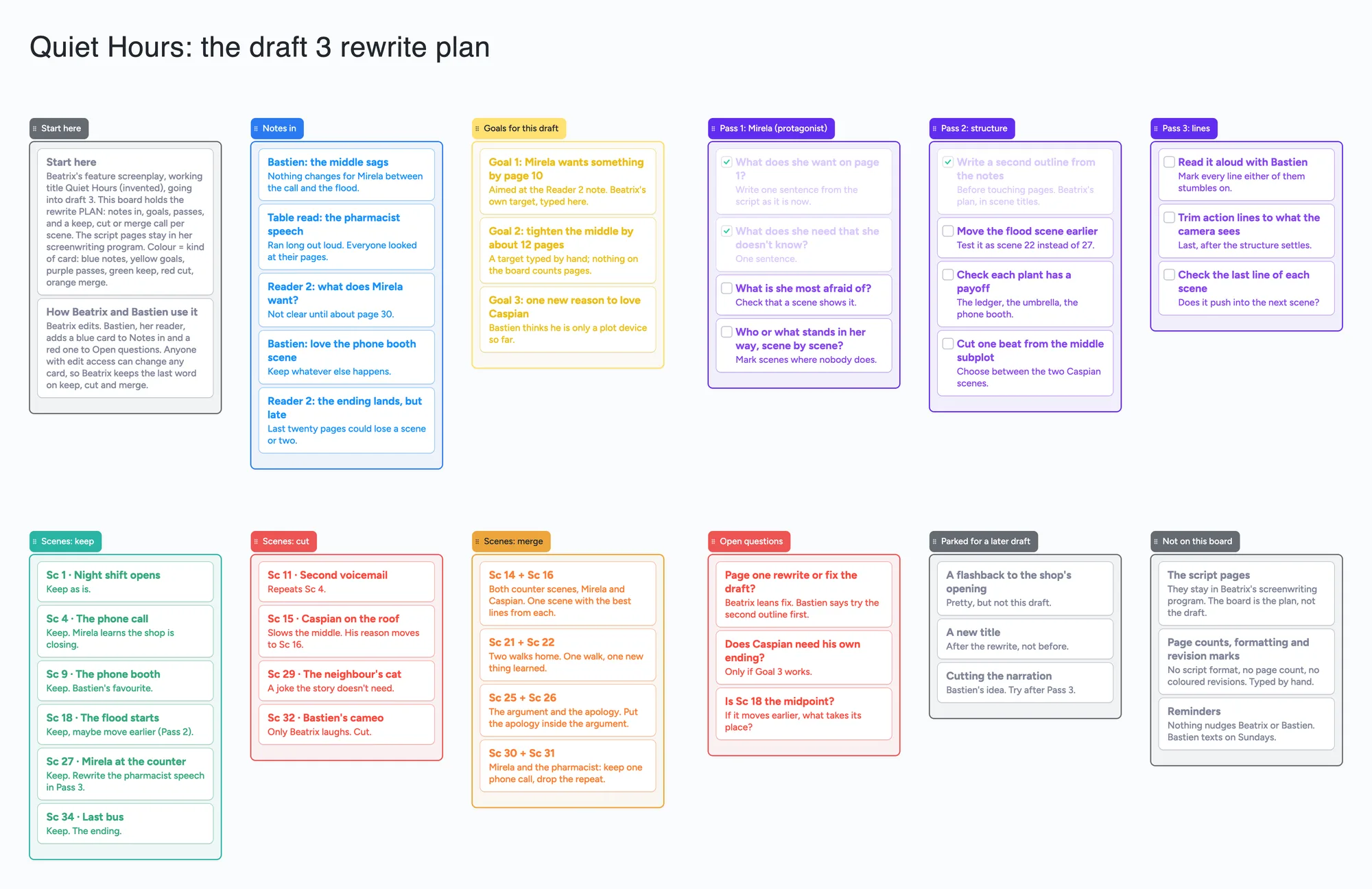
We make Instaboard, an online board for planning with other people. This page gives you a screenplay rewrite plan already laid out on it for an invented writer, Beatrix, and her reader, Bastien. It does one job: it turns a pile of notes into a plan you can see. Notes come in on one list, goals sit next to them, three passes are tick-box lists, and every scene you have decided about is a card in Keep, Cut or Merge. It does not hold your script pages, format them, count them or mark revisions. Open it, replace our scenes with yours and send the link to the one reader who looks at the plan with you.
Opens in your browser. Anyone can view; a free sign-in lets you edit.
Updated
A rewrite plan, not the rewrite, and what the board leaves out
- What it is: a plan for one rewrite. The notes you got, the goals you chose from them, three passes as tick lists, and a keep, cut or merge call per scene, with one line on why. The example uses 57 of your 150 free items.
- What it isn't: not a screenwriting program. It does not hold script pages, format them to the industry standard, count pages, track draft numbers or mark revisions. "About 12 pages" on the board is a target Beatrix typed.
- Scenes are cards, not pages: a scene card is a number, a title and one line. The script itself stays in your writing program.
- A board is shared by link: anyone you give the link to can read it. Scene titles and one-line notes are safer to share than script pages.
- Free plan: 5 boards, 150 items, 3 pictures per board. Copying the board takes 1 of your 5 boards. Writing on it needs a free sign-in. Pro removes the 150-item limit and adds invite-only boards (price in the last question).
What writers say about organizing rewrite notes
Writers describe the same trouble from different sides: too many notes, no order to work in. A few accounts, each one person's view:
- u/wemustburncarthage, in r/Screenwriting "Stuck on Draft 7" (2025-06-03; the poster had asked how to organize rewriting notes): reads the script once and marks issues without fixing them, keeps a list of each issue so they can be addressed in any order, and ends up with "a work order for revision". Their test: if the document full of questions and problems is longer than the to-do list of fixes, it's time to go back to the outline.
- u/stormfirearabians, same thread: "Identify 1 or 2 things to work on with a pass."
- u/ChaseLangley, in r/Screenwriting "What does your rewriting process look like?" (2021-07-09, UTC): made a spreadsheet with each scene's page count and a total at the bottom, aiming to trim a 211-page draft down to 130 pages. That is a job for a spreadsheet, and it is not what this board does.
- u/AshleyRealAF, in r/Screenwriting "How do you normally tackle a rewrite?" (2024-01-13, UTC): combines notes with a running document, re-outlines "very granular", checks what is missing or repeated, then does a page one rewrite.
We read 32, 22 and 35 comments in archived copies of the three threads (one more comment in the second had been deleted). The plan on this page is those methods laid out where a second person can see them.
Start from goals, not page one
Two of the three guides we read start from what you want the draft to do before you touch any pages; the third goes page by page, the other way round. The board is arranged around the first approach.
- John August's "How to Rewrite a Script Without Losing Its Voice": the biggest problem with most rewrites is that you start at page one and tweak as you go; instead, decide what you want to accomplish, then work out which scenes would need to change, and look at a printed script, not the one on screen.
- A No Film School post on a second outline: after notes, the author writes a second outline that reflects what they want the film to be, because it lets them get to "10,000 feet" and see the effect of big changes before writing new scenes.
- Script Reader Pro's rewrite checklist post: describes a hands-on checklist to go through the script page by page, and says the usual trouble is a lack of objectivity about your own work.
On the board this becomes two lists next to each other: Notes in (what people said) and Goals for this draft (what you decided to do about it). A note without a goal is just a note.
Beatrix's board, list by list
The script is invented: Quiet Hours, a feature about a night-shift pharmacy worker, going into draft 3. Scene titles and notes are ours and nothing here is a real script page. Read it as two rows, left to right.
- Start here. What the colours mean, and how Beatrix and Bastien use the board.
- Notes in. Five blue cards: two from Bastien, two from a second reader and one from a table read. One of them is praise, kept as a card so it doesn't get cut by accident.
- Goals for this draft. Three yellow cards, each aimed at a note. The page-count goal says in its own words that nothing on the board counts pages.
- Pass 1: protagonist, Pass 2: structure, Pass 3: lines. Tick-box cards, three of them ticked.
- Scenes: keep, cut and merge. One card per scene or pair of scenes, with a line on why.
- Open questions. Three forks Beatrix and Bastien haven't settled, including whether to do a page one rewrite.
- Parked for a later draft. Ideas that are not for this pass.
- Not on this board. The script pages, page counts and formatting, and reminders.
Nothing is linked. Moving a scene from Keep to Cut is a drag, and ticking a pass card is a tap. The example has no arrows because the lists already say which note or goal a card answers.
Keep, cut or merge: the three calls on a scene
A scene card carries its number, its title and one line on the decision. The example has six Keep cards, four Cut cards and four Merge cards.
- Keep: a scene that stays, sometimes with a note on a later pass (the pharmacist speech is kept and rewritten in Pass 3).
- Cut: a scene with its reason, such as repeating another scene or slowing the middle. If a cut scene's job moves, the card says where it moves to.
- Merge: two scenes that do one job. The card names both scene numbers and a line on what the merged scene keeps.
None of this changes the script. It is a work order you can read in a minute and argue about with one other person before you open the draft.
Three passes as tick lists
The passes in the example are Beatrix's own order, not a method we are selling. Writers disagree about order, and one thread above says to work on only one or two things per pass.
- Pass 1, the protagonist. Four cards that ask what she wants on page one, what she needs, what she is most afraid of and who stands in her way scene by scene. The Go Into The Story "Protagonist Pass" post asks a similar set of questions about the main character, including what they want and need and what they fear most.
- Pass 2, structure. The second outline first, then moving one scene and checking that each plant has a payoff.
- Pass 3, lines. Reading aloud with Bastien, trimming action lines and checking the last line of each scene, last, after the structure settles. ProPath Screenwriting's rewrite checklist is a list of questions to ask of each scene, such as whose scene it is and whether its final line anchors the scene; our Pass 3 uses only a few.
Reorder or delete a pass. The board holds the plan; nothing on it forces the order.
Fill it with your own rewrite
- Open the board and sign in free when it asks you to write. Delete any list you don't want.
- Paste your notes in as cards, one per note, who said it and what they said.
- Write two or three goals and aim each at a note. Cut any note that no goal answers, or move it to Parked.
- Add the scenes you already know you will keep, cut or merge, with one line each. Leave the rest.
- Tick off passes as you do them, and move scene cards between lists when you change your mind.
- Send the link to one reader. Set Share to "Anyone who joins can edit" only if they should write; otherwise leave it on view.
Screenwriting programs, spreadsheets and paper: who wins
Read on November 25, 2026; plans and pages change, so check the page.
| Tool | What the page says | Better for |
|---|---|---|
| Arc Studio (pricing page) | Free is $0 with 2 scripts and comments, with collaborators, outlining tools, revision management and history listed as not included. Essentials is $69 a year. Pro is $99 a year and lists inviting collaborators, outlining tools, history, revision management and feedback links | Writing the script, with revision tools on the paid plan |
| WriterDuet (pricing page) | Free lists three projects. On the monthly toggle Plus is $9.99 with real-time collaboration, Pro is $11.99 and lists colored revisions, and Premium is $13.99 and lists rewinding document or line history; on the Yearly toggle they are $7.49, $8.99 and $10.49, billed annually | Writing the script with other people, with revisions marked |
| Fade In (home page) | Says it has tools for outlining, organizing and navigating and robust functionality for managing rewrites and revisions. We did not read a price | Managing revisions of the script itself |
| Final Draft Beat Board (Final Draft blog post) | Describes the Beat Board as a virtual whiteboard or wall with index cards or sticky notes; beats share a colour and page range with the Outline Editor; changes on one show in the other. We did not read a price | Cards that stay linked to the script's outline |
| A spreadsheet | u/ChaseLangley's scene-by-scene page count, described above | Page counts and totals |
| Printed pages | John August says to work from the printed script and scribble on it | Reading and marking the script itself |
| Instaboard board | 5 boards, 150 items, 3 pictures per board on the free plan | A short, shared plan one other person can open and rearrange without installing anything |
Swipe the table sideways to see every column.
Pages read November 25, 2026: arcstudiopro.com, writerduet.com, fadeinpro.com, finaldraft.com and johnaugust.com (links in Sources). Our wording, not theirs.
Where these win
If you want to write or format the script, use a screenwriting program. If you want page counts, use a spreadsheet. Use this board when the question is which notes you will act on, in what order, and which scenes stay, go or combine, and one other person should see and move it.
Scenes against the 150-item limit
Each card and each list is 1 of your 150 free items, across all your boards. The title text box counts too. Arrows, sections and pen strokes don't. Our arithmetic from the example:
- As built: 12 lists + 44 cards + 1 title = 57.
- Every scene as its own card: the example has 14 scene cards and 30 other cards. A 34-scene script with a card per scene is 34 + 30 + 12 + 1 = 77.
- A longer script, 60 scenes: 60 + 30 + 12 + 1 = 103.
- Two copies to compare plans, each 77: 2 x 77 = 154, over 150, and 2 of your 5 free boards.
- With Pro, the 150-item limit is removed.
What stays off this board
- No script pages. Cards hold a scene title and a line, not action lines or dialogue. Keep the script in your writing program.
- No page counts, no script format and no revision marks. Every number on the board is typed by hand. A spreadsheet or a screenwriting program does this better.
- Nothing links to your script. A scene card is not a door into the page.
- No reminders or due-date alerts. Nothing nudges Beatrix or Bastien.
- It is not private by default. Anyone you give the link to can read it.
- A copy takes 1 of your 5 free boards, and writing needs a free sign-in.
- 3 pictures per board. The example has none.
Start from the ready board
It opens in your browser in a few seconds, with nothing to install. Sign in for free when you want to save it and share it.
Questions
What is a screenplay rewrite board?
A shared board that holds the plan for one rewrite: the notes you got, the goals you chose, three passes as tick lists and a keep, cut or merge call per scene. This one is filled in for an invented script. It records your plan; it does not hold the script.
Does the board hold my script pages?
We would not put them there. Anyone with the link can read the whole board, so the example keeps scene titles and one-line notes only. Keep the script in your screenwriting program.
Is there a right order for the passes?
The writers we read disagree. One suggests working on only one or two things per pass, one re-outlines before a page one rewrite and one starts from goals instead of page one. The board does not choose for you; the three passes in the example are Beatrix's own.
Can a reader or script consultant use it?
Yes. New boards start with "Anyone who joins can view", so anyone with the link can read. Set it to "Anyone who joins can edit" if they should add cards; each person who writes signs in free. Anyone with edit access can change any card, so agree who keeps the last word on keep, cut and merge.
How many scenes fit on the free plan?
The example is 57 of your 150 free items. With a card for each of 34 scenes it would be 77, and two copies of that to compare plans would be 154, over the limit (our arithmetic). Copying the board takes 1 of your 5 free boards.
Is Instaboard free?
There is a free plan: 5 boards, 150 cards and items across your account (pen strokes, arrows and sections don't count), and 3 pictures and 1 file per board. Anyone with the link can read a board; writing on it takes a free sign-in. Pro removes the item limit and adds invite-only boards: $5 a month billed yearly ($59.99 a year), or $7.99 monthly.
Sources
- r/Screenwriting: Stuck on Draft 7, Seeking Rewriting Strategies (OP u/Correct_Photo_1393, 2025-06-03; replies are single accounts, 32 comments read in an archived copy, November 25, 2026)
- r/Screenwriting: What does your rewriting process look like? (OP u/Ryclassic, 2021-07-09 23:29 UTC; replies are single accounts, 22 comments read in an archived copy and 1 more deleted, November 25, 2026)
- r/Screenwriting: How do you normally tackle a rewrite? (OP u/MorningFirm5374, 2024-01-13 16:25 UTC; replies are single accounts, 35 comments read in an archived copy, November 25, 2026)
- John August: How to Rewrite a Script Without Losing Its Voice (August 17, 2005; read November 25, 2026)
- No Film School: Why Crafting a Second Outline Is the Secret to the Rewrite Process (Aug 08, 2023; read November 25, 2026)
- Script Reader Pro: How to Rewrite a Script, A Hands-On Master Checklist (the page prints no date; read November 25, 2026)
- Go Into The Story: Rewrite Strategy, The Protagonist Pass (14 Apr 2021; read November 25, 2026)
- ProPath Screenwriting: The Ultimate Rewrite Checklist (Feb 16, 2020; read November 25, 2026)
- Arc Studio: pricing (read November 25, 2026)
- WriterDuet: plans and pricing (monthly and Yearly toggles both read; read November 25, 2026)
- Fade In: home page (read November 25, 2026)
- Final Draft: Master the Beat Board and Take Control of Your Script at Every Stage (Edwin Cannistraci, September 5, 2025; read November 25, 2026)
Related
A lessons learned log template on one shared board: lessons by kind, what worked, a review before the next job
A lessons learned log on one shared board: lessons by kind, what worked, a review before the next job, and whether each lesson was used.
A decision log template on one shared board: open, decided, revisit, reversed
A decision log template on one shared board for two to five people: open questions, decided with the why, revisit on a date, reversed. When a spreadsheet or Notion is the better home.