For a small product team that keeps customer quotes in chats, emails and a spreadsheet
A customer feedback tracker on one shared board: quotes in, themes out
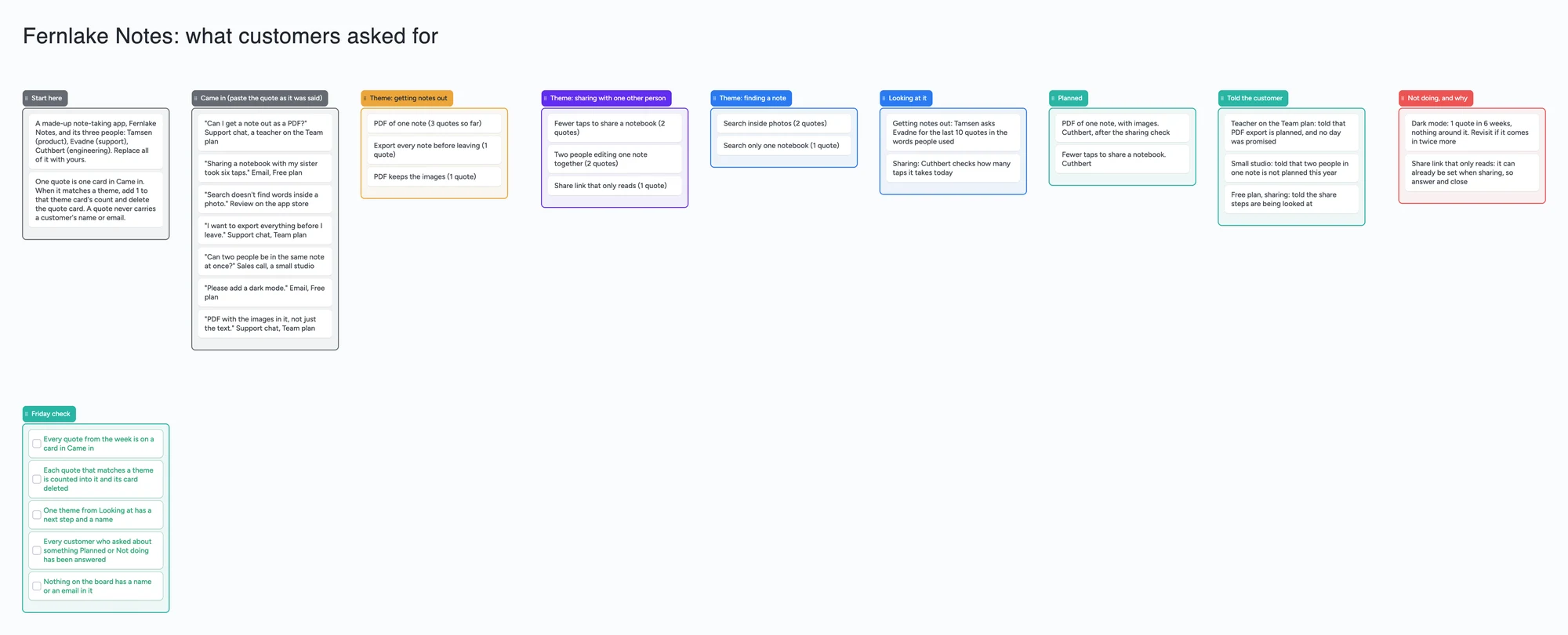
Customer feedback arrives in support chats, app store reviews, sales calls and emails, and one request comes back worded five ways. The board behind this page is a feedback tracker set out and filled in for an invented note-taking app, Fernlake Notes, run by three people: Tamsen (product), Evadne (support) and Cuthbert (engineering). Raw quotes go into one list. When a quote matches others you add 1 to a theme card and delete the quote. Themes then move to looking at, planned, answered or declined. Everything on it is typed by hand: there is no customer-facing form, no vote counting, no link to a support desk, and no reminders or due-date alerts.
Opens in your browser. Anyone can view; a free sign-in lets you edit.
Updated
What this tracker does and does not do
- The idea: one screen that shows which customer quotes are waiting, which themes are growing, what is being looked at or planned, who has been answered and what you decided not to do. Fernlake's example takes 42 of the free plan's 150 items.
- How it counts: a quote is a card until it matches a theme. Then you add 1 to the theme card's count and delete the quote. Nothing adds the counts up for you.
- What never goes on it: a customer's name, email or account. A board link can be opened by anyone who has it, so quotes go in without who said them.
- What it is not: no portal where customers submit or vote, no merge of duplicates, no link to a support desk or CRM, no reminders or due-date alerts.
- Free plan: five boards, with 150 items across them and three pictures on each board. Pro lifts the item limit; the last FAQ gives its prices.
What three product-manager threads say
Three r/ProductManagement threads ask the same thing in different words: how to keep customer requests from burying the backlog. Reddit's own pages show 55, 29 and 40 comments, of which 50, 27 and 29 render in a browser. An archived copy holds 56, 32 and 41, with 0, 2 and 3 marked removed, and it includes the poster's own replies (14 in the first thread). Each point below is one person's view, and the number of accounts we quote is counted in brackets; it is not a vote.
- Keep requests out of the backlog (1 account quoted). In "How do you track feature requests without going insane?" (posted 2025-06-15 UTC), u/jackiekeracky says anything anyone can file "should go into a separate bucket than your actual backlog. Have a requests board or something" (a comment Reddit shows; the archived copy does not have it).
- Call it feedback, then group it (1 account). In the same thread u/whitew0lf says to stop tracking requests and treat them "purely as feedback. Group those into opportunities." The same comment also recommends AI tools for the grouping, which this board does not do.
- Roll duplicates into themes (2 accounts). In "How do you handle duplicate feature requests from users?" (2025-01-17 UTC), u/poodleface says to separate requests from the backlog and have them roll up to more general themes; u/Tim_Riggins_ writes that duplicates are "super common (and ideal)" once you roll them up to a problem statement.
- Some want a portal with votes (3 accounts). In "How do you manage a deluge of feature requests from customers?" (2025-09-22 UTC), u/BearWonderful355 and u/darkstar3333 suggest a portal where customers vote; in the first thread u/Xumade describes a shared form in Coda where anyone can upvote.
- Some say stop taking requests (1 account). u/GeorgeHarter in the first thread says they stopped accepting feature requests years ago and asks users about problems instead.
Our reading, not theirs: the first three points describe a list of quotes, a handful of theme cards and a place where decisions go, which is the shape of this board. The fourth is a job a board cannot do, because customers can't submit or vote on it. If your customers need to see and vote on ideas, that is a portal.
Quote in, count out
The whole habit is one small move. A quote arrives, you paste it into the grey Came in list as one card, in the customer's own words, with the channel and plan after it ("Support chat, Team plan"). Once a week you read the list and do one of three things with each card:
- It matches a theme. Add 1 to that theme card ("PDF of one note (3 quotes so far)") and delete the quote card.
- It is a new theme. Make a theme card in the list that fits, with a count of 1, and delete the quote.
- It is a one-off. Leave it in Came in. If nothing joins it in six weeks, delete it.
Deleting is the point. The theme lists hold counts and wording; the Came in list holds only what you have not read yet. That keeps the board small and the picture honest. If you would rather keep every quote, make a second board for the raw ones; the next section shows what that costs.
Fernlake's board, list by list
Fernlake and its three people are made up, and no customer is named. The table runs along the board, one row per kind of list.
| Kind of list | What belongs there | Fernlake's version |
|---|---|---|
| Came in (grey) | Raw quotes, unread, in the customer's words | "Can I get a note out as a PDF?" Support chat, a teacher on the Team plan |
| Theme lists (orange, purple, blue) | One card per theme with a typed count; the colour only separates the lists | "PDF of one note (3 quotes so far)" |
| Looking at it (blue) | A theme someone has taken, with who asks what next | "Getting notes out: Tamsen asks Evadne for the last 10 quotes in the words people used" |
| Planned (green) | A theme with an owner, nothing promised to a customer | "Fewer taps to share a notebook. Cuthbert" |
| Told the customer (green) | Each answer sent, by plan or role, never a name | "Small studio: told that two people in one note is not planned this year" |
| Not doing, and why (red) | A decision to leave a theme, with the reason and what would change it | "Dark mode: 1 quote in 6 weeks, nothing around it. Revisit if it comes in twice more" |
Swipe the table sideways to see every column.
Quoted from the cards. Every count and who-asked line is typed, and the board keeps no vote or status field.
One quote's route
Follow "Can I get a note out as a PDF?" It lands in Came in on Monday. On Friday Evadne reads the list and sees it matches the first theme, so "PDF of one note" goes from 2 quotes to 3 and the quote card is deleted. A second quote asks for the images to be in the PDF; that becomes its own small theme card, because it is a different ask.
Tamsen moves the "getting notes out" theme to Looking at it and asks Evadne for the last ten quotes in the words people used. Once Cuthbert agrees to take it, it goes to Planned with his name. The customer who asked gets an answer, and a card goes into Told the customer saying "planned, and no day was promised". The Friday check list at the bottom of the board has five tick boxes. A tick stores no name and no time, so treat it as a nudge for the team, not a log.
Keep customers out of the quotes
Anyone who gets the link can read every card, and customer quotes can carry details people did not mean to share. Fernlake's board follows four rules, written on its first card and the last tick box:
- No names, emails or account ids. The channel and plan after a quote are enough to find it again in the tool where it arrived.
- No screenshots of customer screens. Pictures are limited to 3 per board anyway, and a screenshot can show private notes.
- No quote about a named person at the customer. Paste what was asked for, not who was annoyed.
- Keep the link in the team. Pro offers invite-only boards; on the free plan the link is the only door, so send it only to people who could already see the support inbox.
How many quotes fit in 150 items?
Count it yourself: 10 lists, 31 cards and the title text box make 42 items. The free plan allows 150 in total across all your boards, and pen strokes, arrows and sections are left out of that count. Because a counted quote is deleted, the board stays near 42 however many quotes arrive. Keep every quote as its own card and the 108 items still free would be used up by 108 quotes, and only if this were your only board (our arithmetic).
A team that gets hundreds of requests a week needs a tool that counts and merges them. See the table below.
Jobs a plain board leaves to other tools
- No submit form or portal. Customers cannot add a card, and they cannot vote. You paste each quote in.
- No counting. The count on a theme card is text you edit. Nothing adds up quotes or shows which theme is biggest.
- No merging of duplicates. You spot a match by reading. A long list of themes is harder to read than a tool's merge button.
- No link to a support desk, chat or CRM. The card holds the words and a note of where they came from.
- No revenue or account data. Who asked, and how much they pay, belongs in another tool.
- No reminders or due-date alerts. The Friday check is a habit. Nothing tells you a quote has waited.
- No private view. A board can be made invite-only only on Pro.
Three tools built for this job, and when each wins
| Tool | What the page shows, read November 27, 2026 | Pick it instead when |
|---|---|---|
| Canny | Pricing page, Yearly view: Free $0 a month with 25 tracked users; Pro $79 a month billed yearly with 100+ tracked users. The Monthly view shows Pro at $99 a month. A tracked user is any user associated with feedback. Its feedback portal, boards and vote-on-behalf are listed in the plan table | Customers should submit and vote themselves, or you want duplicates merged for you |
| Jira Product Discovery | Pricing page: Free "forever for 3 creators". Standard is $10.50 per creator a month in the Monthly view and $1,050 a year in the Annually view (user tier 6 - 10); the page says "save up to 17%" for annual billing | Your team already works in Jira and wants ideas ranked next to its tickets |
| Notion | Pricing page: Free $0 per seat a month ("For individuals to organize personal projects and life"); Plus $12 per seat a month on Pay monthly and $10 on Pay yearly, which is how the page opened. Its Customer Feedback Tracker category shows 241 templates as of November 27, 2026 | You want a database you can filter and sum, with each quote as a row |
| Instaboard | One shared board; themes and counts typed by hand; no portal, merge, votes or alerts | A small team that wants to see all themes and decisions on one screen, and answer in one place |
Swipe the table sideways to see every column.
Each cell comes from the vendor's own page as read on November 27, 2026, in a browser, with both billing views opened. We did not try these tools; where a page was not read, we did not write a cell.
From Fernlake to your own product in six steps
- Open the board and swap Fernlake for your own product. Overwrite or delete each of their cards as you reach it, so no one reads a half-invented board.
- Paste this week's quotes into Came in, each in the customer's own words, with the channel and plan after it. Leave names and emails out.
- Make three to five theme cards. One card per theme, a count in the title, in the theme list that suits it. Rename the three lists to your own themes.
- Share the board with whoever reads the support inbox, and set Share to "Anyone who joins can edit". Each person signs in with a free account, and the board takes one of their five.
- Fix your Friday. Keep the five tick boxes or change them, and pick one fixed time to read Came in.
- Write down a Not doing card the first time you decline something. The reason and what would change your mind are the part people forget.
What the free plan allows this board
- Items. The example is 42 of the 150 free items across your account; arrows, sections and pen strokes are not counted.
- Boards. The free plan holds 5. A copy of this board takes one, and so does a board you open from someone else's link.
- Pictures. 3 a board. The example has none, so keep screenshots in the tool where the quote came from.
- Writing needs a sign-in. People you share the link with can read; to change a card they sign in with a free account.
- Private notes. Don't paste anything a customer would not want a colleague's colleague to read.
Start from the ready board
It opens in your browser in a few seconds, with nothing to install. Sign in for free when you want to save it and share it.
Questions
Is there a free customer feedback tracker template?
Yes, within limits. Notion shows 241 templates in its Customer Feedback Tracker category as of November 27, 2026, and Canny and Jira Product Discovery both list a free plan. The ready board here is a customer feedback tracker on a shared board with Came in, theme, Looking at it, Planned, Told the customer and Not doing lists, and a copy of it costs one of your five free boards. It has no portal, no voting and no merge.
What should a feedback card contain?
The customer's words, in quotation marks, and after them the channel and the plan or role, such as "Support chat, Team plan". Leave out names, emails and account ids. Theme cards hold a short name for the ask and a count you type.
How do I avoid duplicates?
Read Came in once a week and count each quote into the theme it matches, then delete the quote. The board cannot spot a match for you, so keep theme names short and in the words customers use.
Can customers vote or submit on this board?
No. People you share the link with can read the board, and writing takes a free sign-in, but it is not a portal and cannot count votes. If customers should add ideas and vote on them, a portal tool such as Canny does that.
Does it connect to Zendesk, Intercom or Slack?
No. There is no integration. You paste the quote into a card and note where it came from, so the original stays in the tool where it arrived.
Is Instaboard free?
Yes. The free plan includes 5 boards, 150 cards and items across your account (pen strokes, arrows and sections don't count), 3 images and 1 file per board, unlimited collaborators and video calls up to an hour. Pro is $5 a month billed yearly ($59.99 a year), or $7.99 monthly, and the people you invite join free.
Sources
- r/ProductManagement: "How do you track feature requests without going insane?" (posted 2025-06-15 UTC; replies by u/jackiekeracky, u/whitew0lf, u/Xumade, u/GeorgeHarter; Reddit shows 55 comments, 50 render; archived copy 56, 0 removed, including the poster's own replies; read November 27, 2026)
- r/ProductManagement: "How do you handle duplicate feature requests from users?" (posted 2025-01-17 UTC; replies by u/poodleface and u/Tim_Riggins_; Reddit shows 29 comments, 27 render; archived copy 32, 2 removed; read November 27, 2026)
- r/ProductManagement: "How do you manage a deluge of feature requests from customers?" (posted 2025-09-22 UTC; replies by u/BearWonderful355 and u/darkstar3333; Reddit shows 40 comments, 29 render; archived copy 41, 3 removed; read November 27, 2026)
- Canny: pricing (Free $0 with 25 tracked users; Pro $79 a month billed yearly, $99 a month on the Monthly view, 100+ tracked users; read in a browser November 27, 2026)
- Atlassian: Jira Product Discovery pricing (Free for 3 creators; Standard $10.50 per creator a month on Monthly, $1,050 a year on Annually, user tier 6 - 10; read in a browser November 27, 2026)
- Notion: Customer Feedback Tracker templates (241 templates shown November 27, 2026)
- Notion: pricing (Free $0 per seat a month; Plus $12 on Pay monthly, $10 on Pay yearly; read in a browser November 27, 2026)