For a solo freelancer who keeps projects in DMs and a spreadsheet
A freelance project tracker you can share: from first ask to paid
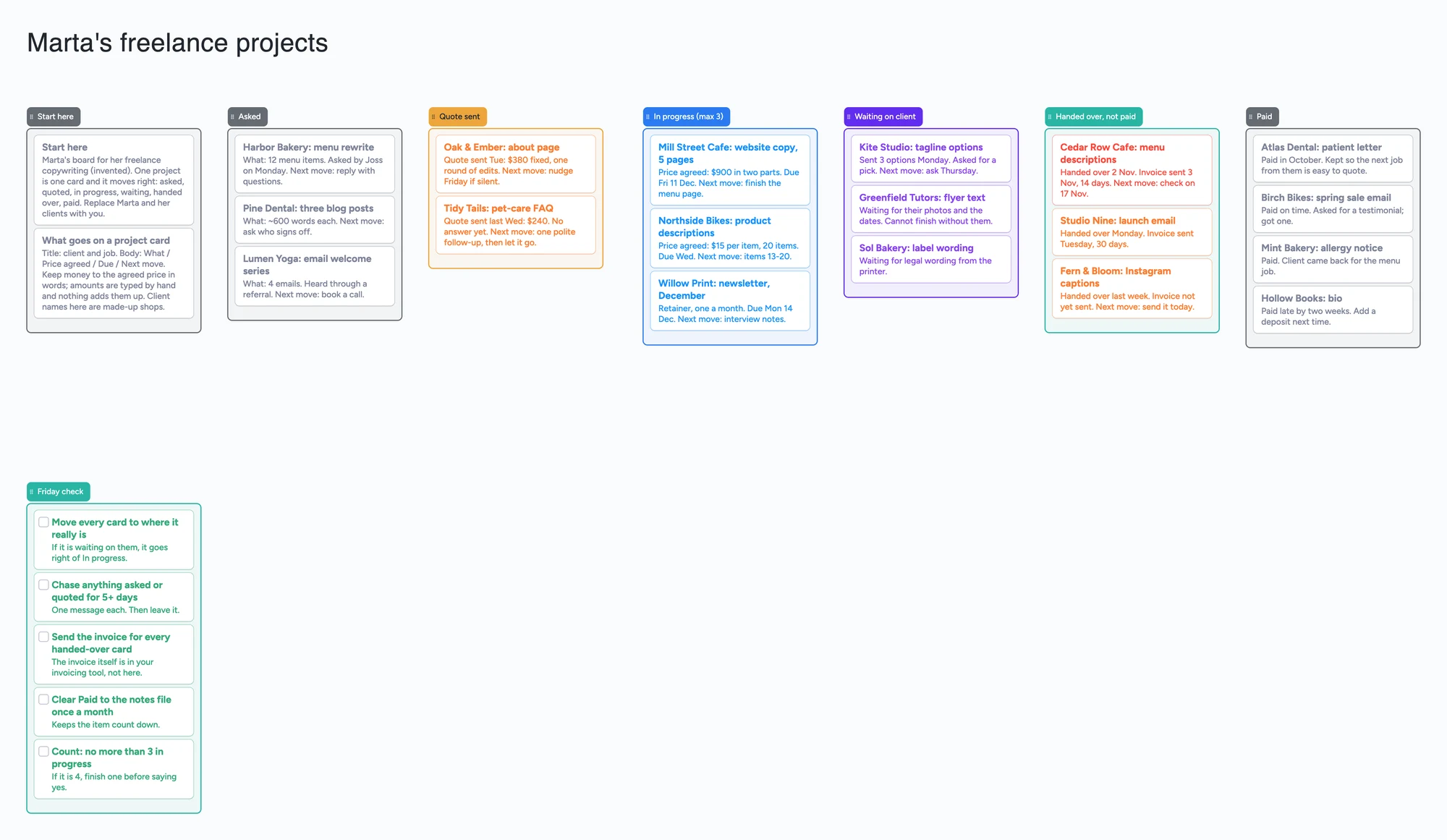
We make Instaboard, an online board. This page gives you a freelance project tracker already laid out on it and filled in for an invented freelance copywriter, Marta: Asked, Quote sent, In progress, Waiting on client, Handed over, Paid, plus a Friday check list. One project is one card and it moves right. It is a board you read by eye. It does not send invoices, add up money, track hours, take a request form from a client or remind you of anything. The first section covers the part people miss: what a client sees when you send the link.
Opens in your browser. Anyone can view; a free sign-in lets you edit.
Updated
Read this first: what the board does and doesn't do
- What it is: one screen where you can see which jobs are asked for, quoted, being worked on, waiting on a client, handed over and paid. Marta's board uses 34 of your 150 free items.
- Who sees what: one board is one link. Everyone who gets the link sees every client's card on it. Send a client a copy that holds only their project, not your master board (first section).
- What it is not: no invoices, no sums, no hour tracking, no contracts or e-signing, no request form for clients, no reminders or due-date alerts. Amounts and due dates here are typed in the card.
- Where it gets tight: every project is a card and a Paid card stays until you delete it. At six new projects a month with nothing deleted, 150 items is passed in month 20 (arithmetic below).
- Free plan: 5 boards, 150 items and 3 pictures per board. Pro removes the item limit; the last FAQ has the prices.
Who sees what when you send the link
A tracker for all your clients holds all your clients, so the board is for you. Marta's cards carry the client name, the agreed price and what each client is waiting on. Anyone who joins can view a board you share, so the master board should not go to a client.
- Keep the master board to yourself. It is where you move cards on Friday.
- Give a client their own board. Make a copy, delete every card but theirs, and send that link. The master board is 1 of your 5 free boards and each copy takes another, so that leaves four client copies.
- Or give them nothing and send a line by email. Two commenters in the thread below say email is what their clients prefer or should be allowed.
- Clients view; they don't edit. A client who opens the link can read it. To change a card they would sign in free, and you would set the board to "Anyone who joins can edit" in Share, which is an extra step we think most clients won't want.
- No invite-only option on the free plan. Invite-only boards are a Pro feature, so a link is the only way to share on free.
What a project card holds
A freelance job is small, so the card is small. Each of Marta's cards has the client and job as its title and a body of short lines:
- What: the job in a few words ("12 menu items", "4 emails").
- Price agreed: typed in words and numbers, for example "$900 in two parts". Nothing adds these up.
- Due: a date typed in the card, like "Due Fri 11 Dec". The app also lets you set a due date on a card, but it has no reminders or due-date alerts, so nothing tells you a date is near.
- Next move: the single thing you will do next, with a day. This line is what makes a card worth opening on Friday.
The handed-over cards add the invoice terms ("Invoice sent 3 Nov, 14 days"). The invoice itself belongs in an invoicing tool. The card only answers the question "have I been paid for this?".
Marta's board, list by list
The example is invented: Marta writes copy for small local shops, and every client name is made up. Here is what each list holds.
| List | What goes in it | In Marta's board |
|---|---|---|
| Asked (grey) | A request nobody has priced yet | "Harbor Bakery: menu rewrite" What: 12 menu items. Next move: reply with questions |
| Quote sent (orange) | A price is with the client and no answer has come | "Tidy Tails: pet-care FAQ" Quote sent last Wed: $240. Next move: one polite follow-up, then let it go |
| In progress, max 3 (blue) | Work you have agreed to. The "max 3" is a rule in the list title; the board doesn't enforce it | "Mill Street Cafe: website copy, 5 pages" Price agreed: $900 in two parts. Due Fri 11 Dec |
| Waiting on client (purple) | You cannot move until they send something | "Greenfield Tutors: flyer text" Waiting for their photos and the dates |
| Handed over, not paid (green) | The work is delivered; the money is not in. Card colour shows age: red is the oldest | "Cedar Row Cafe: menu descriptions" Invoice sent 3 Nov, 14 days. Next move: check on 17 Nov |
| Paid (grey) | Done. Kept for a month so a repeat client's last price is easy to find | "Hollow Books: bio" Paid late by two weeks. Add a deposit next time |
Swipe the table sideways to see every column.
The board's own wording. Colours, dates and prices are typed by hand; the board has no price or status field.
One job from asked to paid
Follow "Harbor Bakery: menu rewrite" through the board. It starts in Asked with a first move: reply with questions. Once you have sent a price it goes to Quote sent. When the bakery agrees, it moves to In progress, and the body gains a Price agreed line and a due date. If the bakery has not sent the allergy list, it moves to Waiting on client with that one line in the body. When the copy goes out it moves to Handed over, not paid, with the invoice date and terms. When the money lands it moves to Paid. At each step the card's body changes by one line; nothing else is typed twice.
The one habit that holds it together is the Friday check list at the bottom: move every card to where it really is, chase anything asked or quoted for five days or more, send the invoice for every handed-over card, and count what is in progress. Its five cards are tick boxes. A tick carries no name or time, so the list is a memory aid, not a record.
Why "In progress" is capped at three
The cap is Marta's own rule, written in the list title. It is a nudge to finish one job before saying yes to a fourth, not something the board prevents. If you would rather not have a cap, rename the list. The rule only works if you read the list on Friday and count.
What freelancers say about clients and boards
A r/freelance thread from May 5, 2024, "Is ClickUp intimidating for clients?", asks whether clients will find a shared project board too much (read 30 in an archived copy, 3 of them removed). The thread is about ClickUp; each reply below is one person's view.
- u/yycmwd says the real challenge is getting any client to use a tool like this, and that it should be simple for clients to send requests and feedback: "If that means email, so be it."
- u/rococo78 writes as a freelancer and small business owner, and says being asked to log in and navigate one more thing "sounds maddening to me", and that it is the freelancer's job to keep the client updated the way the client wants.
- u/wavweaver says a client portal is "just another hoop to jump through, and account to login".
- u/PoopsCodeAllTheTime uses Trello with a client and tells them the specific column where the information is needed, so requests don't get lost; everything else goes through chat.
- u/heregoes_something shares a one-page client portal with a calendar and links, and says that sharing every task made clients "bogged down"; they wanted an overview and a way to connect if something is wrong.
Three of the five (u/yycmwd, u/rococo78, u/wavweaver) dislike or won't use another tool or login, and the other two keep what the client sees small (one column, or one overview page). Our reading, not theirs: keep the board as your own tracker, and if a client sees one, make it a small copy, not the master.
Set up your own, in order
- Open the board and replace Marta and her clients. Delete their cards as you go so the board is never half hers.
- Put today's real jobs on it. One card each, with What / Price agreed / Due / Next move. Skip anything you haven't started a conversation about.
- Move each card to where it really is. Waiting on client is the list people forget; fill it first.
- Write the in-progress cap or delete it. Change the list title to your own number.
- Fix your Friday. Keep the five tick cards or change them, and pick a fixed time.
- Make a copy for each client you want to show. Delete every card but theirs, then share that link. Never share the master.
How long until 150 items is a problem?
Our arithmetic. Each list and each card is 1 of your 150 free items across all your boards; arrows, sections and pen strokes don't count. Marta's board is 8 lists + 25 cards + 1 title text box = 34. If she adds six projects a month and deletes nothing, that is 34 + 6 × 19 = 148 after 19 months and 154 in month 20. Moving a card to Paid doesn't free an item; deleting it does. A freelancer who clears Paid cards once a month into a notes file keeps the board near 34 plus the open jobs.
The 150 is account-wide, so a copy you make for a client counts against the same pool as your master board.
What this board can't do for a freelancer
- No invoicing or payments. Nothing bills a client or checks that money arrived; you type "Invoice sent 3 Nov" and later move the card.
- No sums. Prices on cards are text. Nothing totals what you are owed or what you earned this month.
- No time tracking. Hourly and retainer work needs a timer elsewhere; the card holds only a note.
- No client request form. Nobody can submit a job to the board; you type each one in from an email or DM.
- No reminders or due-date alerts. The Friday check is a habit. Nothing counts how long a quote has waited.
- No contracts or e-signing. Keep those in a document tool.
- One link, one audience. There is no way to show one client only their project on a shared board, so you share copies.
- Not for private work. Don't put a client's confidential brief on a link board; invite-only boards are a Pro feature.
Where other tools do this better
| Tool | What its own page says (read November 25, 2026) | When it wins over this board |
|---|---|---|
| Trello Free | Free for up to 10 collaborators per Workspace; unlimited cards; up to 10 boards per Workspace. Standard lists single board guests and costs $5 per user a month billed annually ($6 monthly) | You want more than 5 boards, or a Power-Up or automation. Single board guests are listed under Standard, not on the Free plan (read November 25, 2026) |
| t0ggles | Free plan to start; "every feature is $5/month" when you outgrow it (freelancer page). Lists multi-project boards, guest users limited to a project, client portals, reminders and a request form | You have many clients at once and want a client to see only their own project, with reminders and a form |
| Breeze | $9 per user a month billed yearly ($10 monthly) with all features; a Solo plan for 1 user at $14 a month; client users cost nothing extra; time tracking; progress shared by public link without a login; 14-day trial | You bill by the hour, or want the client to read progress without any account |
| Notion | Pricing page lists Free at $0 per seat a month "for individuals" and Plus at $10 per seat a month billed yearly ($12 monthly). We did not read what Free includes | You already keep your notes and docs in Notion and want the tracker beside them |
| Google Sheets | Not read | You want totals, filters and a column of amounts that adds itself |
| Instaboard | One shared board; stages are lists; dates and amounts typed by hand; no invoices, sums, time or alerts | One freelancer, a handful of jobs at a time, and you want to see where every job is on one screen |
Swipe the table sideways to see every column.
Each cell is a vendor's own page, read on the date above. Where no page was read, the cell says so.
Limits of the free plan for this board
- Items. Each card and each list is 1 of 150 free items across your account; the example is 34. Arrows, sections and pen strokes don't count.
- Boards. 5 on the free plan. "Make a copy" takes 1 of them, so each client copy uses one.
- Pictures. 3 per board. The example has none; keep screenshots and files in your own folders and put a link in the card.
- Writing needs a free sign-in. Anyone who joins can view the board; to change it they sign in free, and the board then counts as 1 of their 5.
- Private jobs. Don't put a confidential brief on a link board; invite-only boards are a Pro feature.
Start from the ready board
It opens in your browser in a few seconds, with nothing to install. Sign in for free when you want to save it and share it.
Questions
Is there a free freelance project tracker template?
Yes. Trello has a Free plan and t0ggles lists a free plan. The ready board here is a freelance project tracker on a shared board with Asked, Quote sent, In progress, Waiting on client, Handed over and Paid lists, free within 5 boards and 150 items. It is a board you read and move cards on; it has no invoices, sums, time tracking or alerts.
What should a freelance project card include?
The client and job in the title, then what the job is, the price you agreed, the due date and your next move. On this board the price and date are typed text, so write the price in words or numbers you will understand months later, and write the invoice terms on the card once you hand the work over.
Can my clients see my board?
Anyone who joins a link can view the whole board, so every client who gets the link would see every other client's card. Make a copy with only that client's project and share that link. A copy takes 1 of your 5 free boards, and a client who wants to change a card has to sign in free.
Does this replace my invoicing tool?
No. The board shows where each job stands and whether you have been paid. The invoice itself comes from an invoicing app or a document. Nothing here sends a bill, adds up what you are owed or checks a payment.
Can I use it for retainers or hourly work?
For retainers, yes: keep one card per client in In progress and change its next move each month. For hourly work you need a timer in another tool; the card can hold the total as a note, but nothing here counts hours or adds them up.
Is Instaboard free?
There is a free plan: 5 boards, 150 cards and items across your account (pen strokes, arrows and sections don't count), and 3 pictures and 1 file per board. Anyone with the link can read a board; writing on it takes a free sign-in. Pro removes the item limit and adds invite-only boards: $5 a month billed yearly ($59.99 a year), or $7.99 monthly.
Sources
- r/freelance: "Is ClickUp intimidating for clients?" (posted 2024-05-05; replies by u/yycmwd, u/rococo78, u/wavweaver, u/PoopsCodeAllTheTime, u/heregoes_something and others; read 30 in an archived copy, 3 removed, November 25, 2026)
- Trello: pricing (Free, Standard $5 per user a month billed annually, $6 monthly; single board guests listed under Standard; read November 25, 2026)
- t0ggles: Freelance project management tool (free plan, $5 a month, guest users, client portals, reminders, board forms; read November 25, 2026)
- Breeze: Project management software for freelancers (client users, shared progress links, time tracking; read November 25, 2026)
- Breeze: pricing ($9 per user a month billed yearly, $10 monthly; Solo plan $14 a month, 14-day trial; read November 25, 2026)
- Notion: pricing (Free and Plus $10 per seat a month billed yearly, $12 monthly; read November 25, 2026)