For a small studio or in-house team and the one client contact who has to say yes
A creative asset feedback board for a social campaign: one card per asset
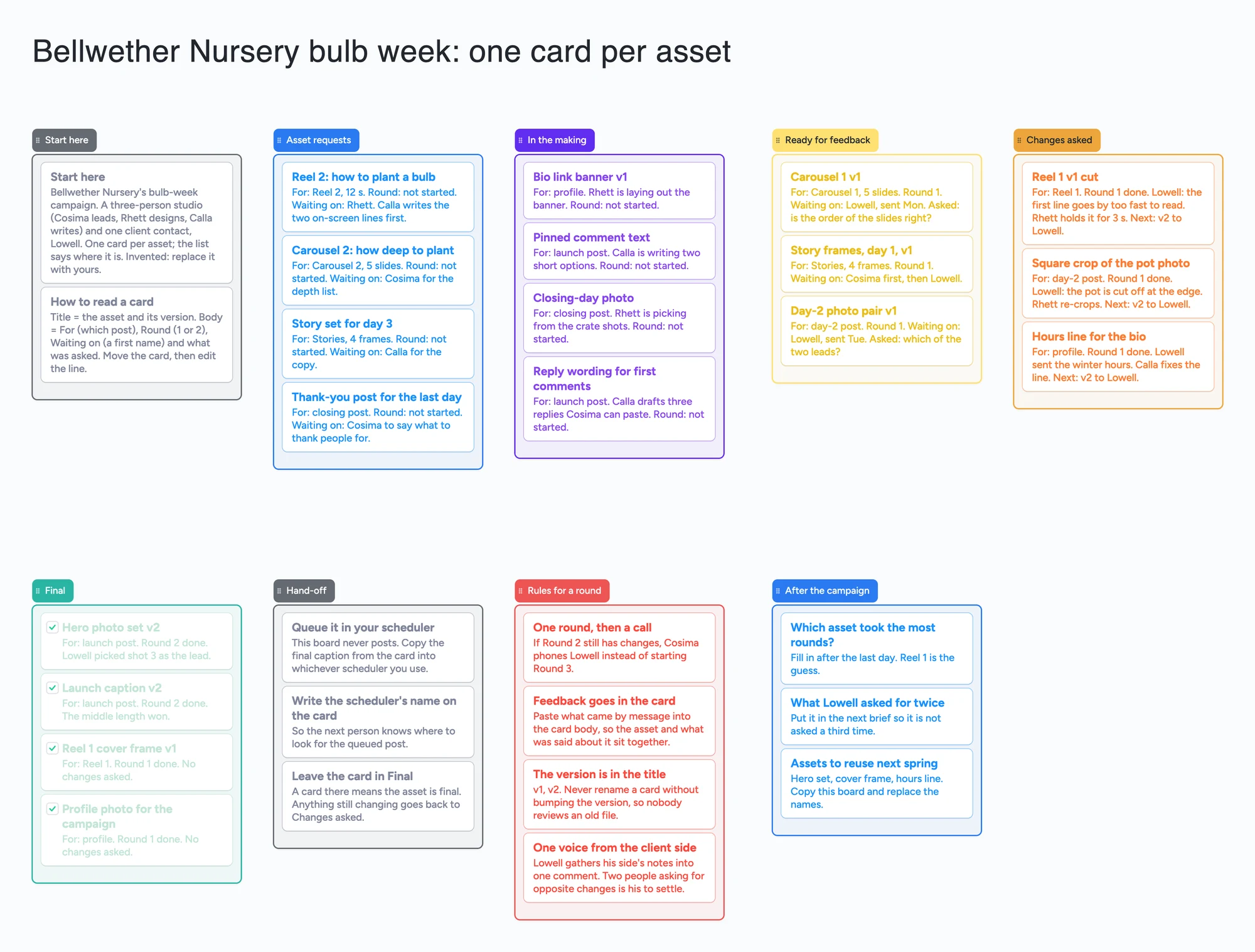
Instaboard is our online board, and this page opens a campaign board built on it, already laid out and filled in for an invented bulb-week campaign at Bellwether Nursery, run by a three-person studio (Cosima, Rhett and Calla) for one client contact, Lowell. Each reel, carousel and photo is a card; the lists say where it is: Asset requests, In the making, Ready for feedback, Changes asked, Final. It is not a content calendar and it never posts anything. It is a board you read by eye, so everyone can see which asset is waiting on whom. If you are one person with a few posts a week, a note on your phone is enough, and the first section says so.
Opens in your browser. Anyone can view; a free sign-in lets you edit.
Updated
The short version
- What it is: one screen where every asset for a campaign is a card, so the studio and the client contact can see what is waiting on whom. The nursery board uses 40 of your 150 free items.
- What it is not: not a content calendar (cards sit in stages, not on days), no previews of how a post will look, never posts to Instagram, TikTok or LinkedIn, no reminders or due-date alerts.
- Where files live: a board holds 3 pictures and 1 file, so a card names the asset and says where its file is kept.
- The client: anyone with the link can view the board without an account. Typing on a card takes a free sign-in, and the board has a rule for a client who won't.
- Free plan: 5 boards, 150 items. Pro removes the item limit; the last FAQ has the prices.
Not a content calendar, and when a note is enough
Google's suggestions, read November 26, 2026: typing 'social media campaign' offers examples, template, ideas, strategy, meaning, definition and 2026, with no planner, tracker or brief. Typing 'social media campaign template' offers recurpost, canva, free, google sheets, word and excel. 'Social media campaign kanban' and 'social media approval board' offered nothing. Our reading: the file strings dominate the template searches. If you post a few times a week alone, a calendar in a spreadsheet or a scheduler does that job and a board adds nothing.
This board is for the stretch before the calendar: the moment there are twenty small assets, three people making them and one client contact who answers on Tuesdays. Instaboard has a calendar view for lists and a due date on a card, but nothing here reminds anyone, and the nursery board does not use either. Every card is placed by stage. The question it answers is 'where is the carousel?', not 'what goes out on Thursday?'.
What a team with 8 clients asked in July
On July 22, 2026 (UTC) u/Careless-Session-300 posted in r/SocialMediaManagers: their team was growing to 8 clients across Instagram, TikTok and LinkedIn, and Google Sheets plus Trello was 'falling apart'. They had tried Loomly, been told Planable has a simple client approval flow, and asked what people use from planning to final approval. Reddit shows 44 comments; we read 42 in an archived copy, 3 of them with no text. Each reply is one person's view, and 10 of the 30 top-level replies come from people who say they work on, co-founded or built the tool they name, so about a third of the top-level replies are vendors answering.
- u/MontgomeryDesign_ wrote that no tool fixes a client who won't check their email: you can buy the fanciest platform and they will still send feedback by WhatsApp at 10 PM on a Sunday.
- u/Difficult-Gur-5847, who says they work at Kontentino, wrote that with 8 clients approvals break first, with feedback scattered across email, WhatsApp and a Google Doc, and that clients should be able to approve without creating an account. They add that Trello is fine for ideas but not for client approvals.
- u/socialmediatips19, who says they use Kadenzo, wrote that planning and production want different tools: keep briefs in a doc tool, use a scheduler for the calendar and publishing, and make per-client separation the deal-breaker.
- u/Milo_Vexler wrote that file size caps matter for video, and that their team runs 1080p web-optimised exports through Handbrake first because raw ProRes files choke a client's browser.
Our reading, not theirs: the poster needs feed previews, scheduling and a clean client approval step, and a card board gives none of those. What the replies keep describing as the broken part is smaller: feedback arriving in four places and nobody knowing which version the client saw. That part, one card per asset with the version in the title and the client's words pasted inside, is what the nursery board does.
One asset, request to final
Follow Carousel 1 at the nursery. Cosima puts a card in Asset requests with the post it is for. Rhett moves it to In the making and lays out five slides. When v1 is ready the card moves to Ready for feedback and its first line says who it is waiting on: Lowell, sent Monday, asked whether the slide order is right.
Lowell says the first line of a reel goes by too fast. The card moves to Changes asked with his words pasted in, and Rhett holds the line for three seconds. The title changes from v1 to v2 so nobody reviews the old cut. On another card, the hero photo set, Lowell picks shot 3 as the lead and the card goes to Final with a tick. A tick carries no name or time, so it only means somebody ticked it.
The nine lists
| List | Whose turn | In the nursery board |
|---|---|---|
| Start here (grey) | Whoever sets up | Who the four people are and how to read a card: title, For, Round, Waiting on |
| Asset requests (blue) | Cosima, then the maker | 'Reel 2: how to plant a bulb', for Reel 2, 12 s, waiting on Rhett |
| In the making (purple) | Rhett and Calla | 'Closing-day photo', Rhett picking from the crate shots |
| Ready for feedback (yellow) | Cosima, then Lowell | 'Day-2 photo pair v1', sent Tuesday, asked which of the two leads |
| Changes asked (orange) | Rhett and Calla | 'Square crop of the pot photo': the pot is cut off at the edge, Rhett re-crops |
| Final (green) | Nobody | Four ticked cards: hero photo set, launch caption, cover frame, profile photo |
| Hand-off (grey) | Whoever queues the posts | Three cards on putting the final text into your scheduler |
| Rules for a round (red) | Everyone | Four rules, below |
| After the campaign (blue) | Cosima | Which asset took the most rounds, what Lowell asked for twice, what to reuse |
Swipe the table sideways to see every column.
The board's own wording. Rounds, owners and versions are typed by hand; the board has no status or owner field.
Four rules for a feedback round
- One round, then a call. If Round 2 still has changes, Cosima phones Lowell instead of starting a third round.
- Feedback goes in the card. What arrives by message is pasted into the card body, so the asset and what was said about it sit together.
- The version is in the title. v1, v2. A card is never renamed without bumping the version.
- One voice from the client side. Lowell gathers his colleagues' notes into one comment. Two people asking for opposite changes is his to settle.
These are the nursery studio's habits, written on cards. Nothing on the board enforces them. A client who will not sign in is common: the rule is that you paste their message in yourself, which is what the second rule does.
Where the board stops and your scheduler starts
Final means the text and the pictures are agreed. The Hand-off list has three cards that say what to do next: copy the final caption into whichever scheduler you use, write the scheduler's name on the card so the next person knows where to look, and leave the card in Final. The board never posts, never checks that a post went out and holds no passwords or logins.
Files stay where they are. A board holds 3 pictures and 1 file, so each card names its asset and you paste the link to the file in the card text. Video previews, feed mock-ups and side-by-side platform views are what the dedicated tools below are for.
Who does the review part better
| Tool | What its own page says (read November 25, 2026) | When it wins over this board |
|---|---|---|
| Asana creative asset feedback and approval template | Page headed 'Creative asset feedback and approval templates'. Its steps: set up a board for the stages, assign reviewers and due dates, use rules that alert the next reviewer, attach the assets. The text prints no date; the page title says 2026 | Your team already runs work in Asana, or you want rules that hand a task to the next reviewer |
| Planable | Pricing page, read in a browser November 26, 2026: with the Yearly toggle showing (the page opens on it, next to a "2 months free" label) Basic is $33 and Pro $49 per workspace per month; with Monthly it showed $39 and $59. A banner reads "Black Friday: Get 20% OFF annual plans + add-ons until Dec 4th". Basic: 60 posts, 4 social pages and 3 campaigns per workspace, 2 types of approval, Feed and Calendar views. Pro: 150 posts, 10 social pages and 10 campaigns, 3 types of approval, Feed, Calendar and Grid views. Both: unlimited users. The page also says the first 50 posts are free | You need to see the post as it will look live and send it for approval, or you manage several brands |
| Smartsheet marketing campaign tracker templates | The page offers Excel and Google Sheets downloads; one of its templates, the Marketing Campaign Tracker Template, tracks status, cost, performance rating, conversions and clicks, with combined totals. Page dated March 5, 2024, updated April 2, 2024 | You want numbers and totals per campaign, which this board does not hold |
| Google Sheets and Trello | Not read | You already have them and the team likes them for ideas |
| Instaboard | One shared board; stages are lists; rounds, owners and versions typed by hand; no previews, posting or reminders | A small crew and one client contact need to see which asset is waiting on whom |
Swipe the table sideways to see every column.
Each cell is the page's own wording, read on the date above. Where no page was read, the cell says so.
Room for how many campaigns
Our arithmetic. Each list and each card is 1 of your 150 free items across all your boards; arrows, sections and pen strokes don't count. The nursery board is 9 lists + 30 cards + 1 title text box = 40. Three copies open at once come to 120; a fourth makes 160, over 150. Raising a version means editing the card, not adding one, so a campaign stays near its size as it moves.
Each copy also takes 1 of your 5 free boards. Our arithmetic for a team like the poster's, with 8 clients: 8 boards and 8 x 40 = 320 items, over the free plan's 5 boards and 150 items.
Start your own campaign board
- Open the board and delete the nursery's cards one list at a time. Keep the list titles; rename them if your stages differ.
- Put the four people on the Start here card: who requests, who makes, who answers for the client.
- One card per asset. The title is the asset and its version; the body has For, Round, Waiting on and the question asked.
- Say how the client gives feedback. If they will sign in, they can type on the card; if not, write the paste-it-in rule on the board.
- Share it. Set Share to "Anyone who joins can edit" so your makers can move cards; each person signs in free to write. A new board starts as "Anyone who joins can view".
- Make a fresh copy for each campaign. Delete finished boards when the last card is final.
Start from the ready board
It opens in your browser in a few seconds, with nothing to install. Sign in for free when you want to save it and share it.
Questions
Is there a creative asset feedback template for a social campaign?
Yes, in several forms. Asana has a guide to building one in its own app, and Planable and Smartsheet sell or share their own versions. The ready board here is a creative asset feedback template on a shared board: one card per asset, lists for requested, in the making, ready for feedback, changes asked and final, and each round written on the card. It is read by eye; it does not preview a post or send anything.
Is this a content calendar?
No. Cards sit in stages, not on days, and the nursery board leaves the calendar view off. Instaboard has a calendar view for lists and a due date on a card, but nothing reminds anyone. If you plan by posting day, use a calendar or a scheduler.
Can my client give feedback without an account?
They can read the whole board from the link without one. Typing on a card takes a free sign-in. If a client will not sign in, the board's second rule applies: you paste what they send by message into the card yourself. Some tools sell no-login approval links; this board does not.
Does the board post anything to my accounts?
No. Final means the text and pictures are agreed; you then copy the caption into your own scheduler. The board has no reminders, due-date alerts or posting.
Can I run several campaigns on one board?
You can, but a copy per campaign keeps each one readable. Each copy takes 1 of your 5 free boards and its own items against the 150; the nursery board is 40, so three open at once is 120.
Is Instaboard free?
There is a free plan: 5 boards, 150 cards and items across your account (pen strokes, arrows and sections don't count), and 3 pictures and 1 file per board. Anyone with the link can read a board; writing on it takes a free sign-in. Pro removes the item limit and adds invite-only boards: $5 a month billed yearly ($59.99 a year), or $7.99 monthly.
Sources
- r/SocialMediaManagers: "What are the most reliable tools helpful in social media campaign planning when dealing with demanding clients?" (posted July 22, 2026 UTC by u/Careless-Session-300; replies quoted from u/MontgomeryDesign_, u/Difficult-Gur-5847, u/socialmediatips19, u/Milo_Vexler; Reddit shows 44 comments, we read 42 in an archived copy, 3 with no text, November 25, 2026)
- Asana: Creative asset feedback and approval template (page title says [2026]; no date printed in the text; read November 25, 2026)
- Planable: Pricing (no date printed; prices and plan limits read in a browser November 26, 2026)
- Smartsheet: Free Marketing Campaign Tracker Templates (March 5, 2024, updated April 2, 2024; read November 25, 2026)