For a small shop launching one physical product
A product launch board for a small shop: one product, four people, one day
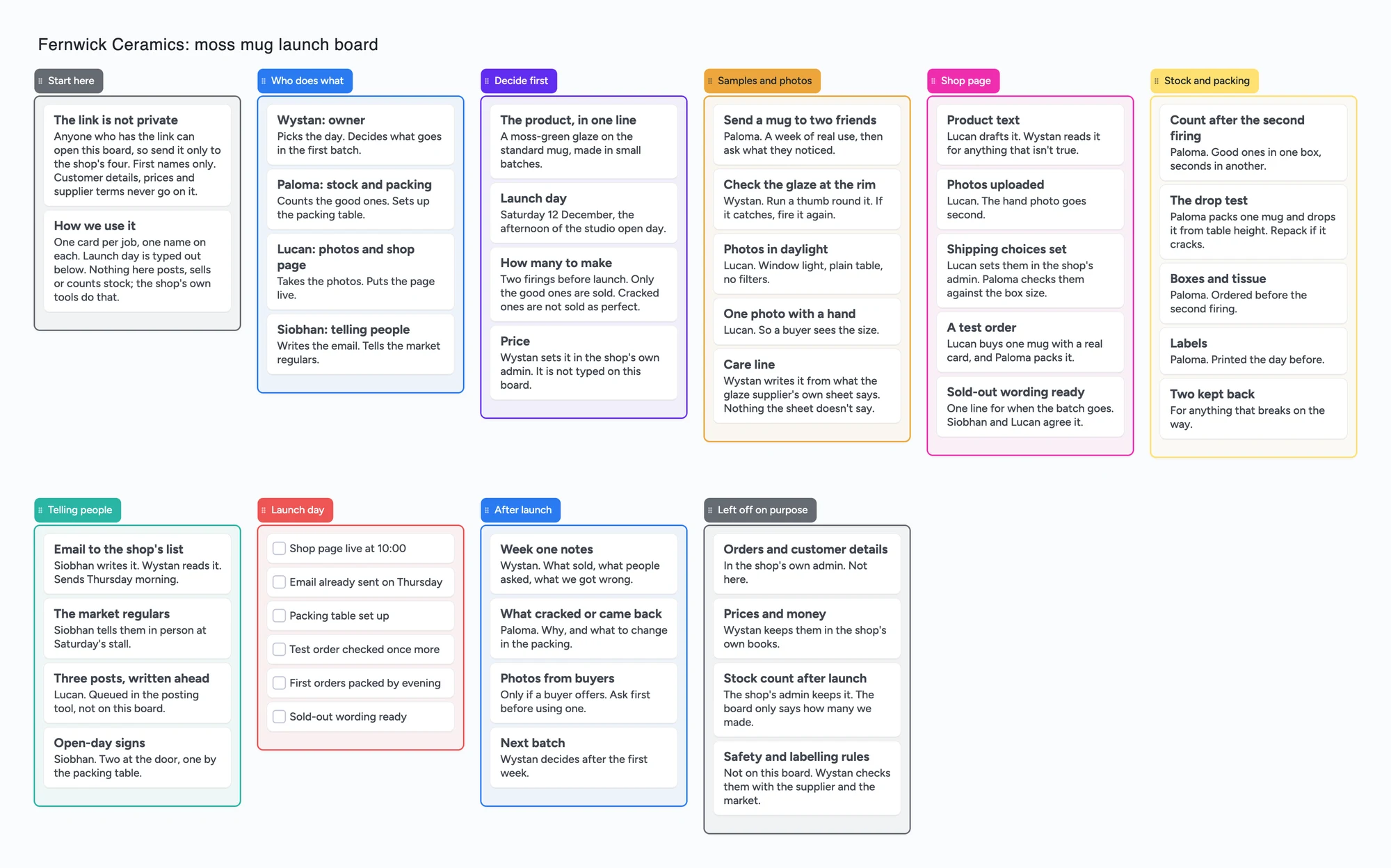
We make Instaboard, an online board. This page gives you a launch board already laid out and filled in for an invented pottery shop, Fernwick Ceramics, putting a moss-green mug on sale on a Saturday open day. Wystan owns the shop, Paloma packs, Lucan does the photos and the shop page, and Siobhan tells people. Each job is one card with one name on it, launch day is a tick list, and a last list says what the board will not hold. It is a board the four of them look at together. It does not take orders, set prices, count stock or post anything; the shop's own tools do those, and the first section says where a stock or launch tool does the job better.
Opens in your browser. Anyone can view; a free sign-in lets you edit.
Updated
Four things to know before you copy it
- It is a plan the shop types and reads together. The samples, the shop page, the packing and the telling-people jobs are cards. Nothing on the board posts, sells, counts stock, sets a price or sends a reminder; launch day is a date typed into a card.
- Orders, prices and customer details stay in the shop's own tools. The last list says so, and the example leaves out anything about safety or labelling rules, which the owner checks for the real product.
- A link is not private. Anyone who has the link can open the board. New boards start as "Anyone who joins can view". Send it only to the people who work on the launch, and keep customer names, supplier terms and prices off it. To let them add or move cards, switch Share to "Anyone who joins can edit"; each person signs in free to write, and the board then counts as 1 of their 5 free boards.
- Free plan limits: 5 boards, 150 items across your account and 3 pictures per board. A copy of this board takes 1 of your 5. Pro removes the item limit and costs $5 a month billed yearly ($59.99 a year), or $7.99 monthly.
- Everyone with edit access can tick or untick any card. The board does not record who ticked a box or when, so agree who ticks the Launch day list.
Fernwick Ceramics' Saturday: one mug, four jobs
Fernwick Ceramics makes mugs in small batches. The launch is one new glaze, moss green, on the standard mug, on the afternoon of the studio open day. Four people, one product, one date. The board's first rule is one card per job and one name on it, so "who is packing the first orders?" is answered by looking.
| List | What goes in it | In Fernwick's board |
|---|---|---|
| Decide first (purple) | The few choices everything else hangs on | "Launch day" Saturday 12 December, the afternoon of the studio open day. "How many to make" Two firings before launch; only the good ones are sold |
| Samples and photos (orange) | Proof the product is what the page will say | "Send a mug to two friends" Paloma. A week of real use, then ask what they noticed. "Photos in daylight" Lucan. Window light, plain table, no filters |
| Shop page (pink) | Everything to be done in the shop's own admin before the page goes live | "A test order" Lucan buys one mug with a real card, and Paloma packs it |
| Stock and packing (yellow) | What Paloma has to have ready before anyone can order | "The drop test" Paloma packs one mug and drops it from table height. Repack if it cracks |
| Telling people (green) | Who is told, by whom, in what order | "The market regulars" Siobhan tells them in person at Saturday's stall |
| After launch (blue) | What gets written down in week one | "What cracked or came back" Paloma. Why, and what to change in the packing |
Swipe the table sideways to see every column.
The board's own wording. Names are typed into the cards; the board has no owner or status field. Launch day is a date typed in a card, not a calendar entry.
The example also has three small lists beside these: Start here (the link is not private), Who does what (one line per person) and Left off on purpose. The Launch day list holds six tick boxes. Your own board will look different the day you copy it.
The two cards that find problems early: the drop test and the test order
Most of the board is jobs anyone would think of. Two cards exist because they catch something before a customer does. "The drop test" has Paloma pack one mug as it would be sent and drop it from table height; if it cracks, the packing changes before the batch goes out. "A test order" has Lucan buy one mug from the live shop page with a real card and Paloma pack it, so the shipping choices, the box size and the confirmation are checked once by the people who will do them.
Neither card does anything by itself. The board cannot run a test order or pack a box. It keeps two checks from being forgotten by putting a name next to each, and the Launch day list asks for the test order to be checked once more on the morning.
Telling people: the stall before the post
The Telling people list starts with the shop's email and the market regulars, and only then three posts. That order comes from a thread we read, not from a measurement of ours. In r/smallbusiness, "First-time small business owner — what worked for you after launch?" (1weyqgh, posted 2026-09-13 UTC; Reddit shows 34 comments; the archived copy has 35 entries, 17 with text, one of them AutoModerator), u/BuildingWithApril, who says they are building a stationery brand, asked how to get first customers when the following on Instagram, TikTok and YouTube is small.
- u/After-Emergency-4787 wrote "I'd be tempted to try a shared table at one small local market once the products are ready", so people can handle the product.
- u/arthaudm wrote "Take prototypes to two markets or small shops, get 30 people to handle them, and collect deposits/preorders for the exact SKU."
- u/Hms-chill wrote "I sell handmade physical products entirely in person via consignment and at markets."
That thread is about a different question, first customers for a new brand, and a few answers also point to a tool or a networking group. Fernwick already has a shop list and a market stall, so the example only borrows one idea: tell the people who can pick the mug up first, in person, and write the posts ahead so the day is not spent on them. The board cannot post, send the email or tell you which of these works for your shop.
Where other tools do this better
| Tool | What its own page says | When it wins over this board |
|---|---|---|
| Notion: Physical Product Launch Checklist (by mrpugo) | A free template for physical launches; a Launches database with a status from Planned to Complete or Restock, inventory targets, on-hand units and a reorder point, a steps database with phases, due dates and owners, and a launch calendar timeline; the page prints "Last updated 5 months ago" when read November 26, 2026 | You want stock numbers, status fields and due dates in one place and are happy to set up Notion. We did not open the template itself |
| 5day.io: product launch marketing plan (blog post) | Dated May 7, 2026. A work-management vendor's guide with a free template; its short example of a small brand launching a product line centres on email, local PR, a product page, social posts and a small paid boost, with first-week sales as the main measure (read November 26, 2026) | You run launches for clients and need client-safe access, time tracking and analytics, which the vendor's page lists for its own software. Pricing not read |
| Etsy: "product launch plan template" search | The first results we read were digital downloads, among them Canva decks and planner templates, listed with ads; the search page shows no date (read November 26, 2026) | You want a printable or a deck to fill in alone and are happy to pay for a file. A shared board adds nothing then |
| Your shop's own admin | Not read for this page | Stock, orders, prices, shipping and customer details belong there. The board only holds the jobs around them |
| Instaboard | One shared board; names typed by hand; a tick list for launch day; no stock, orders or reminders | Three to four people, one product, one look at the plan together |
Swipe the table sideways to see every column.
Each vendor cell is that page's own wording, read on the date shown. "Not read" means we did not open that part. Prices and features may change.
Week one: write it down while you remember
The After launch list has four cards. "Week one notes" is Wystan's: what sold, what people asked, what the shop got wrong. "What cracked or came back" is Paloma's, with the reason and what to change in the packing. "Photos from buyers" says only to ask first before using one. "Next batch" is Wystan's call after the first week. The board does not hold the numbers behind any of these; they are sentences the owner types.
Left alone, a launch board becomes a graveyard of ticked cards. The example keeps these notes on the board for a reason: the next launch starts by copying the board, and the notes are the part worth reading first.
How many launches fit on the free plan
Our arithmetic. Each list and each card is 1 of your 150 free items across all your boards; arrows, sections and pen strokes don't count. Fernwick's board is 10 lists + 43 cards + 1 title text box = 54. A second launch on its own copy is another 54, so two launches are 108, and a third makes 162, over the limit. Deleting the cards of a launch that is over frees its items, and keeping each launch's notes in a document instead keeps the board small. Your other boards share the same 150.
Make it your own launch
- Open the board and make your copy. "Make a copy" takes 1 of your 5 free boards; replace Wystan, Paloma, Lucan, Siobhan and Fernwick Ceramics with your own names and shop.
- Rewrite Decide first with your product, your launch day and your batch size, in your own words. Leave out the price; it lives in your shop's admin.
- Give every card one name. Delete the cards your product does not need, and add the jobs only your product has.
- Share: switch to "Anyone who joins can edit" and send the link only to the people on the launch. Each person signs in free to write.
- Agree who ticks the Launch day list and who writes the week one notes, since anyone with edit access can change any card.
Left off on purpose, and why
- Orders and customer details. They sit in the shop's own admin. A link-shared board is the wrong place for a customer's name or address.
- Prices and money. The owner keeps them in the shop's own books. The board holds no sums.
- Stock after launch. The shop's admin counts it. The board only says how many the shop made.
- Safety and labelling rules. The example does not cover them. If your product is something people eat from, wear, charge or put near children, the rules for it are yours to check, and a launch board is not where they are written.
- Reminders. There are no reminders or due-date alerts. If a job stalls, only a person looking at the board will notice.
Start from the ready board
It opens in your browser in a few seconds, with nothing to install. Sign in for free when you want to save it and share it.
Questions
Does the board take orders or count stock?
No. It has no orders, prices, inventory or checkout. Keep those in your shop's own tools and use the board for the jobs around the launch: samples, photos, the shop page, packing and telling people.
Can it remind us when a job is due?
No. There are no reminders or due-date alerts. Launch day is a date typed into a card, and the Launch day list is six tick boxes that someone ticks by hand.
Do the people on the launch need an account to edit?
To write on the board, yes: they open the link and sign in free, and you tick "Anyone who joins can edit" in Share. The board then counts as 1 of their 5 free boards. Someone who only wants to read can open the link without signing in.
Is it safe to put suppliers or customers on it?
Anyone who has the link can open the board and see every card, so the example uses first names for the team only and leaves off customer details, prices and supplier terms. Send the link only to the people working on the launch.
How many launches fit on the free plan?
150 items across your account, where each card and each list is one item. This board is 54, so two launches are 108 and a third passes 150. That is our arithmetic, and your other boards share the same 150.
Can I use it for a service, a digital product or an app?
The example is a physical product, so it has samples, packing and a drop test. The structure of one card per job and one name on each works for other launches, but you would replace most of the cards, and for an app or a book the shop-focused cards would not apply.
Sources
- r/smallbusiness: "First-time small business owner — what worked for you after launch?" (posted 2026-09-13 UTC; Reddit shows 34 comments; the archived copy has 35 entries, 17 with text including AutoModerator, read November 26, 2026)
- Notion template listing: Physical Product Launch Checklist by mrpugo (free; prints "Last updated 5 months ago" when read November 26, 2026)
- 5day.io blog: How to Create a Product Launch Marketing Plan (dated May 7, 2026; a work-management vendor's post; read November 26, 2026)
- Etsy search: product launch plan template (listings are mostly digital downloads, with ads; no date; read November 26, 2026)