For two to five people who put out a regular newsletter
A newsletter production board: one card per issue, from idea to sent
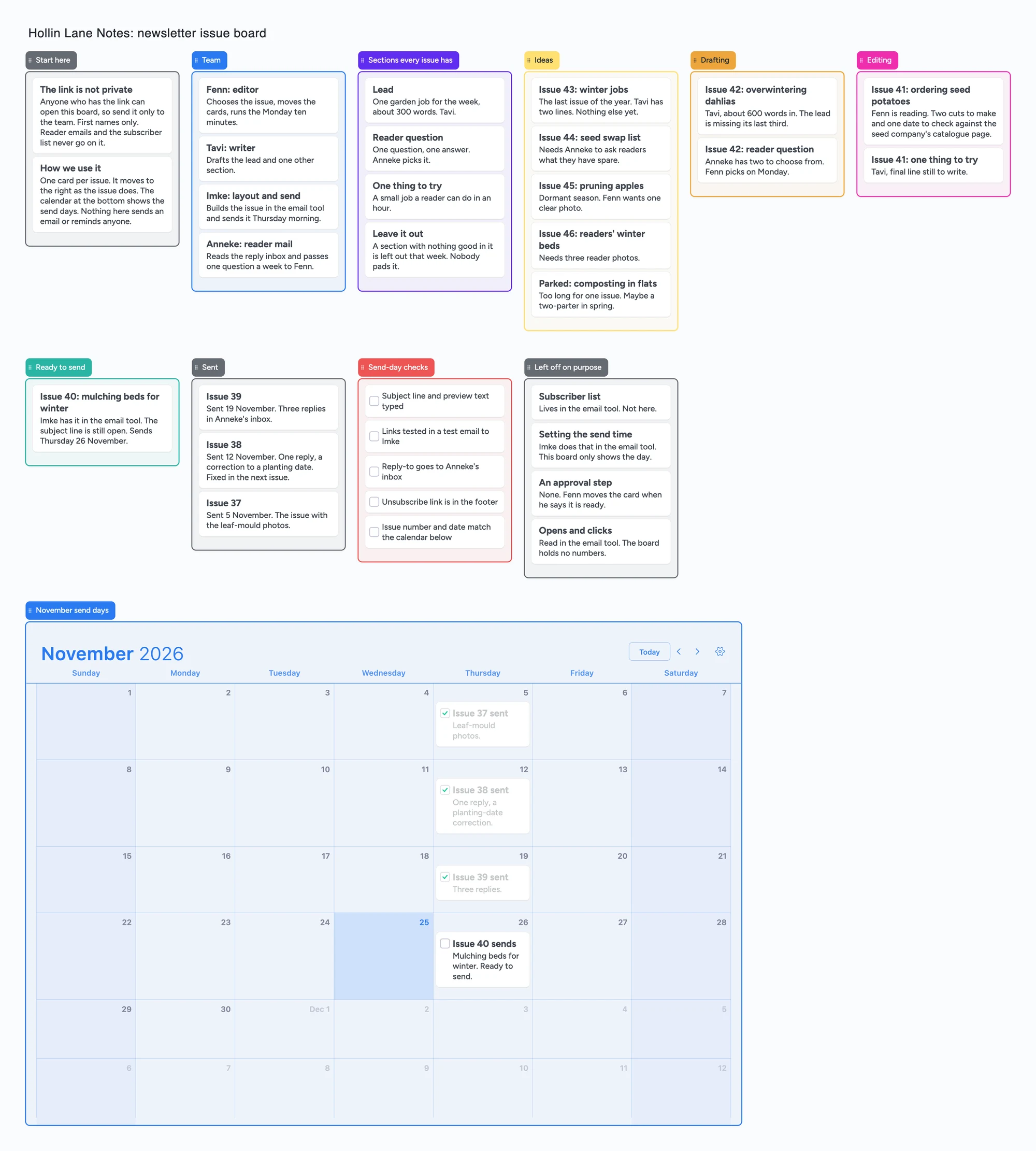
Hollin Lane Notes is an invented garden newsletter that goes out every Thursday, run by four people: we made its board on Instaboard, an online board, and this page lets you copy it. Fenn edits, Tavi writes, Imke builds and sends it, Anneke reads the reply inbox. Each issue is one card that moves from Ideas to Sent, a short list names the sections every issue has, a tick list holds the checks for send day, and a month calendar shows the send days. The board is where the team sees what stage each issue is in. It does not write or send anything, set a send time or queue an issue, and it holds no subscriber list or numbers; the first section says when a plainer tool is enough.
Opens in your browser. Anyone can view; a free sign-in lets you edit.
Updated
Before you copy it: what it holds and what it leaves out
- It shows where each issue is. It does not send, set a send time, queue or count anything. The email tool you already use sends the issue and holds the subscriber list and the opens and clicks. Nothing on the board reminds anyone, sets a send time or asks anyone to approve an issue.
- The calendar is a real month view with one card per send day. Each card has a due date, which is a whole day with no time of day, and a tick box. There are no due-date alerts. A calendar list shows one month at a time.
- A link is not private. Anyone who has the link can open the board. New boards start as "Anyone who joins can view". Send it only to the team, and keep reader emails and the subscriber list off it. To let the team add or move cards, switch Share to "Anyone who joins can edit"; each person signs in free to write, and the board then counts as 1 of their 5 free boards.
- Free plan limits: 5 boards, 150 items across your account and 3 pictures per board. A copy of this board takes 1 of your 5. Pro removes the item limit and costs $5 a month billed yearly ($59.99 a year), or $7.99 monthly.
- Everyone with edit access can tick or untick any card. The board does not record who ticked a box or when, so agree who ticks the Send-day checks.
When a plain tool is enough
If one person writes and sends the whole issue, a note on your phone or the planner inside your email tool may be all you need. This board earns its place when two or more people hand an issue to each other and someone keeps asking "where is issue 42?". Even then the board only answers that question; it does not move the issue for you.
- You send from an email tool (Mailchimp, Substack, Buttondown and the like): keep the list, the send time and the numbers there. The board's last list says so.
- You need approvals, reminders or a send queue: a project tool does those. This board has none of them.
- You send weekly for years: every issue you keep as a card is one of your 150 free items. The 150 section below shows when that bites.
One issue, one card, moving to the right
Hollin Lane Notes runs on one rule: an issue is a single card, and the card's list is its stage. The title carries the issue number and its topic; the line under it says who has it and what is missing.
| List | What goes in it | In Hollin Lane's board |
|---|---|---|
| Ideas (yellow) | An issue worth doing, with what it still needs | "Issue 45: pruning apples" Dormant season. Fenn wants one clear photo |
| Drafting (orange) | The writer has it; the line says how far along | "Issue 42: overwintering dahlias" Tavi, about 600 words in. The lead is missing its last third |
| Editing (pink) | The editor is reading; what is still to fix | "Issue 41: ordering seed potatoes" Fenn is reading. Two cuts to make and one date to check |
| Ready to send (green) | Built in the email tool, waiting for its day | "Issue 40: mulching beds for winter" The subject line is still open. Sends Thursday 26 November |
| Sent (grey) | What went out and what came back | "Issue 38" Sent 12 November. One reply, a correction to a planting date |
Swipe the table sideways to see every column.
The board's own wording. Who has an issue is typed into the card; the board has no owner or status field.
The example has four small lists beside these: Start here (the link is not private), Team (one line per person), Sections every issue has, and Left off on purpose. The two thin lists, Drafting and Editing, hold two cards each because issues 41 and 42 each have a main piece and a small one still open. Your own board will look different the day you copy it.
The sections stay the same every issue
The Sections list has four cards: a lead, one reader question, one thing to try, and a card that says a section with nothing good in it is left out that week. The idea is not ours; it comes from people who run internal newsletters, read on Reddit and credited to each account.
In r/internalcomms, "Internal Newsletter - Tips for Content and Creation?" (1p0fhck, posted 2025-11-18 UTC; Reddit shows 20 comments; we read 20 in an archived copy, one of them removed, so 19 with text), u/atownz17 wrote that when they took over a weekly newsletter they moved "away from sharing whatever random content we had for the week to creating repeatable sections that made sense for our business, so our employees knew what to expect". The same comment warns to "make sure they are sections you can commit to on the cadence you choose for sending", because weekly was "a bit much for some of these sections". u/AxBattler1 wrote "don't force content" for the same reason: a section you must fill becomes filler.
That thread is about a company's internal newsletter, and Hollin Lane Notes is a made-up public garden newsletter, so treat the advice as one group's view, not a rule for your newsletter. The board turns it into a card ("Leave it out") and nothing more; it cannot stop anyone padding a section.
Where the hours go before anyone writes
The Ideas list is the longest on the board on purpose. In r/Newsletters, "How long does it actually take you to produce one piece of content, start to finish?" (1sfoqrc, posted 2026-04-08 UTC; Reddit shows 37 comments; we read 37 in an archived copy, one of them AutoModerator), the answers run from "8 minutes" to "2 days max". u/thoughtcaffeine described the work around the writing: "it takes a lot not only the 30 mins I spend writing it".
u/csarigoz, who says they co-founded an AI newsletter tool and notes the bias, wrote that their own four-week tracking put "reading sources and deciding what's worth covering" at about 2.4 hours per issue "before a single word was written", and that 4 to 6 hours end to end is normal for a curated weekly. That is one person's measurement from a vendor, not a benchmark. We use it for one thing: a board with an Ideas list lets the editor choose the next issue from cards that already hold a line or two, instead of starting from a blank page on Monday.
The calendar list: send days on a month
Below the other lists the example has a calendar list for November 2026 with one card on each Thursday: issues 37, 38 and 39 ticked as sent, issue 40 still open. Each card has a due date and a tick box. The calendar helps the team see the rhythm at a glance and spot a week with no issue in it.
- It shows one month at a time. Keep the cards of one calendar list in one month; the example uses November 2026. We have not checked which month a visitor sees first, and when we exported the board image it drew the current month, so set the list up for the month you are in.
- A due date is a whole day. There is no send time on a card; the time is typed in the card's line if you want it written down.
- Nothing alerts anyone. There are no reminders or due-date alerts, so a missed send day shows only if someone looks.
- The calendar card and the issue card are two cards. Moving the issue to Sent does not tick the calendar card; someone ticks it by hand.
How many issues fit on the free plan
Our arithmetic. Each list and each card is 1 of your 150 free items across all your boards; arrows, sections and pen strokes don't count. Hollin Lane's board is 11 lists + 36 cards + 1 title text box = 48. If you add one card for every new issue and delete nothing, that is 48 + 102 = 150 after 102 issues, a little under two years of weekly sends, and over the limit at issue 103. If you also add a calendar card for each send and a new month list about every four or five issues, as the set-up steps below say, each issue costs about 2.2 items, so you reach 150 at about issue 46, under a year. Deleting old Sent cards, or keeping the archive in your email tool, keeps the board small.
Where other tools do this better
| Tool | What its own page says | When it wins over this board |
|---|---|---|
| Asana editorial calendar template | A template page for editorial calendars that mentions newsletters; the page title says 2026 and prints no other date (read November 25, 2026) | You already run work in Asana and want dates on tasks that follow the project |
| Notion editorial calendar templates | A category page listing 121 templates when read November 25 and 119 when read November 26, among them a free "Substack Publishing OS — Newsletter Planner"; listed prices on the page run from $2.49 to $149; no page date | You want a database with views and filters, and you are happy to set it up. We did not open the templates |
| HubSpot editorial calendar templates | Editorial calendar templates in Excel, Google Sheets and Google Calendar form; no page date (read November 25, 2026) | You want a spreadsheet you can sort and share as a file. The download is behind a form we did not fill in |
| Mailchimp | Pricing page: Standard sends "up to 6,000 emails each month" and starts at $20 a month after a 14-day trial; Essentials starts at $13 a month; the page also mentions a basic free plan; no page date (read November 25, 2026) | You need to send, keep the list and read the numbers. This board does none of that |
| Instaboard | One shared board; issue stage and owner typed by hand; a month calendar with one card per send day; no sending, no alerts | Two to five people, one editor who moves the cards, one screen to look at on Monday |
Swipe the table sideways to see every column.
Each cell is a vendor's own page, read on the date shown. "Not read" means we did not open that part of the page. Prices are as shown on the page and may change.
Set it up for your own newsletter
- Open the board and make your copy. "Make a copy" takes 1 of your 5 free boards; replace Fenn, Tavi, Imke, Anneke and Hollin Lane Notes with your own names and title.
- Rewrite the Sections list to the parts your issue really has, and delete a card for any section you cannot commit to every time.
- Move your next three issues in as cards: one in Ideas, one in Drafting, one in Ready to send, each with a line saying who has it.
- Set up the calendar for the month you are in and add a due date to each send day. Keep each calendar list to one month and add another list for the next.
- Share: switch to "Anyone who joins can edit" and send the link to the team only. Each person signs in free to write.
- Agree who ticks the Send-day checks and who moves a card to Sent, since anyone with edit access can change any card.
What the board leaves out
- No subscriber list, no opens or clicks. They stay in your email tool; the board's last list says so.
- No sending and no send time. The tick list reminds the team what to check; it sends nothing.
- No approval step. The editor moves the card when the issue is ready, and the board does not record who said so.
- No reminders or due-date alerts. If an issue stalls, only a person looking at the board will notice.
- Not private by default. Anyone with the link can see every card, so reader emails and names beyond first names stay off.
Start from the ready board
It opens in your browser in a few seconds, with nothing to install. Sign in for free when you want to save it and share it.
Questions
Does the board send my newsletter?
No. It has no email sending, no subscriber list and no way to set a send time or queue an issue. Build and send each issue in your email tool, and use the board to see which stage each issue is in.
Can it remind us when an issue is due?
No. Each calendar card has a due date and a tick box, but nothing alerts anyone. A missed send day only shows if someone looks at the board.
Do my team members need an account to edit?
To write on the board, yes: they open the link and sign in free, and you tick "Anyone who joins can edit" in Share. The board then counts as 1 of their 5 free boards. Someone who only wants to read can open the link without signing in.
Is it safe to put reader names on it?
Anyone who has the link can open the board and see every card, so the example uses first names for the team only and leaves reader emails and the subscriber list off it. Send the link only to the team.
How many issues fit on the free plan?
150 items across your account, where each card and each list is one item. This board is 48. With one card per new issue and nothing deleted it passes 150 at issue 103; with a calendar card for each send and a month list every few issues, at about issue 46. That is our arithmetic, and your other boards share the same 150.
Can I keep a year of issues on one board?
A weekly newsletter fits for about 46 issues, under a year, if you add one card per issue, one calendar card per send and a month list every few issues, and for nearly two years with issue cards only. Deleting old Sent cards or keeping the archive in your email tool keeps it well under the limit.
Sources
- r/internalcomms: "Internal Newsletter - Tips for Content and Creation?" (posted 2025-11-18 UTC; Reddit shows 20 comments; we read 20 in an archived copy, one removed, 19 with text, November 25, 2026)
- r/Newsletters: "How long does it actually take you to produce one piece of content, start to finish?" (posted 2026-04-08 UTC; Reddit shows 37 comments; we read 37 in an archived copy, one of them AutoModerator, November 25, 2026)
- Asana: editorial calendar template (the page title says 2026 and prints no other date; read November 25, 2026)
- Notion: editorial calendar templates category (121 templates when read November 25, 119 when read November 26; no page date)
- HubSpot: editorial calendar templates (no page date; read November 25, 2026)
- Mailchimp: marketing pricing (Standard from $20 a month, Essentials from $13 a month; no page date; read November 25, 2026)