For the person who has to move a small company's apps onto single sign-on
An SSO rollout board: which app moves in which wave, and who owns it
We make Instaboard, an online board. This page gives you a rollout board already filled in for an invented surveying firm, Tilbury Surveyors: 22 people, 11 apps, one part-time IT person. Each app is one card, and the cards sit in lists for the apps still to sort, a first wave, a second wave, the hard cases and the ones that are live. It is a plan you read and move cards on. It does not connect to an identity provider, set anything up in an app, check who can sign in, or warn you when a certificate runs out. The vendors' own guides do the technical part better, and the first section says what they cover.
Opens in your browser. Anyone can view; a free sign-in lets you edit.
Updated
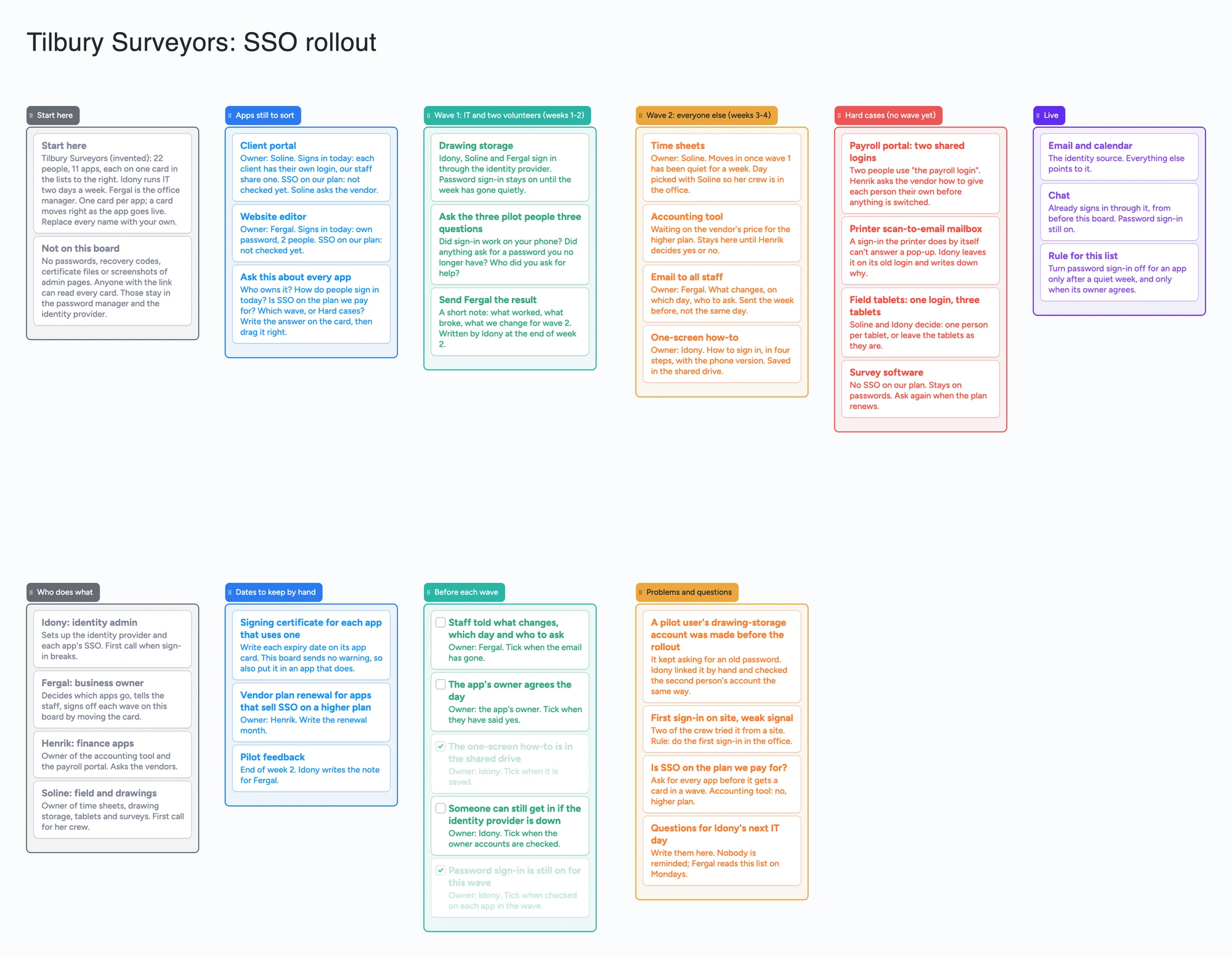
The vendor sets SSO up; this board holds the order of work and the names
- It sets nothing up. Single sign-on is configured in your identity provider and in each app. Nothing on the board reads either of them, tests a sign-in, or tells you that an app has moved. A team with three apps and one admin can keep this in a note.
- What the board is: a list of apps still to sort, a first wave for IT and two volunteers, a second wave, a Hard cases list for what cannot move yet, a Live list, who does what, dates you write by hand, a Before each wave tick list and a Problems and questions list. Tilbury's cards say what each app does today and what is left to decide.
- What it isn't: no protocol advice, no screenshots of admin pages, no passwords or recovery codes, and no promise that a given app offers SSO on your plan. Our example says to ask the vendor for each one.
- Free plan: Tilbury's board uses 46 of the 150 items the free plan allows (35 cards, 10 lists and the title text box, by our count). Drawing strokes and arrows are not counted. To change anything you must be signed in with a free account.
What the vendor guides already cover
A board only helps with what the guides leave to you, so start with what they say. Microsoft's "Plan a single sign-on deployment" for Entra ID (the page shows "Last updated on 04/30/2025"; read November 27, 2026) asks who needs to be told about the change, who the administrators are, and who owns the signing certificate. It says to use the role with the fewest permissions that does the job, and that a SAML certificate Entra creates is valid for three years by default, so someone must own the renewal. It also names shared accounts as a case that needs extra steps.
Cisco Duo's "Easy guide to implementing single sign-on" (the page shows no date; read November 27, 2026) is written for small and mid-sized businesses and has five steps: plan, configure, add multi-factor sign-in, pilot and roll out, then monitor. Its planning step starts with the apps people use and how they sign in today, and says to assign clear roles for planning, configuration and ongoing user management. Duo sells a product, and its page says so.
1Password's guide to rolling out its own SSO sign-in (published August 18, 2026 on the page; read November 27, 2026) is the clearest on staging: test it yourself, run a limited rollout with one or two groups, give them one to two weeks, then widen. It also says people in its Owners group always unlock with their account password, so an outage at the identity provider does not lock the company out. That is a rule for one product, but the habit of keeping a way in is worth a card, and Tilbury's board has one.
None of them gives you a place where a small team sees every app, its owner and its wave side by side. That is the only job here.
Where a small team's rollout usually stalls
CISA's study of why small and medium-sized businesses adopt single sign-on so slowly (publication May 2024 on the first page; read in full November 27, 2026) says the obstacles are cost, technical hurdles and a lack of awareness and resources. It reports that SSO is often sold only inside a premium enterprise-level tier, sometimes with a minimum number of users, and that many small businesses keep handling access with spreadsheets. Its advice for small businesses includes a pilot before the whole organization and clear guidance for staff. That matches the order Tilbury's board uses, and it is why one list on the board is called Hard cases.
The Hard cases list comes from a thread about a different but close job. r/ITManagers "MFA implementation project plan" (posted May 29, 2025; Reddit shows 45 comments; the archive's post record says 33; the archive has 49 nodes, 2 removed, 4 more removed or deleted since it was archived, and their text is not quoted) is about multi-factor sign-in across an organization, not SSO, so we use it only for what any sign-in change shares. u/SASardonic (13 points when read) says "the governance and people management is the hard part". u/nowinter19 (2 points) says to look at special accounts "like smtp for the scan to email function on printers", which "have be blocked trying to enroll". These are single accounts' views.
So Tilbury's board gives the printer mailbox, the tablets that share one login, and the payroll portal with two shared logins their own list, instead of hiding them at the bottom of an app inventory.
Tilbury Surveyors, list by list
Idony is Tilbury's part-time IT person, Fergal is the office manager, Henrik keeps the books and Soline leads the field crew. The first row, left to right:
- Start here has two cards: who they are, and what stays off the board (passwords, recovery codes, certificate files, screenshots of admin pages).
- Apps still to sort holds apps nobody has answered four questions about: who owns it, how people sign in today, whether SSO is on the plan you pay for, and which wave. An app leaves this list when the answers are written on its card.
- Wave 1 is Idony, Soline and Fergal on the drawing storage app, plus two cards for asking them three questions and writing a short note to Fergal. Password sign-in stays on until a week has gone quietly.
- Wave 2 is everyone else: time sheets, the accounting tool (waiting on a price from the vendor), the email to staff and a one-screen how-to.
- Hard cases are the four things that cannot move yet, each with a sentence on why and who is asking whom.
- Live has the email and calendar that the rest point to, chat, and a rule for the list: password sign-in is switched off for an app only after a quiet week, and only when its owner agrees.
The second row is the part a plan like this usually lacks: who does what, the dates you must write by hand (certificate expiry, a vendor's renewal month, the pilot note), a tick list for before each wave, and a list for problems and questions.
Two apps from "still to sort" to a decision
Drawing storage. Soline writes the four answers on its card: she owns it, people use their own passwords, and the vendor's page, which Idony read, says SSO is included on the plan Tilbury pays for. It goes into Wave 1. After two weeks, with the pilot's three questions answered and Soline agreeing, the card goes to Live.
Accounting tool. Henrik writes that people use their own passwords and that the vendor sells SSO on a higher plan. The card cannot move until he has a price, so it sits in Wave 2 with that sentence on it. If the price is too high, he moves it to Hard cases and the card says why. Nothing about the decision is lost, and nobody has to remember a chat message from two weeks ago.
A card that moves is somebody's decision, and a card is typed text that anyone with edit access can change; a tick box does not say who ticked it. If you need that, write the name and the day on the card yourself.
Guides, studies and this board: what each one gives you
Cells are taken from each page as read on November 27, 2026, and are not a review of the products. The last column is our own view, not something a page says.
| Option | What it gives you | Price on its page | Our view: where it wins |
|---|---|---|---|
| Microsoft Entra: Plan a single sign-on deployment ("Last updated on 04/30/2025") | Questions on roles, certificates, communications, licensing and shared accounts, and a list of SSO methods | A documentation page; it says SSO for preintegrated enterprise applications is free in Entra ID, with other licences depending on your directory and features | If you already use Entra ID, this is the plan to follow |
| Cisco Duo: Easy guide to implementing single sign-on (no date on the page) | Five steps for small and mid-sized businesses, with a pilot and training section | Not listed on the page; the guide promotes Duo's own product | A short, readable order of work for a team with no security staff |
| 1Password: Plan your rollout of Unlock with SSO (published August 18, 2026) | Test, limited rollout, feedback and wider rollout stages, and a way in during an outage | Not listed on the page; it applies to 1Password Business | A tight staging model, even if you don't use the product |
| CISA: Barriers to SSO Adoption for SMBs (May 2024) | Why small firms stall and what to do about it | A government study; no product | Evidence for the pilot and the training steps |
| This board | One place to see every app, its owner, its wave and what is left to decide | 46 of the 150 items on the free plan; Pro removes the item limit | Several people agreeing the order of work without a project tool |
Swipe the table sideways to see every column.
Our reading of pages on one day. Plans and dates change; check each page.
Make it yours before you touch an app
- Start from a copy and replace the example with your apps. Delete the lists you don't need; each card is 1 of your 150 items.
- Answer the four questions for every app before it gets a wave. Who owns it, how people sign in today, whether SSO is on your plan, and when. Write each answer on the card.
- Name a pilot of three people. Put them on the first wave card, and give them the three questions from Tilbury's board.
- Open Share and decide who edits. Choose "Anyone who joins can edit" so a second admin or an app owner can move cards; each person signs in with a free account first.
- Write the dates yourself. A signing certificate's expiry goes on the card of the app that uses it, and in a calendar or tool that sends reminders.
What a board can't do for a rollout
- It doesn't connect to an identity provider or any app, and it can't tell you who can sign in.
- It doesn't keep or show secrets. Tilbury's first card says so: passwords, recovery codes, certificates and admin screenshots stay out, because anyone with the link can read every card.
- No reminders or due-date alerts, so a certificate expiry or a vendor renewal needs a date on its card and a reminder somewhere else.
- It doesn't count how many people have moved, or check that password sign-in is off.
- It isn't an audit record or a security review. The cards are text anyone with edit rights can change.
How many apps fit in 150 items?
Tilbury's board is 46 items: 10 lists, 35 cards and the title, with its 11 apps already on it. Suppose each further app takes three cards (the app and two notes): 34 more apps make 148 items and a 35th makes 151. That is our arithmetic. A copy also uses one of your 5 free boards, and the 150 items are counted across every board you have.
Pro removes the item limit; it costs $5 a month billed yearly ($59.99 a year), or $7.99 monthly.
Start from the ready board
It opens in your browser in a few seconds, with nothing to install. Sign in for free when you want to save it and share it.
Questions
Is there an SSO rollout template a small IT team can share?
Yes. Copy the board, replace Tilbury Surveyors' apps and people with your own, and choose "Anyone who joins can edit" under Share. Each person signs in with a free account first. The board holds the order of work and the owners; the setup itself happens in your identity provider and in each app.
Can the board set up SSO or check that it works?
No. It connects to nothing. The vendors' guides, such as Microsoft's plan for Entra ID, Duo's guide and 1Password's staging advice, cover the technical steps. Use the board to see which app is in which wave, and who is asking whom.
Should I put passwords or certificates on the board?
No. Anyone with the link can read every card, and Tilbury's example has a card that says so. Keep secrets in your password manager and your identity provider, and put only names, dates and decisions on the cards.
Why is there a list for hard cases?
Because small firms tend to meet them late: shared logins, tablets that share one account, and accounts a machine signs in with, such as a printer's scan-to-email mailbox. One commenter in an r/ITManagers thread about a multi-factor rollout, u/nowinter19, mentions the printer case. A list of their own keeps them visible while the easy apps move.
Is this better than a project tool like Jira or Asana?
It depends on the team. Our view: project tools usually do due-date alerts, assignees, history and reporting, which this board does not, and one may already hold your IT work. This board is for a small team that wants every app, its owner and its wave on one screen without setting up a project. We don't compare tools' prices here.
What happens when the board passes 150 items?
On the free plan you can't add more until you delete some. Tilbury's board is 46 items with its 11 apps on it; at three cards for each further app, 34 more apps make 148 and a 35th makes 151. Deleting an app's notes once it is live keeps you under, and Pro removes the item limit.
Sources
- Microsoft Learn: Plan a single sign-on deployment ("Last updated on 04/30/2025"; read November 27, 2026)
- Cisco Duo: Easy guide to implementing single sign-on (SSO) (the page shows no date; read November 27, 2026; a vendor)
- 1Password Support: Plan your rollout of 1Password Unlock with SSO (published August 18, 2026; read November 27, 2026; a vendor)
- CISA: Barriers to Single Sign-On (SSO) Adoption for Small and Medium-Sized Businesses (publication May 2024; read in full November 27, 2026)
- r/ITManagers: MFA implementation project plan (posted May 29, 2025; Reddit shows 45 comments; the archive's post record says 33; the archived copy read on November 27, 2026 has 49 nodes, 2 removed, 4 more removed or deleted since archiving (not quoted); replies are single accounts' views)