For an owner hiring one person without an applicant tracking system
A hiring pipeline board for a small business: one stage per question, one owner per candidate
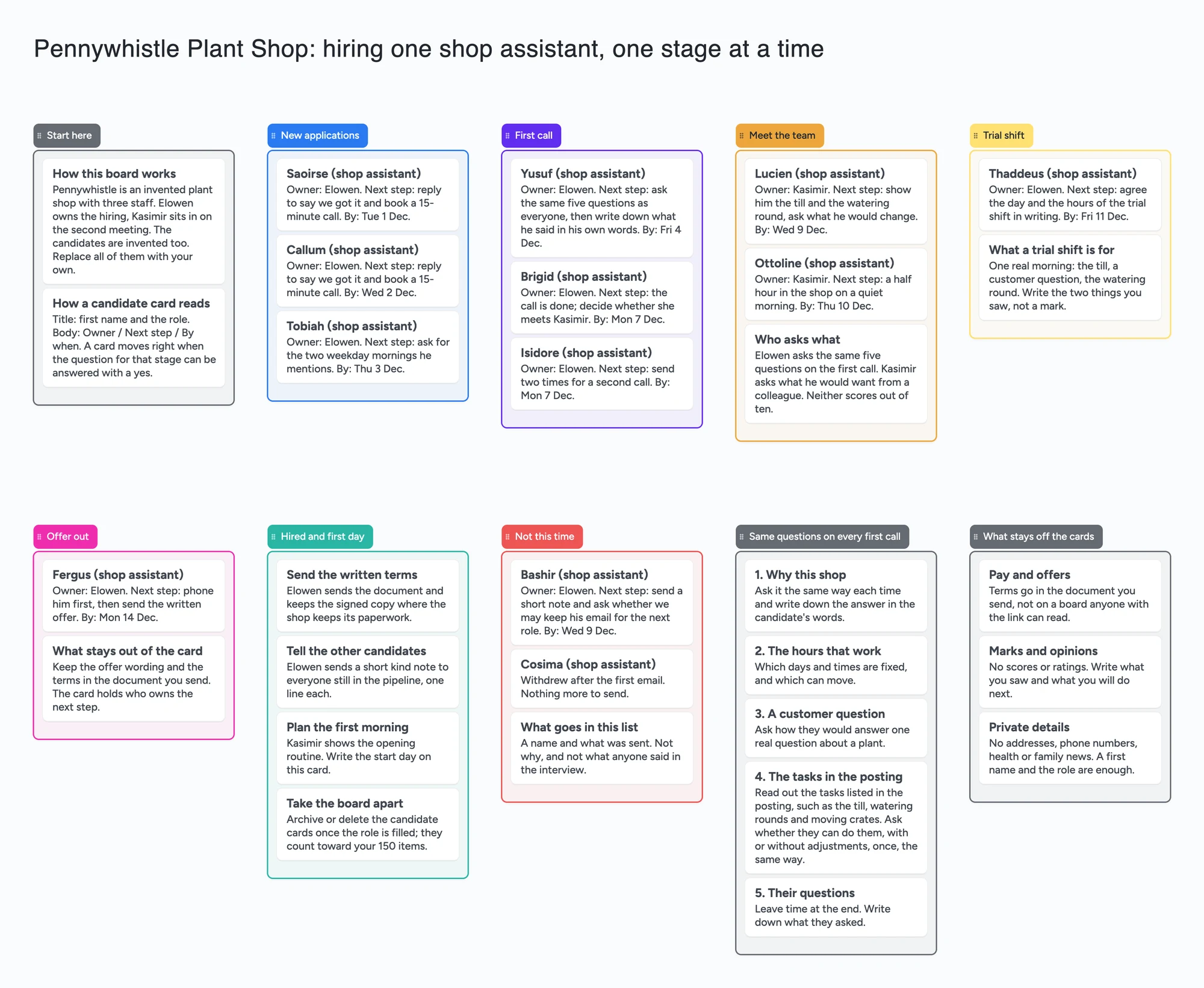
You are hiring one person, you have a pile of applications, and you do not want to buy an applicant tracking system for it. This page is a hiring pipeline already laid out and filled in for an invented plant shop, Pennywhistle, hiring a shop assistant: ten candidates move from New applications through First call, Meet the team and Trial shift to Offer out, and two sit in Not this time. It is a board you read by eye. It sends no emails, keeps no resumes and scores nobody; our view is that an applicant tracking tool does those jobs better. What the board does well is show who owns the next step for each person and keep the first-call questions the same for everyone.
Opens in your browser. Anyone can view; a free sign-in lets you edit.
Updated
The short version
- What it is: one screen where the person hiring sees every candidate, who owns the next step and by when. Pennywhistle's board uses 41 of your 150 free items.
- What a stage is: a question you can answer with a yes. A card moves right when the question for that stage is answered, not when time has passed.
- What it is not: no resumes, no email, no scoring, no reminders or due-date alerts. Dates are typed into each card.
- What stays off it: pay, offer wording, scores and private details about a person. A board anyone with the link can read is a poor place for them.
- When to skip it: with many applicants or several open roles, a tracking tool is the better home (the table below says where).
The same five questions, asked the same way
A Reddit thread started by the owner of a tropical fish store (r/smallbusiness, posted April 16, 2026 UTC, titled "Hiring for the first time - best way to organize applicants") asks the question this page answers. Reddit shows 27 comments; we read 12 with text in an archived copy (they include AutoModerator and the owner's three replies), and 16 more were removed or deleted. The owner wrote that they were getting solicitation messages and thanked the moderators for filtering them. The replies that answer the owner say different things. One, from a user who says they own a small recruiting firm, started with an Excel sheet and resumes in folders and says not to reinvent the wheel. Another suggests one place for every application, the same few stages (new, phone screen, interview, offer) and five to seven must-have questions put to everyone on the first call. A third says to write down the qualifications first and have a second person score each interview. A fourth says organising applicants is the easy part and screening is the hard part. The owner replied that they already know a database program and will use that, which is the honest case for skipping a board.
Pennywhistle's board keeps the second idea and leaves out the third. Its grey list holds five questions: why this shop, which hours work, how they would answer a customer's question about a plant, whether they can do the tasks in the posting, with or without adjustments, and what they want to ask. Each card says to ask it the same way every time and to write down the answer in the candidate's words. Our view: the board is a good place for the list, because Elowen reads it before every call, and a poor place for scores, which is why none are on it.
Pennywhistle's board, list by list
The shop and everyone in it are invented: Elowen owns the hiring, Kasimir joins the second meeting, and the candidates are first names with the role beside them. A candidate card reads Owner, Next step and By, and each person is in one list at a time.
| List | Whose it is | In Pennywhistle's board |
|---|---|---|
| New applications (blue) | Elowen | "Saoirse (shop assistant)" Owner: Elowen. Next step: reply to say we got it and book a 15-minute call. By: Tue 1 Dec |
| First call (purple) | Elowen | "Yusuf (shop assistant)" Owner: Elowen. Next step: ask the same five questions as everyone, then write down what he said in his own words. By: Fri 4 Dec |
| Meet the team (orange) | Kasimir | "Lucien (shop assistant)" Owner: Kasimir. Next step: show him the till and the watering round, ask what he would change. By: Wed 9 Dec |
| Trial shift (yellow) | Elowen | "Thaddeus (shop assistant)" Owner: Elowen. Next step: agree the day and the hours of the trial shift in writing. By: Fri 11 Dec |
| Offer out (pink) | Elowen | "Fergus (shop assistant)" Owner: Elowen. Next step: phone him first, then send the written offer. By: Mon 14 Dec |
| Hired and first day (green) | Elowen and Kasimir | Four cards: send the written terms, tell the other candidates, plan the first morning, take the board apart |
| Not this time (red) | Elowen | "Bashir (shop assistant)" Owner: Elowen. Next step: send a short note and ask whether we may keep his email for the next role. By: Wed 9 Dec |
Swipe the table sideways to see every column.
The board's own wording. On this board the owner and the date are typed in the card text.
Three lists are not stages: Start here and two grey lists. One grey list holds the five questions above; the other, What stays off the cards, is the next section.
What a link board should not hold about a person
Anyone with the link can read a shared board, and new boards start view-only for everyone else. A hiring board is about named people who have not agreed to be on it, so Pennywhistle's keeps to the little a plan needs: a first name, the role, an owner, a next step and a date. Its three off-limits cards say the rest stays out:
- Pay and offers. The terms go in the document you send, not on a card.
- Marks and opinions. No scores or ratings. Write what you saw and what you will do next.
- Private details. No addresses, phone numbers, health or family news.
The Not this time list follows the same rule: a name and what was sent, not why and not what anyone said in the interview. Use the board for the pipeline. Keep a resume, an interview note or an opinion about a real person in the tool your business already uses for people's records. A board link is not private; Pro adds invite-only boards, for a list of real candidates (prices are in the last FAQ). This page is not employment-law advice: pay for trial shifts and hiring rules depend on where you are.
How many stages the pages we read use
Asana's help article on candidate tracking (no page date shown; read November 25, 2026) names its example sections Applied, Phone Screen, Interview, Offer and Hired, with a separate section for people who were declined. It also gives a task template called "[COPY ME] To add a candidate" and custom fields such as Status, Position applied for, Source, Interview stage and Expected start date. FirstHR, a vendor of HR software, publishes a recruiting funnel guide ("Updated October 18, 2026") with seven stages from awareness to an offer with onboarding, and says on that page that applicant tracking in its own platform is coming soon.
Pennywhistle's board has five stages before Hired, plus Not this time. The extra one is Meet the team, the second meeting, because a three-person shop wants the colleague in the room. Take it out if your hiring is one person's decision. Neither page says how many stages is right; use as many as you have real steps.
Where a tracker or a spreadsheet does this better
| Tool | What its own page says (read November 25, 2026) | When it wins over this board |
|---|---|---|
| Asana | Its candidate-tracking article describes sections for the stages, custom fields for Status, Position applied for, Source and Interview stage, and a task template for each new candidate | You already use Asana and want fields you can filter and a template per candidate; this board has no fields, rules, forms or reminders |
| FirstHR | Its guide (dated October 18, 2026) lays out seven stages, the last being an offer with onboarding; the same page says its own applicant tracking is coming soon | You want a guide to the stages before you pick a tool; it is a vendor's page |
| A spreadsheet | The recruiting-firm owner in the Reddit thread started with an Excel sheet and resumes in folders | You want one row per applicant, sorting and a column you can count |
| Instaboard | One shared board; lists are stages, owners and dates typed by hand; no resumes, scores, email or alerts | One or two people share a small hiring round and want to see who owns each next step on one screen |
Swipe the table sideways to see every column.
Each cell is the page's own wording or ours, read on the date above. Vendor claims are the vendor's.
Put your own role in
- Open the board and clear Pennywhistle's candidate cards, one list at a time. Keep the list titles or rename them to your own steps.
- Write your own five questions on the grey list before anyone is called.
- Add one card per candidate, first name and role in the title, then Owner, Next step and By. A person goes in one list at a time.
- Share it. Set Share to "Anyone who joins can edit" so the second person can move cards (new boards start view-only); each person signs in free to write. A copy takes 1 of your 5 boards.
- Read it down on a set day, candidate by candidate, and ask who owns the next step.
- Count the items. Each list and each card is 1 of your 150 free items across all your boards; arrows, sections and pen strokes don't count. Pennywhistle's board is 10 lists + 30 cards + 1 title text box = 41, our arithmetic, which leaves 109 on a first board.
When the role is filled
Hired and first day holds four cards: send the written terms and keep the signed copy where the shop keeps its paperwork, tell the other candidates with a short kind note, plan the first morning, and take the board apart. The last one matters on a shared board: archive or delete the candidate cards once the role is filled, because they count toward your 150 items and anyone with the link can still read them.
- No reminders or due-date alerts. The By date is text; someone has to read the list.
- No resumes or files per candidate worth keeping here. A board holds 1 file; keep resumes in your own records.
- No name or time on a tick. A ticked box only means somebody ticked it; we found no history panel on the board.
- Not built for volume. With dozens of applicants a tracker or spreadsheet is the better home.
Start from the ready board
It opens in your browser in a few seconds, with nothing to install. Sign in for free when you want to save it and share it.
Questions
Is there a hiring pipeline template for a small business?
Yes, in several forms: spreadsheets, tracker templates and boards. This one is a ready board with a list for each step from new applications to hired, five questions asked of every first-call candidate, and an owner and a dated next step on each candidate card. It is built for a round of one or two hires, not for volume.
How many stages should a hiring pipeline have?
Pennywhistle's board has five before Hired, plus Not this time. The pages we read use four to seven: a Reddit reply says new, phone screen, interview and offer, Asana's article names Applied, Phone Screen, Interview, Offer and Hired, and FirstHR's guide has seven. Use as many as you have real steps.
Should the board hold resumes, interview notes or scores?
No. Anyone with the link can read a shared board, so keep to a first name, the role, an owner, a next step and a date. Resumes, notes, scores and pay belong in the tool your business already uses for people's records.
Does it send reminders when a next step is due?
No. The By date is typed text and the board sends no reminders or due-date alerts. Our suggestion is to read the list down on a set day and ask each owner for the next step.
What do I do with the cards when the role is filled?
Send the written terms and a short note to the others, then archive or delete the candidate cards. They count toward your 150 items, and anyone with the link can still read them.
Is Instaboard free?
There is a free plan: 5 boards, 150 cards and items across your account (pen strokes, arrows and sections don't count), and 3 pictures and 1 file per board. Anyone with the link can read a board; writing on it takes a free sign-in. Pro removes the item limit and adds invite-only boards: $5 a month billed yearly ($59.99 a year), or $7.99 monthly.
Sources
- r/smallbusiness: "Hiring for the first time - best way to organize applicants" (posted April 16, 2026 UTC by u/EsisOfSkyrim; replies by u/INFeriorJudge, u/Zyvernoo, u/Common-Orange4022, u/Fresh_Bee_9637; Reddit shows 27 comments, we read 12 with text in an archived copy, 16 more removed or deleted, November 25, 2026)
- Asana Help: "How to use Asana for candidate tracking" (no page date shown; a vendor page; read November 25, 2026)
- FirstHR: "Recruiting Funnel: A 7-Stage Guide for Small Businesses" (updated October 18, 2026; a vendor blog; read November 25, 2026)