For HR, IT, a manager and a buddy bringing in one new hire at a small company
Employee onboarding for one new hire, on a board HR, IT and the manager share
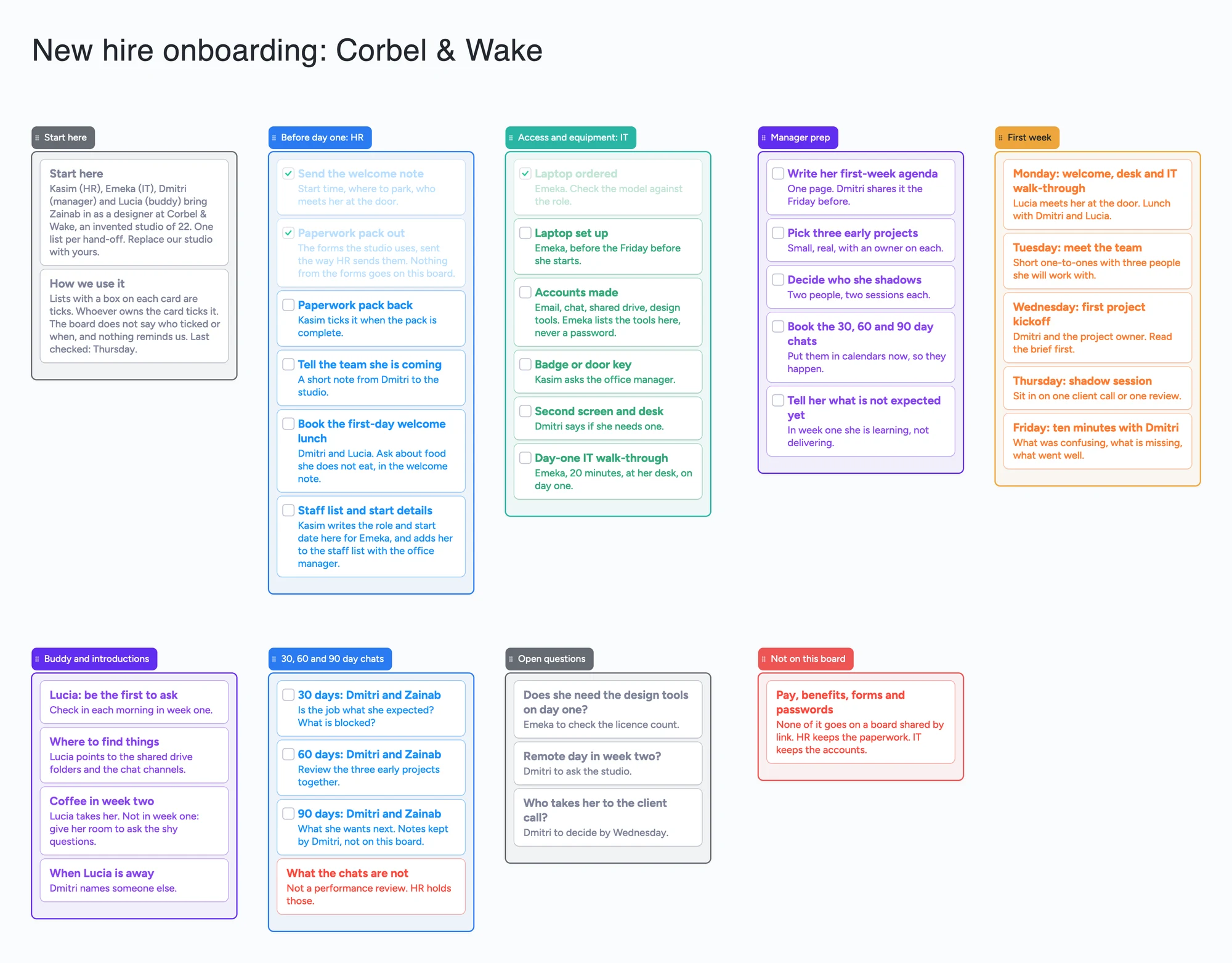
We make Instaboard, an online board for planning with other people. This page is for the three or four people who share one new hire's first weeks at a small company: someone in HR, whoever does IT, the manager and a buddy. The board is already laid out and filled in for an invented hire, Zainab, a designer joining an invented studio of 22, Corbel & Wake, with Kasim in HR, Emeka on IT, Dmitri as manager and Lucia as buddy. Nine lists: Start here, before day one for HR, access and equipment for IT, manager prep, the first week, the buddy, the 30, 60 and 90 day chats, open questions and a list of what stays off the board. Open it, swap our studio for yours and send the link to the others. It is a shared place to see who has done what. It is not HR software: it makes no accounts, collects no forms, takes no signatures and sends no reminders. If one person does all of it, a printed checklist is enough, and the first section says so.
Opens in your browser. Anyone can view; a free sign-in lets you edit.
Updated
In short, for whoever coordinates a start
- Who it is for: three or four people who each own part of one hire's start. The example uses 46 of your 150 free items. If one person does everything, a printed checklist is quicker; the next section says when.
- What it does: it puts the hand-offs on one page. What HR sends before day one, what IT sets up, what the manager prepares, how the first week runs, what the buddy does and when the 30, 60 and 90 day chats happen. Anyone you give edit access to can move a card or tick a box.
- What it isn't: it isn't HR software or an identity tool. It makes no accounts, collects and signs no forms, and sends no reminders or due-date alerts. A day inside a card, such as Monday: welcome, is text you typed.
- Ticks: four lists have tick boxes. Anyone who can edit can tick or untick a card, and the board doesn't record who did or when. Agree who ticks what.
- Keep off it: pay, benefits, forms, passwords, performance notes and reasons for anything. A board is shared by link, so the example writes the tools IT sets up, never a password. HR keeps the paperwork and IT keeps the accounts.
- Free plan: 5 boards, 150 items, 3 pictures per board. Copying the board takes 1 of your 5 boards. Writing on it needs a free sign-in. New boards start with Anyone who joins can view.
One hire, four people: when a board earns its place
A board helps when several people each hold a piece of the same start and nobody can see the whole. If one person in a small company does the paperwork, the laptop and the first-day agenda, a printed list or one note is quicker and nobody has to sign in to anything. The rest of this page is for the shared case.
- One person does it all: print a list, or keep one note.
- You need accounts made, forms signed or a hire tracked across many starts: HR software or a ticket form does that job better. The threads below say as much. This board creates nothing in your systems.
- Three or four people hand one hire along: this board. The shared part is who has finished their piece, and who is still waiting on someone else.
Where a start goes wrong, in three threads
Each reply is one person's account, not a rule. Reddit counts are as the page showed on November 25, 2026 against what we could read in an archived copy, and we quote two of the 18 replies in the first thread, four of the 30 in the second and two of the 76 in the third.
In r/sysadmin, What is your ideal new hire onboarding process? (OP u/anderson01832, August 9, 2024 UTC; Reddit shows 17 comments, we read 18 in an archived copy), u/fieroloki wrote that the ideal is being told before the new hire is at the door asking for a laptop. u/PhillyGuitar_Dude described the order their company uses: HR enters the request with the correct spelling of the name, the title, the start date and any equipment; IT makes the accounts and keeps them disabled until the onboarding session; HR is told when IT is ready and schedules the session; IT ticks off its part. They added that they could also see "a pretty simple workflow being done in something like Microsoft planner", and that the success of the tool depends on everyone using the same thing. Several of the other replies in that thread are about automating from an HR system or a helpdesk (u/pdp10, u/bitslammer, u/ibrewbeer, u/Current_Dinner_4195), and one account says it is a co-founder of an access-automation vendor.
In r/humanresources, What are your favorite New Employee Onboarding practices?? (OP u/IsThisAdulting, September 11, 2019 UTC; Reddit shows 30 comments, we read 30 in an archived copy), u/apawintheface said they prebook 30 and 90 day check-ins with new hires. u/chicklette wrote that a first-week agenda gets the supervisor to sit down and plan the training, and suggested a coffee date a week or two out for the questions a new hire is too shy to ask. u/PrincessCoPilot, a recruiter, wrote that they were overwhelmed when all the directors came in on day one to talk about their departments and wished they had waited until later in the week. u/Busted_Toad wrote that they prefer a low-key start where the workspace is ready, access to systems works and they know who to ask for.
In r/ITManagers, What are people using for employee onboarding in 2026? (OP u/TrickAppropriate618, April 8, 2026 UTC; Reddit shows 83 comments, we read 76 with text in an archived copy, 11 more removed), u/dengar69 wrote that you need some kind of ticketing system with fields people have to fill out, and that they use an onboarding form from Freshdesk. u/bosilk wrote that laptop and permissions problems are almost always a process problem before they are a tooling problem. The OP there has about 140 employees, and many replies name Okta, Entra or Rippling, some from people who sell such tools. This board does none of that.
Our view: these threads are mostly IT staff at companies larger than a studio of 22, so read them for the hand-offs, not the tools. The board does not fix any of this. What it can do is put the hand-offs the accounts describe where all four people can see them: who is waiting on whom, and what is still open a week before the start.
Zainab's board, list by list
The example is invented. Read it from the top left, across, then the second row.
- Start here. Two grey cards: who the five people are and what the board is for, and how they use it, ending with a last-checked day typed by hand.
- Before day one: HR. Six tick cards, two ticked: the welcome note, the paperwork pack out, the paperwork pack back, telling the team she is coming, booking the first-day lunch, and a staff list and start details card where Kasim writes the role and start date for IT. The paperwork card says nothing from the forms goes on the board.
- Access and equipment: IT. Six tick cards, one ticked: laptop ordered, laptop set up, accounts made (Emeka lists the tools, never a password), a badge or door key, a second screen and desk, and a 20-minute IT walk-through at her desk on day one.
- Manager prep. Five tick cards: the first-week agenda, three early projects, who she shadows, booking the 30, 60 and 90 day chats now, and telling her what is not expected yet.
- First week. Five cards, one per day, from a welcome and desk set-up on Monday to ten minutes with Dmitri on Friday.
- Buddy and introductions. Four cards: Lucia checks in each morning in week one, shows where things are, takes her for a coffee in week two, and Dmitri names someone else when Lucia is away.
- 30, 60 and 90 day chats. Three tick cards and a red card that says the chats are not a performance review. Notes from the 90 day chat are kept by Dmitri, not on the board.
- Open questions. Three grey cards nobody has answered yet, such as whether she needs the design tools on day one.
- Not on this board. One red card: pay, benefits, forms and passwords stay with HR and IT.
Nothing on the board is timed. Friday is text on a card, and moving a card changes nobody's calendar.
How far 150 items goes across hires
Each card and each list is 1 of your 150 free items, across all your boards. The title text box counts too. Arrows, sections and pen strokes don't. Our arithmetic:
- As built: 9 lists + 36 cards + 1 title = 46.
- A second hire on a copy: 46 + 46 = 92, and the copy takes 1 of your 5 boards.
- A third: 138. A fourth would be 184, which is over 150.
- With Pro, the 150-item limit is removed.
Who waits on whom
The lists run left to right in the order the example needs them: HR first, because IT needs the start date and the role to order and set up the right equipment, then IT, then the manager's prep that depends on both, then the week itself. The HR-then-IT part follows the sequence u/PhillyGuitar_Dude described; the manager and buddy steps after it are ours, and nothing on the board enforces any of it.
- IT waits on HR. In the example, the Staff list and start details card in HR's list is where Kasim writes the role and start date for Emeka, and the laptop card sits in IT's list to its right.
- Dmitri waits on IT and HR. The first-week agenda can only name a first project once the access list is known.
- Lucia waits on Dmitri. Who Zainab shadows is a Manager prep card and a Thursday card, so Lucia reads them there; the buddy cards only say when she checks in.
- Open questions catch what falls between. If two people each think the other will decide, the question goes in the last grey list with a name on it.
The 30, 60 and 90 day chats on a board
Several guides we read use a 30-60-90 shape: Duke's page lists 30/60/90 reviews and Smartsheet offers a 30-60-90 day onboarding plan template, and the r/humanresources account above prebooks the 30 and 90 day check-ins. Those are reviews of how the start is going, not a performance rating. The board holds three cards, one per chat, each with the two people and one question. It does not hold the notes: Dmitri keeps those elsewhere, and the red card beside them says the chats are not a performance review. Put the dates in the calendar; the card does not remind anyone.
What never goes on this board
- Pay, benefits and tax or bank forms. None of it goes on a board shared by link.
- Passwords and one-time codes. IT writes which tools, not how to sign in.
- Performance notes and reasons for anything about a person. The 90 day card says where the notes live, not what they say.
- Real names of people who have not agreed to be on it. The example uses invented first names; use first names or roles for your own start.
- Reminders and due-date alerts. There are none. A date inside a card is typed text, so one of you has to open the board.
- Who ticked and when. Anyone who can edit can tick or untick a card, and the board does not record who or when.
- Privacy by default. New boards start with Anyone who joins can view. Anyone with the link can read it; sign-in is only needed to write. Set it to Anyone who joins can edit only for the people who should write on it.
Where else onboarding lives, and when each is better
Read on November 25, 2026; pages change, so check the page. A page date is printed only where the page shows one. Plan limits were not read for any vendor below; the Notion template prices are as that page lists them.
| Source | What the page says | Better for |
|---|---|---|
| Duke Human Resources, New Staff Orientation: Tools & Templates (no date printed) | Lists an onboarding checklist for managers, buddy program suggestions, an onboarding binder template and 30/60/90 reviews | A university's own forms and checklists to print or fill in. It is a set of documents, not a shared plan |
| Smartsheet, Free Employee Onboarding Templates (January 4, 2017, updated April 28, 2025) | Offers downloadable templates in Excel, Word and Google formats, including a 30-60-90 plan, a checklist and an onboarding tracking template for tracking tasks for multiple new hires; it describes that one as ideal for large-scale hiring and remote teams | A file you fill in, or one tracking template across many new hires. A vendor's own page, written to sell its software |
| Airtable, Employee onboarding template (no date printed) | Describes a template that centralizes onboarding from pre-arrival paperwork to first-week checklists; it includes an onboarding checklist table, a team members table and an onboarding resources table, and can be extended with new fields, views and automations | Tables and views for many hires. A vendor's own page |
| Microsoft Support, Use the Employee onboarding team SharePoint site template (no published date printed) | A team site with pre-populated pages and web parts for training, teams, news and events, plus a Microsoft List for an onboarding checklist; creating it needs permission to create sites | A company already on Microsoft 365 whose admin allows site creation |
| Notion Marketplace, New Hire Onboarding category | 206 templates as shown November 26, a mix of free and paid, with prices from $9 to $147 on the listings we saw; no single template's limits read | Choosing among many templates if your team already uses Notion |
| HR and ticket tools named in the threads (Rippling, Freshdesk, Freshservice) | Named by accounts in the three threads above; their plans were not read | Making accounts, collecting forms, signatures and tracking many starts at once |
| Printed checklist or one note | Not read for this page | One person doing every step |
| Instaboard board | 5 boards, 150 items, 3 pictures per board on the free plan | A few people who need one plan they can all see and tick, with a link in place of a long thread |
Swipe the table sideways to see every column.
Pages read November 25, 2026 in a browser: hr.duke.edu New Staff Orientation: Tools & Templates, smartsheet.com free-onboarding-checklists-and-templates, airtable.com employee onboarding template, support.microsoft.com Employee onboarding team SharePoint site template, notion.com New Hire Onboarding category. Our wording, not theirs.
Copying it for the next start
- Open the board and sign in free when it asks you to write. Replace our studio and the five names with yours.
- Fill Before day one first, from the offer. IT's cards can only be right once the role and start date are written down.
- Name one owner per card in the card text, and move anything undecided to Open questions.
- Send the link. Set Share to Anyone who joins can edit for the people who should write on it, or leave it on view for someone who should only read. Each person who writes signs in free.
- For the next hire, copy the board. A copy keeps its ticks, so untick them first, and replace the name, the role and the dates.
Start from the ready board
It opens in your browser in a few seconds, with nothing to install. Sign in for free when you want to save it and share it.
Questions
What goes on an employee onboarding board?
One list for each hand-off: what HR sends before day one, what IT sets up, what the manager prepares, how the first week runs, what the buddy does, the 30, 60 and 90 day chats, and open questions. The example holds a task per card and a tick box on four lists. It holds no pay, forms or passwords.
Does this replace HR software?
No. It creates no accounts, collects no forms, takes no signatures and tracks no one across many hires. HR platforms and ticket forms do those jobs better. The board is for the few people who share one start and need to see what is still open.
Will the board remind us of a deadline or chase paperwork?
No. It sends no reminders or due-date alerts. A day inside a card is text you typed, so one of you has to open the board. Put the real dates in your calendars.
Should the new hire see the board?
That is for you to decide. New boards start with Anyone who joins can view, so anyone with the link can read it. The example's Manager prep and Open questions lists are written for the team, so think before sharing the link with the hire.
How much of the free plan does one hire use?
The example is 46 of your 150 free items. A copy for a second hire brings it to 92, a third to 138 and a fourth would be over the limit; each copy takes 1 of your 5 boards (our arithmetic).
Is Instaboard free?
There is a free plan: 5 boards, 150 cards and items across your account (pen strokes, arrows and sections don't count), and 3 pictures and 1 file per board. Anyone with the link can read a board; writing on it takes a free sign-in. Pro removes the item limit and adds invite-only boards: $5 a month billed yearly ($59.99 a year), or $7.99 monthly.
Sources
- r/sysadmin: What is your ideal new hire onboarding process? (OP u/anderson01832, August 9, 2024 UTC; replies are single accounts; Reddit shows 17 comments, we read 18 in an archived copy, November 25, 2026)
- r/humanresources: What are your favorite New Employee Onboarding practices?? (OP u/IsThisAdulting, September 11, 2019 UTC; Reddit shows 30 comments, we read 30 in an archived copy, November 25, 2026)
- r/ITManagers: What are people using for employee onboarding in 2026? (OP u/TrickAppropriate618, April 8, 2026 UTC; Reddit shows 83 comments, we read 76 with text in an archived copy, 11 more removed, November 25, 2026)
- Duke Human Resources: New Staff Orientation: Tools & Templates (no date printed; read November 25, 2026)
- Smartsheet (a vendor's own page): Free Employee Onboarding Templates (January 4, 2017, updated April 28, 2025; read November 25, 2026)
- Airtable (a vendor's own page): Employee onboarding template (no date printed; read November 25, 2026)
- Microsoft Support: Use the Employee onboarding team SharePoint site template (no published date printed; read November 25, 2026)
- Notion Marketplace: New Hire Onboarding category (read November 25, 2026)