For a small event team that has to deliver what its sponsors were promised
A sponsor fulfillment tracker on one board: every promise, one card, one owner
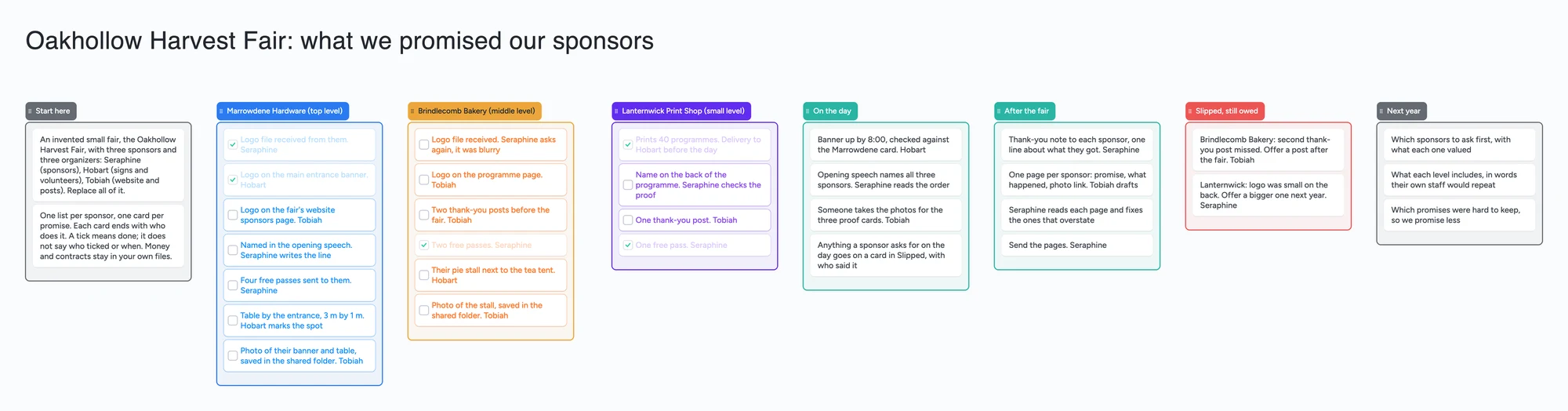
Once a sponsor has signed, the work is keeping the promises: the logo on the banner, the line in the opening speech, the free passes, the thank-you post. Below is a sponsor fulfillment tracker built as an Instaboard board and filled in for an invented small event, the Oakhollow Harvest Fair. Three sponsors share the work of three organizers: Seraphine (sponsors), Hobart (signs and volunteers) and Tobiah (website and posts). A sponsor is a list, a promise is a card, and each card ends with the name of whoever does it. You read the board and keep it up by hand. It holds no contracts, payments, reports or results, and it sends nothing.
Opens in your browser. Anyone can view; a free sign-in lets you edit.
Updated
The short version, for whoever keeps the promises
- The idea: each sponsor's promises sit on one screen with an owner beside each, so nobody has to ask on the day whether the banner is up. The example takes 41 of your 150 free items.
- A card: one promise and one name at the end ("Four free passes sent to them. Seraphine"). A tick means done, and it carries no name or time.
- Left out: contracts, invoices and payment status, sponsor reports and results, reminders and due-date alerts. Proof of delivery is a photo in your own shared folder, with a card saying where it is.
- Where it strains: a list per sponsor and a card per promise add up fast. Forty sponsors with ten to twenty promises each would mean several hundred cards, well past 150 (the sums are further down).
- Free plan: 5 boards, 150 items across them and 3 pictures a board. Pro lifts the item limit, with prices in the last FAQ.
What a festival team asked, and what it shows
The one forum thread we found that asks about this job is on Asana's community forum: "Sponsor Fulfillment - Project + Tasks or Tasks + Subtasks?" (posted 2019-03-05 UTC; the page shows four replies from March 2019, one from 2020-01-31 and a system post in 2025; read in a browser November 27, 2026). The poster manages "a large annual festival" with "roughly 40 sponsors at varying levels", each with "anywhere from 10-20 things to track", such as signing agreements, sending invoices, getting an ad and sending thank-you cards. They set out three ways to lay it out in Asana: a project per sponsor, a task per sponsor with the promises as subtasks, or a section per sponsor with promises as tasks. What follows is what each reply wrote, one person at a time.
- Jason_Woods (shown as an Ambassador) suggests the project-per-sponsor option as a starting point, and also mentions milestone tasks, the timeline and custom fields.
- Marie (shown as a Former Community Manager) agrees: with up to 20 tasks per sponsor, a project each, with all tasks multi-homed into a master project if overall visibility is needed, plus milestones and the timeline.
- James_Carl agrees with both and adds sections inside each project (Project-Sections-Tasks), milestones if they earn their place, and three ways to copy a setup: copy the project, Asana's template feature, or Sendana Add. Teams and custom fields are also named.
- CraigGrella says the right setup depends on the workflow, then also leans to a project per sponsor from a template, with sections for major milestones, portfolios, custom fields for sponsor level or spend, and a saved search filtered by custom field or tag to find sponsors who are stuck.
- Elisabeth_Bocklet (2020-01-31 UTC) says they will land on a template and a project per sponsor, with a master project holding all the deliverables, maybe in a portfolio, and shares a form that collects key information and logos from sponsors.
Our reading, not theirs: all five replies land on a project per sponsor. Past that they differ: custom fields (Jason_Woods, James_Carl, CraigGrella), a master project (Marie, Elisabeth_Bocklet), milestones or the timeline (Jason_Woods, Marie, James_Carl), sections (James_Carl, CraigGrella) and a saved search (CraigGrella only). At forty sponsors with ten to twenty promises each that is a project tool's job, and a board does less. At three to ten sponsors the same shape, a list per sponsor, fits on one screen, which is what this page is for. The thread dates from 2019 and the poster was on Asana's Premium plan, so it says nothing about Asana today.
What a promise card holds
A sponsor's promise is small, so the card is small. Each of the fair's cards is one line: the promise, then the one person who does it.
- The promise in the sponsor's terms: "Four free passes sent to them", "Table by the entrance, 3 m by 1 m".
- One name at the end: "Seraphine", "Hobart". If two people are needed, make two cards.
- A reason when something is stuck: "asks again, it was blurry" stays on the card until the file arrives.
- A tick when it is done. Nobody's name or the time is stored with a tick, so treat it as a prompt to yourself, not a record.
Proof is a photo of the banner or the stall, saved in a shared folder. The board has a card for it ("Photo of their banner and table, saved in the shared folder. Tobiah"), and the photo itself stays in the folder. The board limits pictures to 3 per board, so it is not the place to hold proof.
The fair's board, list by list
Everything in the example is made up: a small fair, three sponsors at three levels, no real company. Each kind of list, in turn:
| Kind of list | Its job | Example from the fair |
|---|---|---|
| One list per sponsor (blue, orange, purple) | That sponsor's promises, one card each; the list title names the sponsor and level | "Marrowdene Hardware (top level)", seven cards from the logo file to the photo of the table |
| On the day (green) | Checks to do on the day itself, with an owner | "Banner up by 8:00, checked against the Marrowdene card. Hobart" |
| After the fair (green) | The thank-you and the one page per sponsor | "One page per sponsor: promise, what happened, photo link. Tobiah drafts" |
| Slipped, still owed (red) | Promises that did not happen, with the offer made | "Brindlecomb Bakery: second thank-you post missed. Offer a post after the fair. Tobiah" |
| Next year (grey) | What to change before the next round of asks | "Which promises were hard to keep, so we promise less" |
Swipe the table sideways to see every column.
Wording from the board itself. Names and ticks are typed in; there is no status or owner field.
One sponsor from signed to thanked
Follow Brindlecomb Bakery. Seraphine makes a list for it when the sponsorship is agreed and writes one card for each promise in the agreement: the logo on the programme page, two thank-you posts, two free passes, a pie stall next to the tea tent. She puts a name at the end of each card. The logo file arrives blurry, so that card gets "Seraphine asks again, it was blurry" and stays unticked.
On the day the "On the day" list is the check. After it, the second thank-you post turns out not to have gone out, so its card moves to Slipped, still owed, with the offer Tobiah will make. Seraphine then reads one page per sponsor before it is sent, and fixes any line that claims more than happened.
Making it yours: six steps
- Make your copy and swap out the fair. Put your organizers where Seraphine, Hobart and Tobiah are, and remove the fair's cards as you replace them.
- One list per sponsor. Title it with the sponsor and the level, then copy each promise from the agreement onto its own card with one name at the end.
- Send the link to the organizers. Set Share to "Anyone who joins can edit"; each person signs in free to write, and the board counts as 1 of their 5.
- Fill On the day with that morning's checks, each one something a person can walk past and see.
- Move what slipped into Slipped, still owed, with the offer you made written beside it.
- Afterwards, clear out what you no longer need. Keep Slipped and Next year; they help the next round of asks.
Four tools, by what their own pages say
| Option | Printed on its own page (read November 27, 2026) | Pick it instead when |
|---|---|---|
| GolfStatus | A $0.00 resource: a Sponsorship Fulfillment Report guide (PDF), a Sponsorship Deliverables Tracker (Google Sheets), a report deck template (Google Slides) and a sample deck. Written for golf tournaments | You want a sheet with sums, or a report deck to show sponsors afterwards |
| Eventeny | Pricing page: Basic $0 a month with 3-5% transaction fees and 1 admin; sponsor management is listed from Plus, shown as $120 a month billed annually ($1,440 a year) on the Annual view and $180 a month on the Monthly view, with 5 admins | You also take tickets, vendor applications or payments, and want sponsors in the same system |
| Notion | Its Sponsorship Tracker template page says it "organizes sponsorship agreements, timelines, deliverables, and income" and shows "Last updated last month" (its creator box links an affiliate.notion.so address); the Event Sponsorship Management page shows "Last updated last year" | You want a database of sponsors you can filter, with amounts in columns |
| Instaboard | One shared board; ticks and names typed by hand; no contracts, payments, reports or alerts | A small team, a handful of sponsors, and one screen that shows who owes what on the day |
Swipe the table sideways to see every column.
Every cell paraphrases or quotes the vendor's page on the day read. We have not used any of these tools.
Left to your own files
- No contracts, invoices or payments. A card can say "agreement signed"; the document stays in your own files, and nothing checks that money arrived.
- No sponsor report. The "after the fair" cards say who writes the page. The board makes no report, results or impressions.
- No sums. Nothing adds up passes given or sponsors at each level.
- No reminders or due-date alerts. The "On the day" list is a list you read. Nothing tells you a promise is late.
- No sponsor view of their own list. Anyone with the link sees every sponsor's list. Share a copy with only one sponsor's list if you want one to see theirs; each copy takes one of your 5 free boards.
- Not for private terms. Keep prices and private terms off a link board; only Pro has invite-only boards.
Counting sponsors against the 150
Arithmetic, ours. A list or a card each use 1 of the 150 free items, and the 150 is shared across your account; arrows, sections and pen strokes aren't counted. The fair's board is 8 lists + 32 cards + 1 title text box = 41. A sponsor with six promises adds 7 (one list, six cards). Nine more like that add 63 and take the board to 104, with whatever else is on your account counted against the same 150. The forum poster's forty sponsors with ten to twenty promises each would need roughly 40 lists and 400 to 800 cards. Pro lifts the item limit, and the prices are in the last FAQ.
What the free plan covers
- Items. Each card and each list takes 1 of the 150 free items, shared across your account; the example is 41. Arrows, sections and pen strokes aren't counted.
- Boards. Five on the free plan. Making a copy for one sponsor uses one of them, and so does opening anyone's board by link.
- Pictures. 3 a board. The example has none; keep proof photos in a shared folder and name the folder in a card.
- Writing means signing in. Reading needs no account; changing a card needs a free sign-in.
- Private terms. Prices and terms stay in your own files.
Start from the ready board
It opens in your browser in a few seconds, with nothing to install. Sign in for free when you want to save it and share it.
Questions
Is there a free sponsor fulfillment tracker template?
Yes, within limits. GolfStatus offers a Sponsorship Deliverables Tracker as a Google Sheet at $0.00, and Notion has sponsorship tracker templates. The board on this page is a sponsor fulfillment tracker with a list per sponsor and a card per promise; it works on the free plan up to 5 boards and 150 items, and has no payments, reports or alerts.
What goes on a sponsor fulfillment card?
One promise in the sponsor's terms, such as "Four free passes sent to them", and one name at the end for who does it. If something is stuck, say so on the card. A tick means done and shows no name or time.
How do I show proof that a sponsor got what was promised?
Keep the photos and files in a shared folder, and put a card on the board that says what was saved and who saved it. The board allows 3 pictures, so it is not the place to hold proof.
Can a sponsor see only their own list?
Not on one board. Anyone with the link sees every list. To show one sponsor only theirs, make a copy and delete the other lists; the copy takes 1 of your 5 free boards.
Does it track what each sponsor paid?
No. Keep contracts, invoices and payments in your own files. A card can say that an agreement is signed, and nothing on the board checks it.
Is Instaboard free?
Yes. The free plan includes 5 boards, 150 cards and items across your account (pen strokes, arrows and sections don't count), 3 images and 1 file per board, unlimited collaborators and video calls up to an hour. Pro is $5 a month billed yearly ($59.99 a year), or $7.99 monthly, and the people you invite join free.
Sources
- Asana Community: "Sponsor Fulfillment - Project + Tasks or Tasks + Subtasks?" (posted 2019-03-05 UTC; replies by Jason_Woods, Marie, James_Carl, CraigGrella, Elisabeth_Bocklet; read in a browser November 27, 2026)
- GolfStatus: Golf Tournament Sponsor Fulfillment Report (a $0.00 guide, tracker sheet, report deck and sample; read November 27, 2026)
- Eventeny: pricing (Basic $0; Plus $120 a month billed annually or $180 monthly, sponsor management listed from Plus; read in a browser November 27, 2026)
- Notion: Sponsorship Tracker template page (shows "Last updated last month"; read in a browser November 27, 2026)
- Notion: Event Sponsorship Management template page (shows "Last updated last year"; read in a browser November 27, 2026)