For a small crew running a live night: a talk, a class, a launch or a webinar
An event run of show your whole crew can open: one cue per card
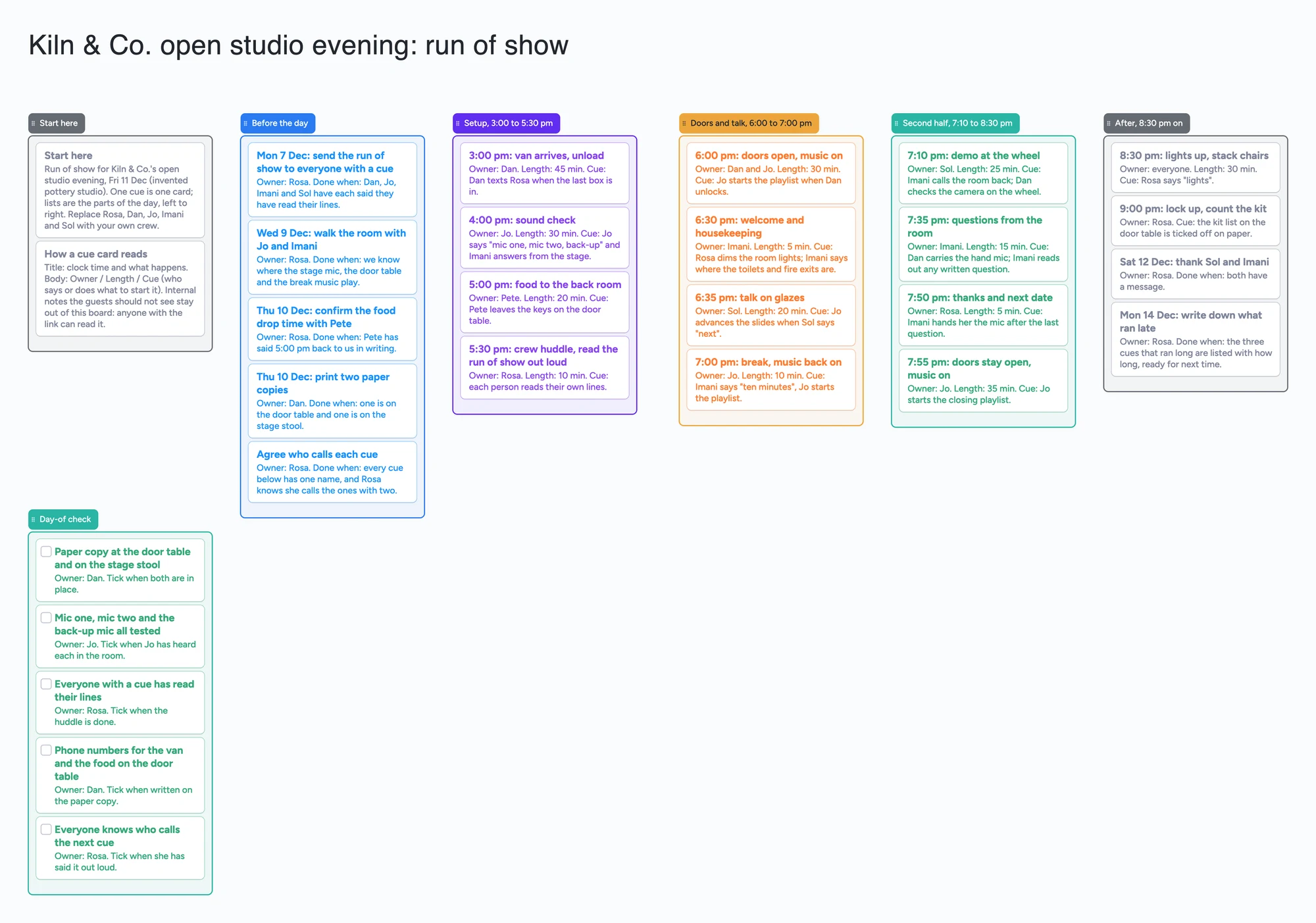
We make Instaboard, an online board. This page gives you a run of show already laid out on it and filled in for an invented pottery studio, Kiln & Co., and its open studio evening: Before the day, Setup, Doors and talk, Second half, After, and a Day-of check list. One cue is one card, with who owns it and how long it runs. It is a board you read by eye, and the crew can tick a card on the night. It does not keep time, call a cue, send a reminder or hide anything from a guest who has the link, and the fourth section is about that last point.
Opens in your browser. Anyone can view; a free sign-in lets you edit.
Updated
What to know before you open it
- What it is: the evening in order, one card per cue, so the person on the door, the person on sound and the host see the same plan. Kiln & Co.'s board uses 36 of your 150 free items.
- Who sees it: one link, one audience. Everyone who opens the link sees every card, so it is a crew board. Guests and speakers get a copy with only what they need.
- What it is not: no clock, no cue signal, no reminders or due-date alerts, no sums, no ticketing or registration. Times and lengths are typed in the cards.
- On the night: the crew can tick cards as they happen. A tick carries no name or time.
- Free plan: 5 boards, 150 items and 3 pictures per board. Pro removes the item limit; the last FAQ has the prices.
What one cue card holds
Virtual Velocity, a company that produces virtual events, describes a run of show as the master script for an event: every segment in order with its start time, duration, owner and production notes. Its page lists the columns it wants at a minimum: a clock or T+ time, a segment duration, a segment title, a segment owner, the action the platform needs and internal notes. We read that page on November 25, 2026; it is a producer's view, not a rule.
A card has less room than a sheet row, so Kiln & Co. keeps four things in each one and puts the rest in the crew's heads or on paper:
- Title: the clock time and what happens, like "6:35 pm: talk on glazes".
- Owner: one name. If two people share a cue, the card says which one starts it.
- Length: minutes, typed. Nothing adds the lengths up, so check the sum by hand once (on the board, the Doors and talk list runs 6:00 to 7:00 pm, the Second half list 7:10 to 8:30 pm, and the crew's After list starts at 8:30 pm).
- Cue: who says or does what to start it, for example "Jo advances the slides when Sol says next".
Virtual Velocity says some producers write times as T+ minutes from the start so the document stays right when the event runs a few minutes late, and others use wall-clock times; it says to pick one and stay with it. Kiln & Co. uses wall-clock times because its guests and its speaker read the plan too. If your crew prefers T+, put it in the title.
Kiln & Co.'s evening, list by list
The example is invented: Kiln & Co. is a small pottery studio, its open studio evening is on Friday 11 December, and Rosa, Dan, Jo, Imani, Sol and Pete are made up. Each list is a part of the day.
| List | What goes in it | In Kiln & Co.'s board |
|---|---|---|
| Before the day (blue) | Things to settle before anyone arrives | "Mon 7 Dec: send the run of show to everyone with a cue" Owner: Rosa. Done when: Dan, Jo, Imani and Sol have each said they have read their lines |
| Setup, 3:00 to 5:30 pm (purple) | The crew's jobs before the doors open | "4:00 pm: sound check" Owner: Jo. Length: 30 min. Cue: Jo says "mic one, mic two, back-up" and Imani answers from the stage |
| Doors and talk, 6:00 to 7:00 pm (orange) | Guests arrive; the first talk | "6:30 pm: welcome and housekeeping" Owner: Imani. Length: 5 min. Cue: Rosa dims the room lights |
| Second half, 7:10 to 8:30 pm (green) | The demo, questions and thanks | "7:35 pm: questions from the room" Owner: Imani. Length: 15 min. Cue: Dan carries the hand mic |
| After, 8:30 pm on (grey) | Packing down and a note for next time | "Mon 14 Dec: write down what ran late" Owner: Rosa. Done when: the three cues that ran long are listed |
Swipe the table sideways to see every column.
The board's own wording. Times, owners and lengths are typed by hand; the board has no time or owner field.
The Day-of check list holds five tick-box cards, each naming its owner in the body. One of them is "Paper copy at the door table and on the stage stool". The crew still wants paper on the night: a phone dies, and a tick on a board carries no name or time.
How many events before 150 items
Our arithmetic. Each list and each card is 1 of your 150 free items across all your boards; arrows, sections and pen strokes don't count. Kiln & Co.'s board is 7 lists + 28 cards + 1 title text box = 36. Four events open at once come to 4 × 36 = 144; a fifth makes 180, over 150. Deleting a finished board frees its items; keeping it does not. Each speaker copy takes 1 of your 5 free boards and its own items too, so the board limit usually bites first if you send copies.
Who sees the board on the night
A board you share by link can be opened by anyone who has the link. Virtual Velocity says to give the lead producer, the supporting producers, the host and any speakers with transitional roles a copy of the run of show, to give speakers a read-only version, and never to share the full internal producer notes with the entire attendee list. Our reading of that for a link board:
- The master board is the crew's. Everything on it, including who calls which cue and what to do when something runs late, is visible to anyone with the link.
- Speakers get their own copy. Make a copy, delete every card but their cues, and send that link. A copy takes 1 of your 5 free boards, so the master and four copies is the limit on the free plan.
- Guests get nothing from it. Kiln & Co.'s guests are told the start time and nothing else; their schedule is a line in the invitation.
- Read-only is the default for a reader, not a setting you control per person. Anyone who joins can view; to change a card they sign in free. Per-person permissions and invite-only boards are Pro features.
When a sheet or a live tool is the better pick
| Tool | What its own page says (read November 25, 2026) | When it wins over this board |
|---|---|---|
| A spreadsheet from Rundown Studio's templates page | 15 free run of show and event planning templates, offered as downloads for Excel, Google Sheets and Numbers that the page says need no signing up (page also shows an app, Rundown Studio, which we did not read) | You want a file you can print, sort and do time arithmetic in |
| Virtual Velocity's sample run of show | A sample table for a 70-minute webinar with times, durations, owners and production notes; its page says to copy the table into Google Sheets or Notion and add a Status column the team updates live; the template itself sits behind a name-and-email form | You want a worked webinar example before you build your own |
| Asana run-of-show template | Says the format works for in-person conferences, hybrid events, webinars, podcasts and live streams; lists Tasks, Project views, Rules and Time tracking as integrated features. Pricing not read | You already run your work in Asana and want assignments and rules beside the plan |
| A producer service (Virtual Velocity) | Says its team builds the run of show, runs every rehearsal and executes every cue on event day | You want someone else to own the plan and call the cues |
| A printed copy | Not read | The stage stool, the door table and a dead phone |
| Instaboard | One shared board; one card per cue; times, owners and lengths typed by hand; no clock, cue signal or alerts | A small crew that wants to see the same plan on any screen and tick cards as they happen |
Swipe the table sideways to see every column.
Each cell is the page's own wording, read on the date above. Where no page was read, the cell says so. None of the three pages printed a date in the text we read.
A webinar on the same board
The same lists work for an online session if you rename them. Zoom's blog post "How to run a webinar: your during-event strategy guide" (published September 18, 2026; it sells Zoom Webinars Plus) names three roles to assign before the session opens: a host who owns the agenda and transitions, a moderator who manages Q&A, chat and audience prompts, and a technical producer who handles slides, video and platform controls. It says running all three from one seat can create friction.
- Before the day: the same cards; add one that names who plays each of the three roles.
- Setup becomes the green room. Virtual Velocity's sample webinar opens the production team 30 minutes before the start and the speaker green room 25 minutes before; Zoom says to join 10 to 15 minutes early and use the waiting room.
- Doors and talk becomes Live. Zoom suggests prompting participation every 8 to 10 minutes rather than saving Q&A for the end. A card can say "prompt the room" at those marks; it cannot prompt anyone.
- After is the recording. Virtual Velocity's sample ends with "Recording stops / wrap": stop, confirm the backup, debrief.
The board plans the webinar. It does not run it: your webinar tool runs the session, and the crew still has to start each cue.
Before your first run
- Open the board and delete Kiln & Co.'s cards one list at a time. Keep the list names or rename them to your parts of the day.
- Write the crew first. One line on the Start here card: who owns sound, the door, the host, setup and the money.
- Put the real cues in, in order, with a name on each. A cue nobody owns gets dropped on the night.
- Add the lengths and check the sum once. Does the last card end when the room has to be empty?
- Share it: set Share to "Anyone who joins can edit" so the crew can tick cards; each person signs in free to write. Send speakers their own copy.
- Keep a paper copy at the door and on the stage. Tick the Day-of check cards at the huddle.
Where it stops on the night
- No clock and no cue signal. A time in a card is text. Rosa watches the clock and says "lights"; nothing counts down or turns a card red.
- No reminders or due-date alerts. The Before-the-day dates are typed. The huddle at 5:30 pm is how the crew finds out if someone missed a message.
- No sums. Lengths are typed and nothing totals them or warns when a cue overlaps the next.
- No registration, ticketing or guest list. Kiln & Co. keeps those in the tool it sells tickets with.
- Not private. Anyone with the link sees every card; keep phone numbers, door codes and money off it. Invite-only boards are a Pro feature.
- Not a script. A card holds a line or two, not the host's words; those stay in a document.
Start from the ready board
It opens in your browser in a few seconds, with nothing to install. Sign in for free when you want to save it and share it.
Questions
Is there a free event run of show template?
Yes, in several forms. Rundown Studio's templates page offers downloads for Excel, Google Sheets and Numbers that the page says need no form, and Virtual Velocity shows a sample table and offers its template after a name and email form. The ready board here is a run of show on a shared board with one cue per card and an owner on each; it does not keep time or call cues.
What goes on a run of show card?
The clock time and what happens in the title, then an owner, how long it runs and the cue that starts it. Kiln & Co.'s cards keep those four things and nothing else. Times and lengths are typed text, so check the sum by hand once.
Should speakers or guests see the run of show?
Not the whole crew board. Virtual Velocity says never to share the full internal producer notes with the entire attendee list. Anyone with the link to a board sees every card, so give speakers a copy that holds only their cues. A copy takes 1 of your 5 free boards.
Can I run a webinar from this board?
You can plan one on it: the same lists work with the host, moderator and technical producer named on cards. The board does not run the session; your webinar tool does, and someone on the crew calls each cue.
Does the board keep time or tell the crew when a cue is due?
No. A time in a card is text, and the board has no clock, cue signal, reminder or due-date alert. Someone watches the clock, and the Day-of check list is a tick-box habit: a tick carries no name or time.
Is Instaboard free?
There is a free plan: 5 boards, 150 cards and items across your account (pen strokes, arrows and sections don't count), and 3 pictures and 1 file per board. Anyone with the link can read a board; writing on it takes a free sign-in. Pro removes the item limit and adds invite-only boards: $5 a month billed yearly ($59.99 a year), or $7.99 monthly.
Sources
- Virtual Velocity: Virtual Event Run-of-Show Template (what a run of show is, columns, T+ versus clock times, who gets a copy, sample 70-minute webinar; template behind a name-and-email form; no date printed in the text; read November 25, 2026)
- Zoom: How to run a webinar: your during-event strategy guide (published September 18, 2026; by Rafa Acuna; host, moderator and technical producer roles; prompt every 8 to 10 minutes; read November 25, 2026)
- Asana: Run-of-Show Template to Coordinate Every Event Detail (page title says [2026]; no date printed in the text; read November 25, 2026)
- Rundown Studio: 15 Free Run of Show & Event Planning Templates (Excel, Google Sheets and Numbers downloads, no form; no date printed in the text; read November 25, 2026)