For a small app or web team that keeps losing bug reports in chat
A bug triage board for a small team: report, triage, fix, close
We make Instaboard, an online board. This page gives you a bug triage board already laid out on it and filled in for an invented four-person app team, Tidewater, who ship a recipe app called Pebble. Each bug is one card that moves from Reported to Closed, its colour says how bad it is, and a Monday list holds the 15-minute routine. It is a board you read by eye and move cards on. It does not take bug reports from users, link to your code, time anything or send alerts. If you need those, a tracker does the job better, and the first section says when.
Opens in your browser. Anyone can view; a free sign-in lets you edit.
Updated
Read this first: what the board does and doesn't do
- What it is: one screen where a small team can see which bugs are new, which are waiting for details, which are decided on, which are being fixed and which are done. Tidewater's board uses 42 of your 150 free items.
- What it is not: no report form for users, no link to commits or pull requests, nothing that counts how long a bug has waited, and no reminders or due-date alerts. Severity is a colour you pick, not a field you can filter the whole board by.
- Where it gets tight: every bug is a card, and closed bugs stay on the board until you remove them. At five new bugs a week with nothing removed, the 150 limit is passed in week 22 (arithmetic below).
- Why a board at all: everyone you share it with sees the same bugs and can add or move a card live. Anyone who joins can view it; to change it they sign in free.
- Pro removes the item limit: $5 a month billed yearly ($59.99 a year), or $7.99 monthly. The free plan keeps 5 boards, 150 items and 3 pictures per board.
When a bug tracker is the better home
Say it first, because it decides whether you need this page. If your bugs come from users through a form, if you want a bug linked to the code change that fixed it, or if more than a handful of people file and fix them, use a tracker. Jira's Free plan covers up to 10 users and lists forms, custom fields, backlog, list, board, timeline and calendar views and 150 automation steps per month (read on Jira's pricing page, November 25, 2026). GitHub Issues keep bug reports beside the code: you can assign people, add labels such as bug, duplicate, wontfix and question, and mention an issue from a pull request (GitHub Docs, read November 25, 2026).
A shared board is the lighter choice when the whole team is two to six people, the bugs arrive by chat or email and someone types them in, and what you are missing is one place everyone looks on Monday. That is the job Tidewater's board does.
What a bug card holds, and how colour stands in for severity
A triage meeting goes faster when a card carries enough to decide on without opening anything else. Tidewater's cards have a title that says what broke and a body with four short lines:
- Steps: what to do to see it.
- Saw: what happened instead.
- Where: device, system and app version.
- Owner: a first name, typed in once someone takes it.
Eigenfocus's small-team workflow gives each bug a Severity field with four levels: Critical ("System down, data loss or security vulnerability"), High ("Core feature broken, no workaround available"), Medium ("Feature degraded but workaround exists") and Low ("Cosmetic issue, minor inconvenience"), shown in colour so a developer can scan the board (Eigenfocus blog, dated April 28, 2026 on the page; read November 25, 2026). This board has no severity field, so it borrows the idea with three card colours you set by hand: red for data loss or a blocked app, orange for annoying, blue for cosmetic. Eigenfocus also says to keep the definitions concrete enough that two people would give the same bug the same level; that holds for three colours too.
Tidewater's board, list by list
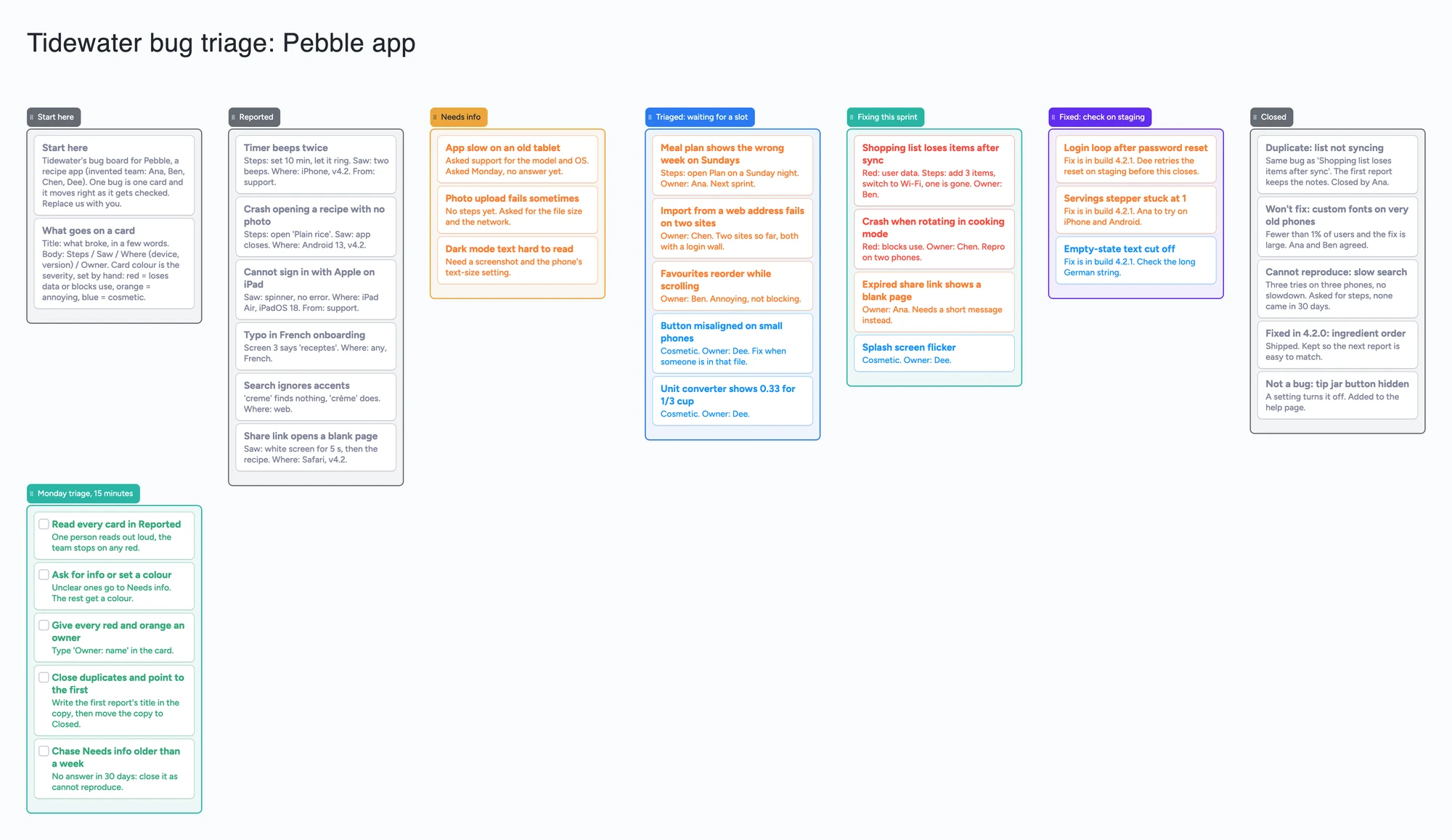
The example is invented. Ana, Ben, Chen and Dee build Pebble, a recipe app, and keep every bug on one board. Here is what each list holds.
| List | What goes in it | In Tidewater's board |
|---|---|---|
| Reported (grey) | A bug as it came in, not yet looked at | "Timer beeps twice" Steps: set 10 min, let it ring. Saw: two beeps. Where: iPhone, v4.2 |
| Needs info (orange) | A report that can't be judged until someone answers a question, with who was asked and when | "Photo upload fails sometimes" No steps yet. Asked for the file size and the network |
| Triaged: waiting for a slot (blue) | Looked at, colour set, owner named, not started | "Meal plan shows the wrong week on Sundays" Owner: Ana. Next sprint |
| Fixing this sprint (green) | What the team is working on now | "Shopping list loses items after sync" Red: user data. Owner: Ben |
| Fixed: check on staging (purple) | The fix is in a build; someone other than the fixer checks it | "Servings stepper stuck at 1" Fix is in build 4.2.1. Ana to try on iPhone and Android |
| Closed (grey) | Duplicates, won't-fix, can't-reproduce, shipped. Kept so the next similar report is easy to match | "Won't fix: custom fonts on very old phones" Fewer than 1% of users and the fix is large |
Swipe the table sideways to see every column.
The board's own wording. Colours and "Owner:" lines are typed by hand; the board has no severity or owner field.
Eigenfocus's workflow uses six statuses: Reported, Triaged, Scheduled, In Progress, Fixed and Closed. Tidewater's board merges Scheduled and In Progress into one list and adds Needs info, because a report that cannot be reproduced otherwise sits in Reported and gets read again every week. Atlassian's bug triage guide describes the same arc in five steps: reporting, categorization, prioritization, assignment and tracking to resolution (Atlassian, read November 25, 2026).
A 15-minute Monday, with Tidewater's cards
The bottom list on the board is the routine. Eigenfocus describes a weekly triage of about 15 minutes with two to four people and a lead who rotates each week: five minutes on the Reported column, five on scheduling and five on what is in progress. Tidewater copies the shape with five tick-box cards, each one a step:
- Read every card in Reported. One person reads aloud and the team stops on any red.
- Ask for info or set a colour. A report nobody can reproduce goes to Needs info; the rest get a colour.
- Give every red and orange an owner. Type "Owner:" and a first name in the card.
- Close duplicates. Write the first report's title in the copy and move the copy to Closed, so the notes stay on the first card.
- Chase Needs info older than a week. No answer in 30 days: close it as cannot reproduce.
Eigenfocus walks through a Monday with 12 reported bugs: one Critical, three High, three Medium and five Low; one is closed as won't fix, the other 11 move to Triaged, and five are scheduled for the week. On Tidewater's board a Monday looks smaller: six cards in Reported, three in Needs info, five waiting in Triaged. The ticks on the Monday list have no name or time on them, so the list is a reminder to the team, not a record of who did what.
What one thread says about who owns a bug
A r/ProductManagement thread from January 1, 2024, "How do you solve Bug triage in your company?", asks how to stop a client team investigating bugs that belong to another team (read 9 in an archived copy). A few replies are about the habit, not the tool; each is one person's view:
- u/eurcka says their group runs a weekly bug triage with a small group of PMs and QE, and gave support and QE a template for how bugs should be submitted, which they say keeps bugs to about 30 minutes a week.
- u/brianly suggests a rotating dedicated lead for fast triage of other teams' issues, capped to a small number so they stay effective.
- u/kinlou10 says whoever collects feedback should write exact replication steps, ideally with a video, and that escalated issues should be replicated within one business day.
- u/samwheat90 says that if a bug is found to belong to a different team during refinement, they create and link a duplicate ticket on that team's board or move the original.
The first two ask for a small, regular slot; the third and fourth are about a clear write-up and a named owner. Those are the three things the board's card lines and Monday list try to make routine. Nothing in the thread names a particular tool.
Set up your own, in order
- Open the board and replace the Tidewater names. Delete their cards as you go so the board is never half theirs.
- Move in the bugs you already know about. One card each, with Steps / Saw / Where. Skip the ones nobody can describe; they start in Needs info.
- Set a colour on each. Agree once what red, orange and blue mean for your product, in one sentence each, and put it on the Start here card.
- Name an owner for every red and orange. Type "Owner:" and a first name.
- Pick the Monday slot and the lead. Rotate the lead each week; keep the five Monday steps or change them.
- Share the link with the people who file bugs. Viewers need no account. For them to add or move a card, set the board to "Anyone who joins can edit" in Share; they then sign in free to write.
How long until 150 items is a problem?
Our arithmetic. Each list and each card is 1 of your 150 free items across all your boards; arrows, sections and pen strokes don't count. Tidewater's board is 8 lists + 33 cards + 1 title text box = 42. If the team adds 5 bugs a week and removes nothing, that is 42 + 5 × 21 = 147 after 21 weeks and 152 in week 22. Moving a bug to Closed doesn't free an item; deleting the card does. Tidewater's Closed list holds 5 cards; a team that deletes closed bugs after each release, or keeps the history in a document, stays under 150 much longer.
The 150 is account-wide, so a second board you own uses the same pool. Pro removes the item limit.
What this board can't do for bug triage
- No intake. Nobody outside the board can submit a bug; someone types each one in. Slack's bug reporting template lists a bug submission form, an automated bugs tracker, item status change alerts and a weekly summary (Slack, read November 25, 2026); this board has none of those.
- No severity field or filter across lists. A colour is typed in by hand. A list can be sorted or filtered on its own, but there is no view of every red card across the whole board.
- No links to your code. A card can hold a link, but it isn't tied to a commit or a pull request and doesn't close when one merges.
- No clocks or alerts. Nothing counts how long a bug has waited, and there are no reminders or due-date alerts. "Needs info older than a week" is a habit on the Monday list.
- No duplicate detection. You find duplicates by reading. On a long list, a tracker's search will find them faster.
- Tick boxes carry no name or time. The Monday list shows what is ticked, not who ticked it or when.
- Not private by default. A link board is the wrong place for bugs that expose customer data or a security hole; invite-only boards are a Pro feature.
Where other tools do this better
| Tool | What its own page says (read November 25, 2026) | When it wins over this board |
|---|---|---|
| Jira Free | Free for up to 10 users; forms, custom fields, backlog, list, board, timeline and calendar views; 150 automation steps per month. Standard $8.48 per user a month, Premium $15.56 (pricing page, billing toggle on monthly) | Bugs come in through a form, you want fields and filters across the whole backlog, or the team is over a handful |
| GitHub Issues | Issues track bugs, features and ideas; labels, assignees, milestones, Projects, and references from pull requests. Default labels include bug, duplicate, wontfix and question | The code is already on GitHub and you want a bug closed by the pull request that fixes it. Pricing not read |
| Slack bug reporting template | A reporting instructions list, a bugs tracker, a submission form and status change alerts, per the template page | The team lives in Slack and wants submissions and alerts without typing each bug in. Pricing not read |
| Eigenfocus | Six statuses and a Severity custom field in its own workflow guide | You want severity as a real field with colour badges. Pricing not read |
| Instaboard | One shared board; colour and owner typed by hand; no form, no alerts, no code links | Two to six people, bugs typed in by one person, one screen to review on Monday |
Swipe the table sideways to see every column.
Each cell is a vendor's own page, read on the date above. "Pricing not read" means we did not open that vendor's price page.
Limits of the free plan for this board
- Items. Each card and each list is 1 of 150 free items across your account; the example is 42. Arrows, sections and pen strokes don't count.
- Boards. 5 on the free plan. "Make a copy" takes 1 of them.
- Pictures. 3 per board. The example has none; a screenshot of a bug is best kept in a linked document, not on the card.
- Writing needs a free sign-in. Anyone who joins can view the board; to change it they sign in free, and the board then counts as 1 of their 5.
- Private bugs. Don't put customer data or a security flaw on a link board; invite-only boards are a Pro feature.
Start from the ready board
It opens in your browser in a few seconds, with nothing to install. Sign in for free when you want to save it and share it.
Questions
Is there a free bug triage template?
Yes, several: Jira's Free plan for up to 10 users, GitHub Issues, Slack's bug reporting template, and spreadsheet templates. The ready board here is a bug triage board on a shared board with Reported, Needs info, Triaged, Fixing this sprint, Fixed and Closed lists, free within 5 boards and 150 items. It is a board you read and move cards on; it has no report form, alerts or code links.
What should a bug report on the card include?
What to do to see it, what happened instead, where it happened (device, system, app version) and who owns it. Atlassian's guide lists identification and reporting, categorization, prioritization, assignment and tracking as the process steps. On this board the first three are lines in the card body, and the owner is a first name you type.
How do I show severity without a severity field?
Use the card colour. Tidewater's board uses red for data loss or a blocked app, orange for annoying and blue for cosmetic. The colour is set by hand and can't be filtered across the whole board, so write what each colour means on the Start here card and keep to it.
How often should a small team triage bugs?
Eigenfocus describes about 15 minutes a week with two to four people and a lead who rotates. One r/ProductManagement commenter, u/eurcka, describes a weekly bug triage and says they "spend only 30 minutes a week on Bugs"; that is one person's view. Pick a fixed weekly slot first; a tracker's reminders are not something this board gives you.
Can I use this board for customer-reported bugs?
Only if someone on your team types them in. Customers can't submit to the board, and a link board shouldn't hold anything that exposes their data. For a public report form, a tracker or a Slack-based template does that job better.
What happens when the board passes 150 items?
On the free plan you can't add more items until you delete some. At five new bugs a week with nothing deleted, Tidewater's board passes 150 in week 22. Deleting closed cards after each release keeps it under; Pro removes the item limit.
Sources
- Eigenfocus blog: A simple bug triage workflow for small dev teams (6 statuses) (six statuses, Severity field, 15-minute weekly triage, 12-bug Monday example; page dated April 28, 2026; read November 25, 2026)
- Atlassian: Bug triage: A guide to efficient bug management (five steps; read November 25, 2026)
- Atlassian: Jira pricing (Free for 10 users, Standard $8.48 and Premium $15.56 per user a month on the monthly toggle; read November 25, 2026)
- Slack: Bug Reporting Template (read November 25, 2026)
- GitHub Docs: About issues (read November 25, 2026)
- GitHub Docs: Managing labels (default labels; read November 25, 2026)
- r/ProductManagement: "How do you solve Bug triage in your company?" (posted 2024-01-01; replies read by u/South_Sale_9753, u/brianly, u/samwheat90, u/kinlou10, u/eurcka and others; read 9 in an archived copy, November 25, 2026)
Related
A decision log template on one shared board: open, decided, revisit, reversed
A decision log template on one shared board for two to five people: open questions, decided with the why, revisit on a date, reversed. When a spreadsheet or Notion is the better home.
A shift handoff template for a small shop: one shared board instead of a group chat
A shift handoff template for a small cafe, shop or bar: done today, still to do, low stock, notes and tomorrow on one shared board, with a first name on every card. Free to copy. Not a clinical record.
A lessons learned log template on one shared board: lessons by kind, what worked, a review before the next job
A lessons learned log on one shared board: lessons by kind, what worked, a review before the next job, and whether each lesson was used.