For a small team or a freelance editor with a stack of short videos on the go
A video editing pipeline for a small team: one card per video, on one shared board
We make Instaboard, an online board for planning with other people. This page is for an editor and the one or two people around them who cut many short videos at once: how-tos, teasers and promos for a shop or a channel. The question it answers is simple and boring: which videos are where, and which file is the current one? The board is already laid out and filled in for an invented team, Imogen (editor), Tavita (captions and motion) and Sione (producer), cutting short videos for an invented kitchenware shop. There is one card per video, moved right as it goes: footage in, cutting, waiting for feedback, fixes, ready to export and delivered. It is a queue, not a review tool. You cannot play a cut here, pin a note to a frame or a timecode, or add up hours, and it sends no reminders. Frame.io and Vimeo do the review better, and the first section says so. If you edit alone and one video at a time, a list in a notes app is enough.
Opens in your browser. Anyone can view; a free sign-in lets you edit.
Updated
Before you copy it: what this board is and isn't
- Who it is for: an editor plus one or two others, with several short videos in flight. The example uses 46 of your 150 free items. For one video at a time, a note is quicker.
- What it does: it shows where each video is and which file is current. One card per video, a short line on it (length, shapes, who has it), moved from list to list. The card names the shared-drive folder; the footage and the cuts stay there.
- What it isn't: it isn't a player or a review tool. You can't play a cut, leave a frame-accurate note or compare versions here. There are no sums of hours, no reminders and no due-date alerts. A day inside a card, such as cut 3 sent Monday, is text you typed.
- Review lives elsewhere: Frame.io and Vimeo both list time-stamped or frame-accurate comments and version tracking (what we read of each is in the table and the section below). Put the link to the review in the card, and keep the comments there.
- Ticks: the delivery list has tick boxes. Anyone who can edit can tick or untick a card, and the board doesn't record who did or when.
- Free plan: 5 boards, 150 items, 3 pictures per board. Copying the board takes 1 of your 5 boards. Writing on it needs a free sign-in. New boards start with Anyone who joins can view.
What a review tool does that this board can't
Read on November 25, 2026 in a browser. Pages change, so check them; a date is printed only where the page shows one.
- Frame.io (its pricing page): frame-accurate and range-based comments, annotations, version stacks and a comparison viewer appear in its plan comparison table (we did not check which plan holds each). Its Free plan lists up to 2 members, 2GB storage, 2 projects, Camera to Cloud, and transcription and captions. Pro shows $15 a month per member on the monthly setting and $156 a year per member on the annual one, with up to 5 members.
- Vimeo (its video collaboration page, titled Video Collaboration Tools & Review Platform): time-stamped comments you can sort, filter and resolve, status labels and version history, review links with passwords and expiry, and a Premiere Pro integration. The same page lists Free at $0 (1 seat, 1GB), Starter at $13 a month billed annually (1 seat, with shared folders, version history, and file transfer and video review), Standard at $26 (5 seats) and Advanced at $76 (10 seats). We did not check which plan holds each review feature beyond what that page says.
- This board: none of that. It holds one line per video and a link to wherever the review happens.
So the split is: review in the review tool, the queue on the board. If every video needs timed notes from a client, a review tool is the first thing to set up, and the board is optional.
One card is one video, not one task
In the Asana Community thread Video Production Workflows? (started by Caisha, November 29, 2017 UTC; the reply marked solved is from Stacey_Wiemers, February 2019), Stacey_Wiemers wrote that their team keeps one board for all their video projects, with each card being a video, and a few checklist items inside it, because a board per video left the team with hundreds of boards to look at. They also wrote that they use Slack for the back and forth about edits, because the Asana comments were cluttered with system messages. An Asana staff member's reply in the same thread (Alexis, December 2017) described a board with columns Scripting, Screencasting, Filming, Editing, Feedback, Done and Final Files. These are two accounts from one thread, not a standard.
Our example takes the one-card-per-video shape. Each card holds four things: who has it (Imogen or Tavita), how long it runs, which shapes to export (9:16, 16:9 or both), and one line of state, such as cut 2 in progress. That is what the board can hold well. The notes themselves go in the review tool, and the card says so.
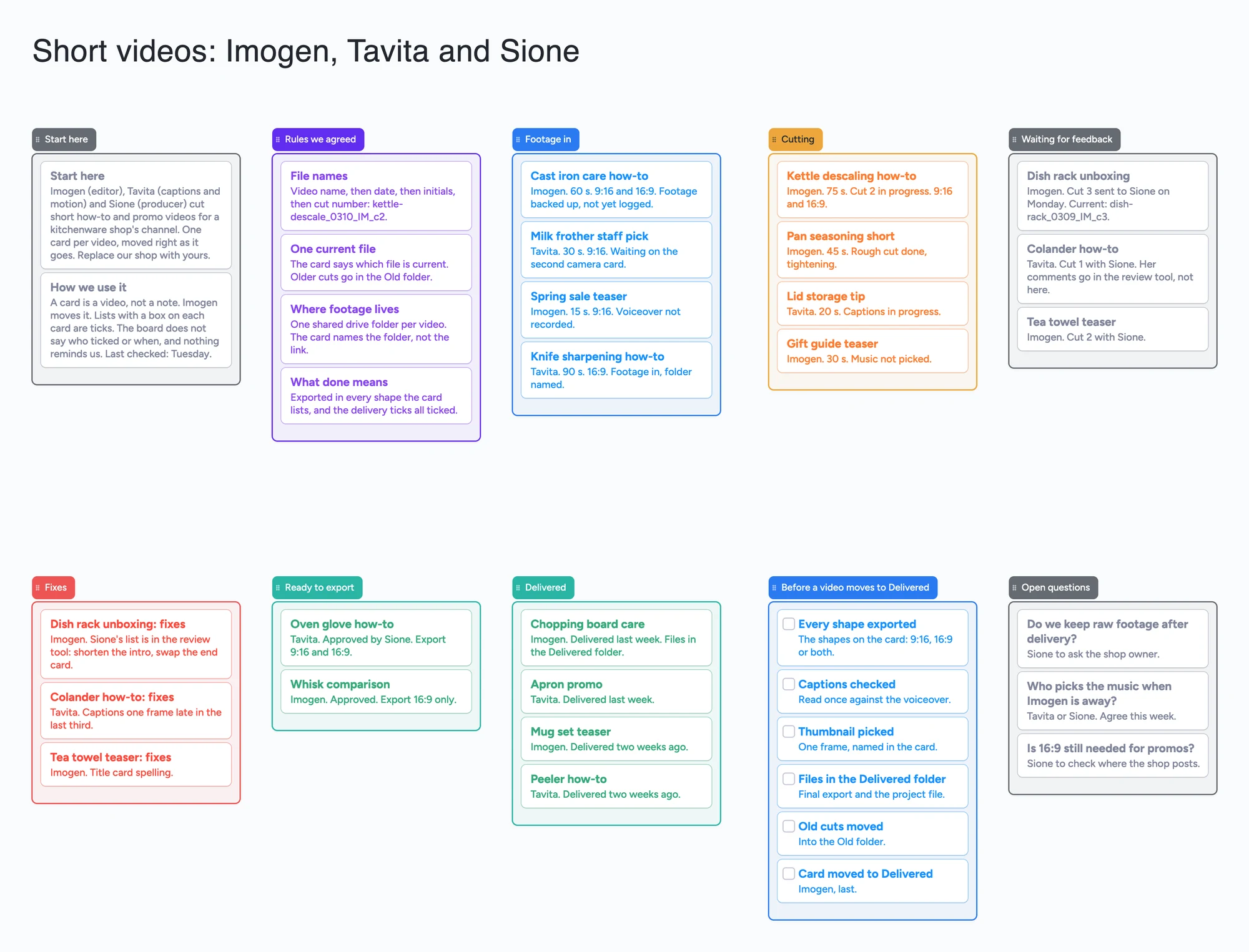
Imogen, Tavita and Sione's board, list by list
The example is invented, and so is the shop. Read it from the top left, across, then the second row.
- Start here. Two grey cards: who the three people are, and how they use it, ending with a last-checked day typed by hand.
- Rules we agreed. Four purple cards: a file-name pattern, one current file per video, where footage lives and what done means.
- Footage in. Four cards for videos whose footage has arrived: backed up but not logged, waiting on a camera card, voiceover not recorded, folder named.
- Cutting. Four cards: a cut in progress, a rough cut being tightened, captions in progress and a teaser waiting on music.
- Waiting for feedback. Three grey cards, each saying who has the cut and which cut it is. The comments are in the review tool.
- Fixes. Three red cards, each with the one or two changes the producer asked for.
- Ready to export. Two green cards: approved, with the shapes still to export.
- Delivered. Four green cards, kept as a record for now.
- Before a video moves to Delivered. Six tick cards: every shape exported, captions checked, thumbnail picked, files in the Delivered folder, old cuts moved and the card moved.
- Open questions. Three grey cards nobody has answered yet, such as whether raw footage is kept after delivery.
Nothing here is timed or enforced. Moving a card to Delivered doesn't check that the files are there.
What editors argue about: naming the cuts
In r/editors, What is your file naming structure for versions & revisions? (OP u/wasabitamale, May 25, 2022 UTC; Reddit shows 100 comments, we read 101 with text in an archived copy, 7 more removed), every reply is one person's habit. u/rehabforcandy, in a high-scored reply, argued against version numbers and for a project name, a date and time stamp and initials, so that anyone can tell which export is the newest. They called it the Bus Principle: if one of you were hit by a bus, someone with no history should still understand what is going on. u/helloall99999 wrote in one reply that every time an editor or assistant touches a sequence it gets a new number, and that they do not use revision numbers for particular audiences. u/helloall99999 also wrote, in a deeper reply, that they work in film and TV with four to six people touching an edit. u/dirgable_dirigible, replying to that account, wrote that a client does not care if v15 is the first cut they see, and that tracking changes internally matters more. u/RizzoFromDigg wrote that they keep a date and V1 until the project is approved, then append FINAL on the day the invoice is paid and move the rest to an OBSOLETE folder.
Our view: the board does not settle this. The example's rule card gives a pattern of our own (video name, date, initials, cut number), borrowed in spirit from the dates-and-initials account, and the card says which file is current. Replace it with whatever your team agrees; the point is that the card holds the answer, so nobody has to ask.
The board next to a tracker, a review tool and a guide
| Source | What the page says | Better for |
|---|---|---|
| Notion Marketplace, Video Editing Workflow Tracker (System4Business Co; the page showed Last updated 11 days ago when read on November 25, 2026) | A free Notion template with an editing tasks database, a board by To Do, In Progress, Review and Completed, a deadline calendar and revision views. Requires a Notion account | A team already in Notion that wants a database, a calendar of deadlines and filters by project |
| Asana Community thread (Alexis, December 2017; Stacey_Wiemers, February 2019) | One board for all videos with a card per video, or a column board from Scripting to Final Files | A team already in Asana. Plan limits were not read |
| Frame.io pricing page | Frame-accurate comments, annotations, version stacks. Free: 2 members, 2GB, 2 projects. Pro $15 a month per member on the monthly setting, $156 a year per member on the annual setting | Review rounds and client sign-off on the cut itself |
| Vimeo, video collaboration page | Time-stamped comments, status labels, version history, review links with passwords and expiry, Premiere Pro integration. Free $0 (1 seat, 1GB); Starter $13 a month billed annually (1 seat); Standard $26 (5 seats); Advanced $76 (10 seats) | Review and hosting in one place, if you already use Vimeo |
| Figma Weave, Post-production workflow: Stages and a checklist (no date printed) | Five stages of post and a delivery checklist; it notes that one campaign often needs a hero cut, vertical and square versions, captions and thumbnails | A longer, film-style workflow with many roles and hand-offs |
| Sheet or note | Not read for this page | A list of videos and statuses for one person |
| Instaboard board | 5 boards, 150 items, 3 pictures per board on the free plan | A few people who want to see all the videos and their state on one page, with a link in place of a message thread |
Swipe the table sideways to see every column.
Pages read November 25, 2026 in a browser: notion.com Video Editing Workflow Tracker, forum.asana.com Video Production Workflows?, frame.io pricing, vimeo.com video collaboration, figma.com post-production workflow. Our wording, not theirs.
How many videos until 150 is a problem?
Each card and each list is 1 of your 150 free items, across all your boards. The title text box counts too. Arrows, sections and pen strokes don't. Our arithmetic:
- As built: 10 lists + 35 cards + 1 title = 46.
- Each new video adds one card. With nothing deleted, 104 more videos bring you to exactly 150, and the 105th is over.
- At six videos a week, that is 148 items after week 17 and over in week 18.
- To keep going: copy the board each month and start the copy with the open videos only. A copy takes 1 of your 5 boards and keeps its ticks, so untick them first.
- With Pro, the 150-item limit is removed: $5 a month billed yearly ($59.99 a year), or $7.99 monthly.
What stays off a board shared by link
- Footage and cuts. Files stay in your shared drive or review tool. A card names the folder, not a link to unreleased work.
- Client names and prices. The example uses an invented shop. Write the project name, not the customer.
- Invoices and hours. The board does no sums. Keep time and billing where you already do.
- Reminders and due-date alerts. There are none. A date inside a card is typed text, so one of you has to open the board.
- Who ticked and when. Anyone who can edit can tick or untick a card, and the board doesn't record who or when.
- Privacy by default. New boards start with Anyone who joins can view. Anyone with the link can read it; sign-in is only needed to write. Set it to Anyone who joins can edit only for the people who should write on it.
Before you copy it, in order
- Open the board and sign in free when it asks you to write. Replace our shop and three names with yours.
- Write the rules first, the file-name pattern and what done means, so the cards can point to them.
- One card per video. Put the length, the shapes and the owner on it, and the name of the drive folder.
- Send the link. Set Share to Anyone who joins can edit for the people who should move cards, or leave it on view for a client who should only watch the queue. Each person who writes signs in free.
- Put the review link in the card when a cut goes out, and keep the comments there.
Start from the ready board
It opens in your browser in a few seconds, with nothing to install. Sign in for free when you want to save it and share it.
Questions
What goes on a video editing pipeline board?
One card per video, moved through lists such as footage in, cutting, waiting for feedback, fixes, ready to export and delivered. A card holds who has it, the length, the shapes to export and one line of state. The footage, the cuts and the notes stay in your drive and your review tool.
Can I review cuts and leave timed notes on it?
No. You can't play a cut, pin a note to a frame or compare versions on the board. Frame.io and Vimeo both list time-stamped or frame-accurate comments. Put the review link in the card.
Will the board remind us when a video is due?
No. It sends no reminders or due-date alerts, and it does no sums of hours. A day inside a card is text you typed, so one of you has to open the board.
How do I name the cuts?
The accounts in one r/editors thread disagree: dates and initials, a new number every time a sequence is touched, or a version plus FINAL when the project ends. Pick one, write it on a Rules card, and let the card say which file is current.
How much of the free plan does a month of videos use?
The example is 46 of your 150 free items, and each video adds one card. At six videos a week that is 148 items after week 17 and over in week 18 (our arithmetic). Copy the board each month, or move to Pro.
Is Instaboard free?
There is a free plan: 5 boards, 150 cards and items across your account (pen strokes, arrows and sections don't count), and 3 pictures and 1 file per board. Anyone with the link can read a board; writing on it takes a free sign-in. Pro removes the item limit and adds invite-only boards: $5 a month billed yearly ($59.99 a year), or $7.99 monthly.
Sources
- r/editors: What is your file naming structure for versions & revisions? (OP u/wasabitamale, May 25, 2022 UTC; replies are single accounts; Reddit shows 100 comments, we read 101 with text in an archived copy, 7 more removed, November 25, 2026)
- Asana Community (an Asana forum): Video Production Workflows? (started November 29, 2017 UTC; replies December 2017 and February 2019; read November 25, 2026)
- Notion Marketplace: Video Editing Workflow Tracker by System4Business Co (the page showed Last updated 11 days ago when read on November 25, 2026)
- Frame.io (a vendor's own page): Pricing (monthly and annual settings both read November 25, 2026)
- Vimeo (a vendor's own page): Video Collaboration Tools & Review Platform (prices as shown with annual billing; no date printed; read November 25, 2026)
- Figma (a vendor's own page): Post-production workflow: Stages and a checklist (no date printed; read November 25, 2026)