For a small content team planning one pillar page and its spokes
A pillar page and topic cluster board: the pillar brief, each spoke's stage and the links still to add
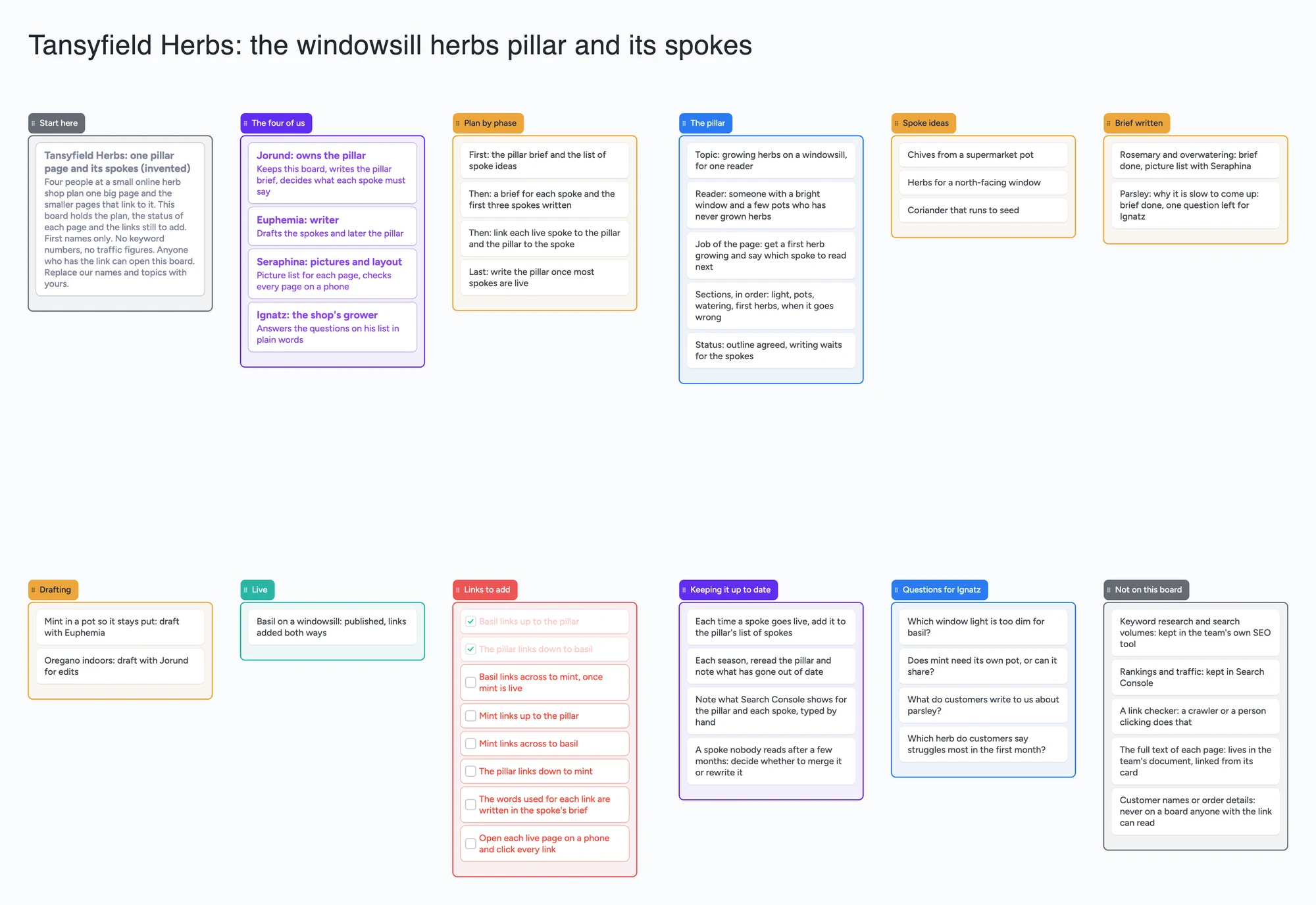
We make Instaboard, an online board. This page is for two to five people who run a small site and are planning one big page and the smaller pages that link to it, and who keep losing track of which spoke is written, which is live and which links are still missing. The board is filled in for four invented people at Tansyfield Herbs, an online herb shop: Jorund, Euphemia, Seraphina and Ignatz. They plan one pillar on growing herbs on a windowsill and eight spokes, each sitting in one stage list. It is a planning view only. It holds no keyword numbers, rankings, traffic figures or page text, and it does not check a single link. Your SEO tool and your documents do those jobs, and the first section says when a spreadsheet or a paid Notion template is the better home.
Opens in your browser. Anyone can view; a free sign-in lets you edit.
Updated
What the board holds, and what it leaves to your SEO tool
- It holds a plan, not data. The pillar's job in a few lines, one card per spoke in a stage list, one tick card per link still to add, and a short refresh list. The example uses 56 of your 150 free items.
- It does not hold keyword research, search volumes, rankings or the pages themselves. Those live in your SEO tool, Search Console and your document or CMS, and each spoke's card can carry a link to its text. Nothing on the board checks a link or counts a visit.
- It sends no reminders or due-date alerts. A card can carry a due date, but nobody is nudged. Someone on the team has to open the board and look.
- Everyone you share it with sees the same stage of every page. New boards start as "Anyone who joins can view". Switch Share to "Anyone who joins can edit" and each person signs in for free to write; the board then counts as 1 of their 5 free boards.
- Limits on the free plan: 5 boards, 150 items across your account and 3 pictures per board. A copy takes 1 of your 5 boards. Pro removes the item limit and costs $5 a month billed yearly ($59.99 a year), or $7.99 monthly.
When a spreadsheet or a paid Notion template is the better home
Start with the honest part, because it decides whether you need this page. Every source we read here is a vendor, a blogger or a Reddit poster, and we did not open the free templates they offer; Moz's guide mentions Google Sheets. If you want keyword columns, a page-URL column that you filter and sort, a formula, or a score for each spoke, use a spreadsheet or a Notion database. The Notion listing by Happy Habbits has four linked databases (pillar topic ideas, cluster ideas, a Content Ideas Brainstorm Hub and an SEO research and pain point database) and prints "Purchase template for $15.00" (read in a browser November 27, 2026; the page says "Last updated last year").
A shared board is the lighter choice when the team is small, the research already lives somewhere else, and what you are missing is one picture of where every page is. In an r/SEO thread of February 2026 the poster said their Google Sheets plan "turned into a mess" with "no visual way to see how topics connect", and that they "constantly lose track of what's written vs. what's still just an idea". That is the job the board does. It does not replace the sheet that holds the keywords.
- One person plans and writes every page: a document or a sheet is quicker and nobody has to sign in.
- Keyword columns, volumes, difficulty, URL lists you sort: a spreadsheet or your SEO tool.
- Four databases with linked views: a paid Notion template, if you already live in Notion.
- Three to five people who share the writing, the pictures and the linking: this board is a fair fit.
Pillar, hub, spoke: the words, and what the board calls each
The words are used loosely, and the guides disagree. Conductor's guide ("Last updated: Apr 30, 2026") says a hub and spoke strategy is "synonymous with a topic cluster strategy", but that a hub and a pillar page are different: a hub is a navigational page that links to every cluster page, while a pillar is a standalone page that covers one topic in depth, and "if you took a topic cluster (AKA a hub and all of its cluster pages) and combined them into a single page, you would have a pillar page". Moz's guide (May 8, 2025) describes the pillar page as "the main page that covers your primary topic in depth" and the cluster pages as individual pages on subtopics, each linking back to it.
The board does not need you to settle that. Tansyfield's The pillar list is the one big page, and every other page is a spoke. If yours is a hub that only links out, rename the list; the cards still say what the page's job is, who it is for and which sections it has. Both guides say a cluster helps rankings and authority. We have not measured that for any site, so this page promises no ranking, traffic or citation.
Tansyfield's board, list by list
The example is invented. Jorund owns the pillar, Euphemia writes, Seraphina does the pictures and phone checks, and Ignatz is the shop's grower who answers the questions. The pillar is about growing herbs on a windowsill and the eight spokes are single herbs and single problems. Here is what each list holds.
| List | What goes in it | In Tansyfield's board |
|---|---|---|
| The pillar (blue) | The one big page's topic, reader, job and section order | Five cards: topic, reader, job of the page, sections in order, status "writing waits for the spokes" |
| Spoke ideas (orange) | A spoke that has a title and nothing else | Three: chives from a supermarket pot, herbs for a north-facing window, coriander that runs to seed |
| Brief written (orange) | A spoke with a brief and an owner, not yet drafted | Two: rosemary and overwatering, parsley and why it is slow to come up |
| Drafting (orange) | A spoke someone is writing or editing | Two: mint in a pot, oregano indoors |
| Live (green) | A spoke that is published and linked | One: basil on a windowsill |
| Links to add (red, tick boxes) | One card per link, up, down and across, plus two standing checks | Eight cards: two ticked for basil, four open (three of them for mint), two standing checks |
| Keeping it up to date (purple) | What to do when a spoke goes live and each season | Four cards, including "Note what Search Console shows ... typed by hand" |
| Questions for Ignatz (blue) | What the writer cannot answer alone | Four plain questions about light, pots and parsley |
Swipe the table sideways to see every column.
Counted from the board: 8 spoke cards, 5 pillar cards and 8 link cards, with the start card, the four people, four phase cards, four refresh cards, four questions and five "Not on this board" cards: 43 cards in all. The tick boxes carry no name or time.
Why the pillar waits: writing the spokes first is one guide's advice
Tansyfield's phases put the pillar last, and that is borrowed. Moz's guide says to start with the subtopics that have lower search volume: "I've seen better results when cluster pages rank first." Its reason is that "If you publish the pillar first, it often ends up competing with your supporting content." That is one writer's experience at one company, and Moz sells an SEO tool, so treat it as a view, not a rule. We did not test it.
The board makes the order easy to see and easy to change. The Plan by phase list has four cards, and The pillar list's status card says "outline agreed, writing waits for the spokes". If you prefer to publish the pillar first and add spokes under it, move the phase cards and rewrite the status card; nothing else on the board depends on the order.
A pillar brief is a few lines, not a page. Tansyfield's has the topic, one reader ("someone with a bright window and a few pots who has never grown herbs"), one job (get a first herb growing and say which spoke to read next) and the sections in order. The point of putting it on a card is that Euphemia and Seraphina can read it without asking Jorund.
Links in both directions, one tick card each
Moz lists the internal linking model as "Link from pillar → cluster" and "Link from cluster → pillar", and advises a content brief with a section for internal linking "so you plan your cluster links before you start writing". Conductor says the hub links to every cluster page, and that cluster pages "should link to one another and back to the hub". Both describe the same job: after a spoke goes live, three kinds of link need adding, and it is easy to do two and forget the third.
- Up: the spoke links to the pillar. Tansyfield's card: "Basil links up to the pillar" (ticked).
- Down: the pillar links to the spoke. "The pillar links down to basil" (ticked).
- Across: a spoke links to a neighbour once the neighbour is live. "Basil links across to mint, once mint is live" (open).
Two standing cards close the list: the words used for each link are written in the spoke's brief, and someone opens each live page on a phone and clicks every link. The board cannot find a broken link, so the second card is a person doing it. The ticks have no name or time on them, so a tick tells you a link was done, not who did it or when. How many links a page should carry is not settled either: in an r/SEO thread of February 2025 the user u/WebLinkr wrote "Never more than 3 internal links per page", which is one person's view. Because each link is its own card, you can set your own rule and see it.
What two r/SEO threads say about planning, per account
Neither thread asks for a shared board, and every reply here is one commenter's experience. In "How do you actually plan your pillar-cluster content strategy? Spreadsheets? Notion? Something else?" (posted 2026-02-08 UTC by u/Alphabart; Reddit shows 32 comments; the archive's post record says 25; the archived copy has 33 entries, 6 of them [removed] stubs, with 27 carrying text, including 4 AutoModerator notes and 7 replies by the poster; we read all 27), the tools named include spreadsheets, Notion, Obsidian, paper and pencil and SEMrush. u/boggycakes wrote that they use "a google sheet and break it down by level, topic keyword, page url, and status tracker". u/calimovetips keeps "one sheet for taxonomy and internal link intent, another simple tracker for status and ownership". u/trainmindfully wrote, in the archived copy, that once a system "gets too visual or too detailed, i stop maintaining it and the whole system falls apart". u/SovereignThrone suggested Obsidian to visualise and Screaming Frog ("500 URLs free") to map existing pages.
Two things stand out. Two commenters, u/calimovetips and u/trainmindfully, keep two places, one for taxonomy and link intent and one for status; that is a different split from the board's, which keeps the plan in one place and the keyword data elsewhere. And the poster mostly asks follow-up questions, but also thanks people and says "Only issue I have is the price point though" about one suggestion, so the thread tells us what people use, with one remark about price.
In "How do YOU structure topic clusters?" (posted 2025-02-05 UTC by u/SelfGullible2092; Reddit shows 18 comments; the archive's post record says 14; the archived copy has 19 entries, 4 of them removed, with 15 carrying text, including 7 replies by the poster; we read all 15), u/Hot_Dave advised to "start your topics around each service or product that you offer", and u/cornelmanu wrote that each buyer page is the pillar for its own cluster. Tansyfield's pillar is an information page for one reader; if yours is a product or service page, say so on the pillar card.
Keeping a cluster current without a clock
Moz's content audit step lists five actions: for each page you already have, "Update outdated content or pages slipping from page one", "Consolidate low-performing or overlapping posts", "Redirect irrelevant or outdated pages that can't be salvaged" or "Leave quality content that's already performing well and aligned with the cluster", and then "Do keyword research and gap analysis to discover new topics". Tansyfield's Keeping it up to date list has four cards that cover the same ground by hand: add each live spoke to the pillar's list, reread the pillar each season, note what Search Console shows (typed in, not pulled in), and decide what to do with a spoke nobody reads after a few months.
The board will not tell you a season has gone by or a spoke has gone quiet. A card can carry a due date, but there are no reminders or due-date alerts, so the routine depends on someone opening the board. If you want a nudge, put the date in a calendar your team already looks at.
Copy the board and make it yours
- Open the board and replace the Tansyfield names. Delete their cards as you go so the board is never half theirs.
- Write the pillar's five cards first: topic, reader, job of the page, section order, status.
- Put every spoke you already have in the stage list it is in. One card per spoke with a short line. Skip the ones you only half imagine.
- Add three link cards for each live spoke (up, down, across) and tick the ones that are done.
- Write the questions your expert has not yet answered in their own list.
- Share it. Set Share to "Anyone who joins can edit"; each person signs in free to write and the board counts as 1 of their 5.
Where the free plan runs out
Our arithmetic. Each list and each card is 1 of your 150 free items across all your boards; arrows, sections and pen strokes don't count. Tansyfield's board is 12 lists + 1 title text box = 13, plus 29 standing cards (the start card, the four people, four phases, five on the pillar, four on refresh, four questions, five on what stays off and two standing link checks) = 42 before any spoke. Eight spoke cards and six link cards make 56.
If every spoke gets one stage card and three link cards that all stay on the board, a spoke costs 4 items and 42 + 4 × 27 = 150 at the 27th spoke. Moving a card from Drafting to Live frees nothing; deleting a ticked link card does. A site with several pillars would put each on its own board, and the 150 is shared across every board you own. Pro removes the item limit.
- Boards: 5 on the free plan. "Make a copy" takes 1 of them.
- Pictures: 3 per board. The example has none; keep the picture list in your document.
- Writing needs a free sign-in. Anyone who joins can view the board; to change it they sign in free.
- Not private by default. Anyone who has the link can open it, so keep unreleased plans and customer details off it; invite-only boards are a Pro feature.
Where the other templates do more
| Template | What its own page says (read November 27, 2026) | When it wins over this board |
|---|---|---|
| Notion: Content Pillars and Clusters Strategy Hub (Happy Habbits) | $15.00; four databases (pillar topic ideas, cluster ideas, content ideas hub, SEO research and pain points); keyword metrics, buyer's journey stages; "Last updated last year" | You live in Notion and want keyword and journey fields on each page. We did not open the template itself |
| Moz: free topic cluster template and content brief template | Offered on the guide (May 8, 2025); the content brief "includes a section for internal linking"; the guide says to copy page URLs from a spreadsheet into the template and, in Google Sheets, to pull in clicks and impressions | You want a sheet with URLs and metrics, and a brief that plans the links. We did not open the files |
| Conductor: free Pillar Page Template | Offered on the guide ("Last updated: Apr 30, 2026") as an outline for three pillar page types plus a publish checklist | You need an outline for writing one pillar page, not a plan for many. We did not open the file |
| Saffron Edge: Topic Cluster Content Planner | A free template behind an email and name form; the page shows no date | You want an agency's cluster planning sheet. We did not open it |
| Instaboard | One shared board; stage lists, tick cards and a refresh list typed by hand; no data, no checks, no alerts | Three to five people who share the writing and linking and want one picture of where every page is |
Swipe the table sideways to see every column.
Each cell is the vendor's own page, read on the date above. "We did not open" means we read the listing or guide page but not the template file.
What this board will never tell you
- No keyword or ranking data. Nothing here pulls from Search Console or an SEO tool; anything on a card was typed by hand.
- No link checking. A person opens each page and clicks each link. The board does not know whether a spoke links to the pillar.
- No page text. Keep drafts in your document and link them from the card.
- No reminders or due-date alerts. A card can carry a due date; nothing nudges anyone.
- No who or when on ticks. The Links to add list shows what is ticked, not who ticked it or when.
- No proof the cluster works. The board plans the work. Whether it helps your pages is something only your own numbers can show.
Start from the ready board
It opens in your browser in a few seconds, with nothing to install. Sign in for free when you want to save it and share it.
Questions
Is there a free pillar page and topic cluster template?
Several. Moz and Conductor each offer free downloads on their guides and Saffron Edge offers a planner behind an email form; we read those pages but did not open the files. The ready board here is a shared planning board with a pillar list, stage lists, a tick list of links to add and a refresh list. It is free within 5 boards and 150 items, and it plans many pages rather than outlining one.
What is the difference between a pillar page and a topic cluster?
Conductor's guide describes a topic cluster as a group of pages around a central topic, usually with a hub page that links to every cluster page, and a pillar page as a standalone page that covers one topic in depth. It says that combining a hub and its cluster pages into one page would give you a pillar page. The board holds both: The pillar list is the big page and every other card is a spoke.
Should the pillar page be written first or last?
Guides differ. Moz's author writes that cluster pages ranking first has worked better for them and that a pillar published first "often ends up competing with your supporting content". That is one company's experience. Tansyfield's phases put the pillar last; move the phase cards if you would rather publish it first.
How many internal links should each spoke have?
Sources do not agree. Moz and Conductor describe links up to the pillar and down to each spoke, and Conductor adds links between cluster pages. One r/SEO commenter, u/WebLinkr, wrote "Never more than 3 internal links per page", which is one person's view. The board makes each link a card, so you can set a rule for your site and see where it is broken.
Can the board check my links or show my rankings?
No. It holds a plan typed in by people. It does not check a link, pull in Search Console, count visits or send a reminder. Use your SEO tool and Search Console for data, and keep the board for who is doing what and which links are still to add.
How many spokes fit before the free limit stops me?
About 27 if you keep the same layout. Tansyfield's board starts at 42 items and each spoke adds a stage card and three link cards, so the 27th spoke reaches 150, and on the free plan you then have to delete something before adding more. Deleting ticked link cards keeps it lower, and Pro removes the item limit.
Sources
- Conductor: Topic Clusters and Pillar Pages: What They Are & Why They Matter for SEO/AEO in 2026 [Free Template] ("Last updated: Apr 30, 2026"; a software vendor's guide; read in a browser November 27, 2026)
- Moz: SEO Topic Clusters: Complete Guide, Examples & Free Templates, by Chima Mmeje ("May 8, 2025"; a software vendor's guide; read in a browser November 27, 2026)
- Notion Marketplace: Content Pillars and Clusters Strategy Hub, by Happy Habbits ("Purchase template for $15.00", "Last updated last year"; read in a browser November 27, 2026)
- Saffron Edge: Free Topic Cluster Content Planning Template (no date shown; an agency's page with an email form; read in a browser November 27, 2026)
- r/SEO: "How do you actually plan your pillar-cluster content strategy? Spreadsheets? Notion? Something else?" by u/Alphabart (posted 2026-02-08 UTC; Reddit shows 32 comments; the archive's post record says 25; the archived copy has 33 entries, 6 removed (27 with text, 4 of them AutoModerator notes, 7 by the poster), all 27 read; read November 27, 2026)
- r/SEO: "How do YOU structure topic clusters?" by u/SelfGullible2092 (posted 2025-02-05 UTC; Reddit shows 18 comments; the archive's post record says 14; the archived copy has 19 entries, 4 removed (15 with text, 7 by the poster), all 15 read; read November 27, 2026)